4 Operation
Removing the Rotor
4-8
Heraeus Pico 17 / 21
Thermo Scientific
Removing the Rotor
To remove the rotor, proceed as follows:
1. Open the centrifuge door.
2. Unscrew the rotor with the allen wrench.
3. Grab the rotor in the middle. Pull the rotor directly upwards and remove it from the centrifuge
spindle. Make sure not to tilt the rotor while doing this.
Aerosol-tight Rotors
When using an aerosol tight lid the rotor can be removed with the lid closed. This is to protect you and
the samples.
Audible Alarm
Error
Accompanying all error messages, a warning signal is given out.
Press any key to silence the warning signal.
End of Run
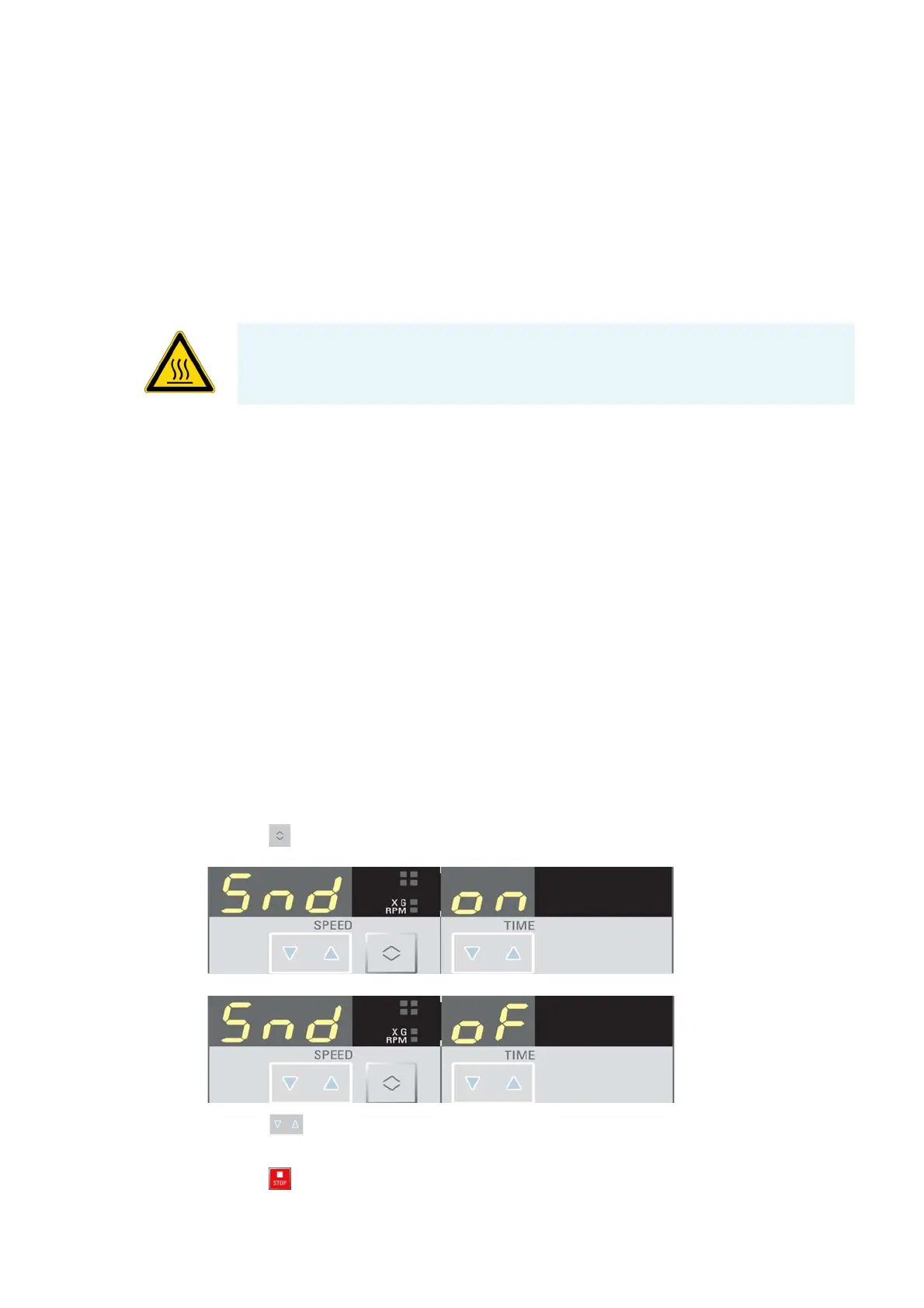
By default there is an acoustic signal at the end of any centrifugation run. To switch off this signal
proceed as follows:
Press the key when you turn on the centrifuge.
The display shows:
or
4. Press the key under the display in the middle.
The acoustic signal is turned on or off.
5. Press the key to confirm the pre-selected value.
WARNING Be careful, when you change a rotor after a run. Centrifuge spindle and
motor bearing assembly can be hot (>55 °C).



 To Next Page