Need help?
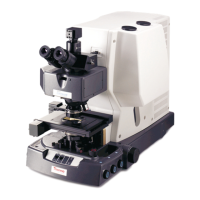
Do you have a question about the Thermo Scientific Nicolet iN10 and is the answer not in the manual?
General greeting and introduction to the instrument and its features.
Contact information for inquiries, support, and service representatives.
Explanation of formatting, symbols, and safety icons used in the manual.
Details on the duration and start date of the product warranty.
Conditions and actions that will void the product's warranty.
Specific components or services that are explicitly excluded from warranty coverage.
List of registered trademarks and their respective owners.
Instructions on how to locate and access instrument documentation files.
Procedure and contact information for ordering replacement parts.
Essential safety guidelines and warnings for operating the instrument.
Information regarding compliance with the Waste Electrical and Electronic Equipment directive.
Guidelines for safely handling and using liquid nitrogen with the instrument.
Precautions for using chemicals that may degrade or damage instrument components.
Step-by-step instructions for powering the instrument on and off.
Procedures for aligning the instrument's optical and mechanical components.
Instructions for correctly placing samples on the manual stage.
How to move the sample stage using motorized controls and joystick.
Configuration of gas supply settings for instrument purging and desiccation.
Steps for acquiring spectral data using the instrument's software interface.
Measures to prevent damage to instrument components from electrostatic discharge.
Procedure for installing the necessary kit for instrument gas purging.
Care instructions and troubleshooting for the detector's cooling dewars.
Instructions for drying and reusing the desiccant canister for moisture absorption.
 General
| Brand | Thermo Scientific |
|---|---|
| Model | Nicolet iN10 |
| Category | Microscope |
| Language | English |


 To Next Page