11
EN
Your water heater: Troubleshooting
6.Troubleshooting
6.1 Blinking shower indicators
6.2 No indicator on*
* Unless HMI switched off deliberately
EN
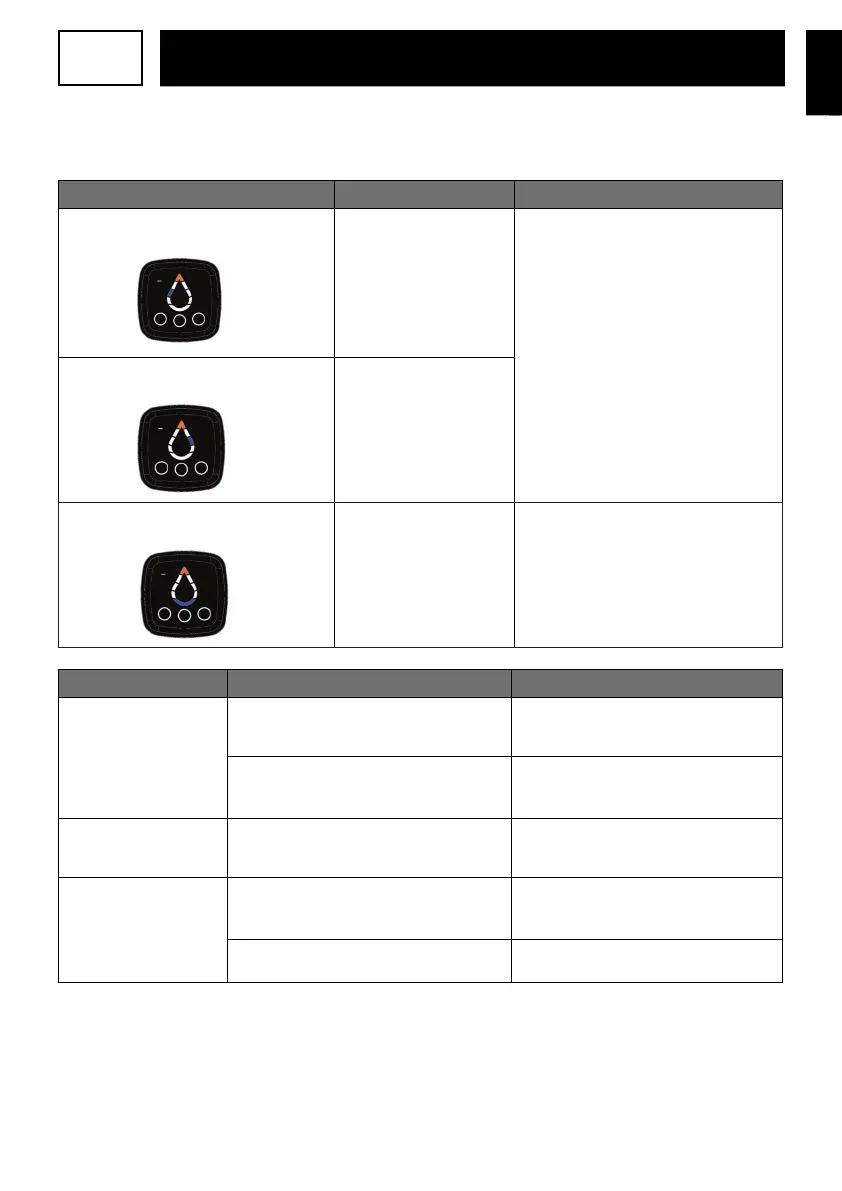
Indicator status
Meaning
Solution
Top segment lit in orange with a lit segment
of the water drop lit on the left
Fault with the
regulationsensor
(Outlettank)
Replace the regulation sensor.
Top segment lit in orange with a lit segment
of the water drop lit on the right
Fault with the
regulationsensor
(Inlettank)
Top segment lit in orange with the bottom
segment lit
Communication error with
the power board
Check the connection to the power board
(MCB). If connected, replace the MCB or
contact after-sales service.
Possible cause Action to be taken
Solution
Water heater
powersupplyfaulty
Check the water heater power
supply(230volts) using a
measuringdevice(multimeter).
If there is no power supply or the power
supply is faulty, contact an electrician
Check whether the power supply is
continuous(24/7).
If the appliance is connected to the
off-peakhours switch, the installation is
incorrect; contact an electrician
Safety
thermostat
deactivated
Check the power supply at the outlet
forthesafety thermostat(s).
Reactivate the thermostat safety device.
If this fault is still present, contact
aninstallerand the after-sales service.
Water heater operational
fault
Check the water heater power supply at the
PCB using a measuring device (multimeter) to
ensure it is 230 volts.
If the power supply is correct, contact an
electrician to have the PCB replaced.
Check that the cable connecting the PCB and
control unit is correctly connected.
Reconnect the connecting cable
correctly.


 To Next Page