Need help?
Do you have a question about the THIEYE i60 and is the answer not in the manual?
Instructions on how to charge the device's battery using a USB cable and adapter.
Guidance on inserting and removing Micro SD cards, including compatibility and handling precautions.
Steps to power the camera on and off using the Power/Mode button, including indicator feedback.
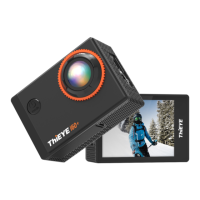
Details on the 1.5-inch LCD screen for framing shots, changing settings, and playback.
Explanation of automatic screen activation/deactivation and how to manage display off time for battery saving.
Configuration options for video recording modes and parameters.
Configuration options for photo capture modes and parameters.
General camera settings including display, Wi-Fi, date/time, and language.
Instructions on how to start and stop video recording, and what indicators to observe.
Overview of available video modes including Defaulted, Timelapse, Slow Motion, and Looping Record.
Overview of available photo modes including Defaulted, Self-Timer, Photo Burst, and Timelapse Photo.
Instructions on how to view, play back, protect, and delete video and photo files on the camera or other devices.
Methods to protect and delete video and photo files from the camera via the Power/Mode button.
Details on video resolutions, aspect ratios, and frame rates supported by the camera.
Explanation of how to create timelapse videos by capturing photos at set intervals.
Guide to using slow motion mode to capture and view fast movements with adjustable slow-down rates.
How to quickly start video capture using the Power/Mode button for immediate recording.
Information on recording videos in segments and how the latest video overwrites the oldest when storage is full.
Using the camera as an automobile data recorder, including auto turn-on/off with the car's engine.
Instructions on setting the car plate number using navigation buttons.
Option to enable or disable the car play display, showing numbers in the upper right corner.
Enabling or disabling voice recording to accompany video footage.
Details on photo resolutions (12MP, 8MP, 4MP) and their storage implications.
How to set a delay timer (3/5/10s) for shooting photos, with countdown and indicator feedback.
Configuring the camera to capture multiple photos (3/5/10) in a single burst with continuous sounds.
Capturing photos at intervals (3/5/10/30/60s) and observing indicator light during the process.
How the camera detects vibration and corrects direction to improve photo quality.
Enabling HDR for capturing photos with rich details in both shadows and highlights.
Adjusting photo exposure from -2 to +2EV in increments of 1.0 for light control.
Selecting ISO levels (AUTO, 50-1600) to adjust brightness, shutter speed, and potential quality trade-offs.
Configuring screen timeout (1/3/5 min) to conserve battery life or keep the screen lit.
Adjusting volume levels (0-3) for keypad tones and warning sounds.
Enabling 180° Turnover for normal recording and photo taking when the camera is mounted upside down.
Instructions for changing the camera's Wi-Fi network name and password.
Setting the camera's date and time, and the importance of resetting it after periods of non-use.
Option to add time information ('Off', 'Date', 'Date & Time') to videos and photos.
Selecting the camera's display language from a list of 9 available options.
Setting power frequency (50Hz/60Hz) to determine video format and playback compatibility on TV.
Adjusting color tones for videos and photos by selecting different white balance presets or auto.
Accessing basic camera information, including firmware version and SD card details.
Formatting the SD card to delete all files, preparing it for new recordings.
Step-by-step guide to download the app, connect the camera via Wi-Fi, and establish a connection.
Tips for maximizing battery life, including turning off the screen and avoiding extreme temperatures.
Precautions for storing and handling the camera and battery, avoiding damage from drops or temperature.
Detailed instructions on how to safely remove the battery from the camera.
Troubleshooting steps for when the camera fails to power on, focusing on charging.
Common causes for choppy video playback, including player compatibility, computer performance, and file transfer.
Guidance on recovering forgotten Wi-Fi credentials by checking system settings or performing a factory reset.
Answers to common questions regarding Micro SD card issues like 'No Card', 'Full Card', and 'Error Card'.
 General
| Photo Resolution | 12MP |
|---|---|
| Battery Capacity | 1050mAh |
| Field of View | 170° |
| Chipset | Sunplus 6350 |
| Dimensions | 59 x 41 x 25 mm |
| Display | 2.0-inch LCD |
| Storage | Micro SD card, up to 64GB |
| Connectivity | Wi-Fi, HDMI, USB |
| Weight | 65g |
| Video Resolution | 4K at 30fps, 1080p at 60fps |
| Lens | 6G lens |

 To Next Page