Troubleshooting
Operation Guide
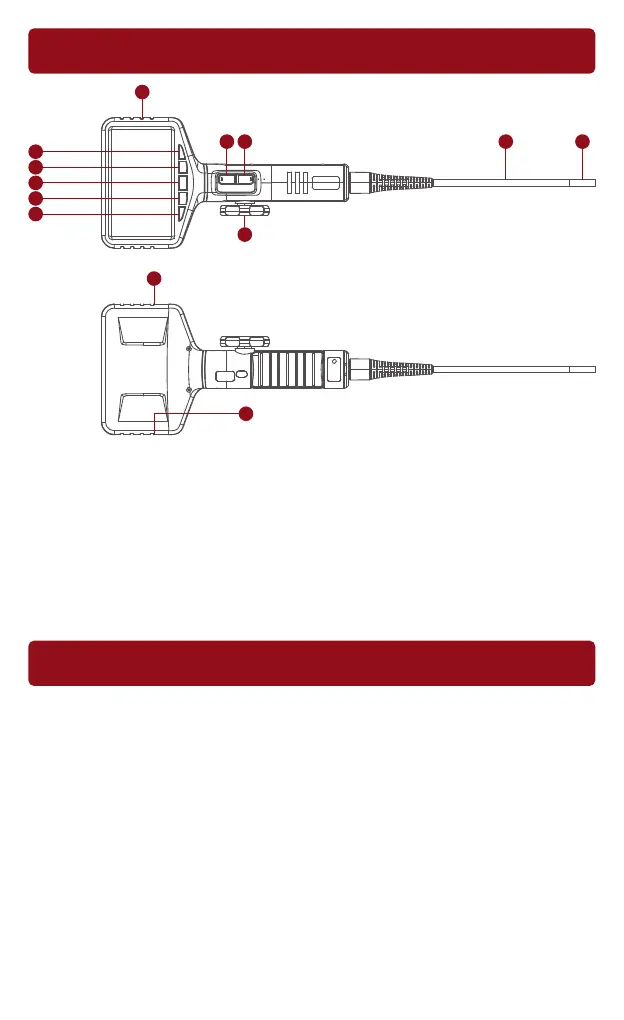
① Display Screen
② Confirm Button
③ Down/Switch
④ Set Button
⑤ Up Button
⑥ Menu Button
⑦ Power On/Dimming Button
⑧ Camera/Video Button
⑨ Steering Wheel
⑩ Elastic Snake Tube
⑪ HD Camera
⑫ TF Card
⑬ Charging Port
1. Switch on/off: long press the switch on button for two seconds, and the blue indicator on
the display screen is on, indicating that the device is successfully switched on. Long press
the switch on button for two seconds to turn off the device.
2. Light adjustment
3. Take photos and videos: After starting up, press the record button briefly to take photos,
and long press for 2 seconds to record videos.
4. Image playback: After starting up, press the M key briefly to play back the image. Select
the key up and down to find the desired picture or video, and press the OK key briefly to
play back the video.
5. Time/date: after starting the device, press the setting key twice to switch to the setting
interface, scroll down to select the date/time, and adjust it to the required time by pressing
the up and down selection keys (confirm the required time by pressing the OK key)
6. Date tag: The date tag is opened by default, and the date and time will be automatically
displayed in the lower right corner of the photos and videos you have taken.
4
3
5
6
2
1
7 8
9
1110
12
13



 To Next Page