
 Need help?
Do you have a question about the thomann Millennium Drums Rookie and is the answer not in the manual?
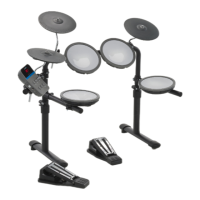
The Millenium Rookie E-Drum Module is a compact and versatile electronic drum module designed for beginners and casual players. It serves as the central processing unit for an electronic drum kit, converting digital trigger signals from drum pads into a variety of percussion sounds. The module is intended for indoor use and is designed to be user-friendly, allowing drummers to quickly set up and start playing.
The primary function of the Millenium Rookie E-Drum Module is to provide a wide range of drum and percussion sounds that can be triggered by connected drum pads and pedals. It features 68 distinct sounds, offering a good selection for various musical styles. These sounds are organized into 12 preprogrammed drum kits, each designed to suit a particular music genre, such as Classic, Rock, Fusion, Blues, Metal, Funk, Pop, Gospel, Jazz, Reggae, Concrete, and Fix. This allows users to quickly change the overall sound of their e-drum set to match their desired musical context.
Beyond sound generation, the module includes a built-in metronome, which is an essential tool for practice and timing development. The metronome offers adjustable tempo and rhythm settings, allowing drummers to practice with different speeds and time signatures. Additionally, the module comes with 10 preprogrammed songs, providing backing tracks for users to play along with, enhancing the practice experience and making it more engaging.
The module also features a USB-C port for power supply, allowing it to be powered via a power adapter or a power bank, offering flexibility in different environments. It includes a headphones output for silent practice, an AUX IN socket for connecting external audio devices like MP3 or CD players to play along with music, and a USB-MIDI interface for connecting to a computer or other MIDI devices. This USB-MIDI connectivity allows the module to be used as a MIDI controller for software instruments or to record MIDI data into a digital audio workstation.
Operating the Millenium Rookie E-Drum Module is straightforward, thanks to its intuitive control layout. The front panel features a display that shows selected values and modes, along with status LEDs for 'Drums', 'Tempo', 'Rhythm', and 'Song' modes, indicating the currently active function.
To switch the module on or off, users press or press and hold the [Power] button. Upon startup, the module defaults to drum kit mode, indicated by the 'Drums' LED. The volume can be adjusted using a dedicated rotary control, allowing users to set the output level for both the audio and headphones outputs.
Selecting a drum kit involves repeatedly pressing the [Select] button until the 'Drums' LED lights up, then using the [+] or [–] buttons to scroll through the 12 available drum kits. The selected kit number is displayed, and the setting is automatically saved.
For metronome use, the [Select] button is pressed until the 'Tempo' LED illuminates, then the [+] or [–] buttons are used to adjust the speed (20 to 320 bpm). The metronome can be turned on or off with the [Metro/Play] button, which also flashes to the beat. The metronome's volume can be adjusted by pressing and holding [Metro/Play] while the metronome is active, then using [+] or [–] to set the volume level (1 to 20). The time signature of the metronome can also be set by selecting the 'Rhythm' mode and choosing from nine different time signatures ('1-4' to '9-4').
Playing along with songs is similar: the [Select] button is used to enter 'Song' mode, and [+] or [–] selects one of the 10 demo songs. The [Metro/Play] button starts and stops song playback. The metronome can be toggled on or off in song mode by pressing and holding [Metro/Play].
The module also includes an automatic shutoff feature to conserve power. This can be enabled or disabled, and the shutoff time can be set from 0 (disabled) to 240 minutes of inactivity. This setting is accessed by pressing and holding [Metro/Play] when the module is off, then pressing [Power] to switch it on.
While the Millenium Rookie E-Drum Module is designed for ease of use and durability, certain maintenance aspects are important for its longevity and optimal performance.
Before switching on the device, it is crucial to check all cable connections for a correct and secure fit. This prevents potential damage and ensures proper signal transmission. Additionally, turning the volume control to minimum before powering on the module is a good practice to avoid sudden loud sounds that could damage hearing or connected equipment.
The module is designed for indoor use only and should be protected from liquids, moisture, direct sunlight, heavy dirt, and strong vibrations. Operating the device within specified ambient conditions (temperature range and relative humidity) is important to prevent malfunction. Avoiding heavy temperature fluctuations and not switching on the device immediately after exposure to low outside temperatures helps prevent condensation, which can damage internal components. Regular maintenance by qualified service personnel is recommended if the unit is operated in harmful ambient conditions (e.g., dust, smoke, nicotine, fog) to prevent overheating and other issues.
For power, the device uses an external power supply. Users should ensure that the input voltage of the AC outlet matches the voltage rating of the device and that the outlet is protected by a residual current circuit breaker. Unplugging the external power supply during electrical storms or when the device is unused for long periods reduces the risk of electric shock or fire.
In case of issues or to restore the module to its original settings, a factory default reset function is available. This procedure involves switching off the module, then pressing and holding [Select] while pressing [Power] to switch it on. The display will show 'rSt', and pressing [Metro/Play] will initiate the reset. This can be useful for troubleshooting or preparing the module for a new user.
Proper disposal of packaging materials and the device itself is also part of maintenance from an environmental perspective. Environmentally friendly materials are used for packaging, and users are encouraged to dispose of them through normal recycling channels. The device itself is subject to the European Waste Electrical and Electronic Equipment Directive (WEEE) and should not be disposed of with normal household waste but through approved waste disposal firms or local waste facilities, complying with local regulations.
 General
| Bass Drum | 22" x 16" |
|---|---|
| Snare Drum | 14" x 5.5" |
| Hardware | Included |
| Cymbals | Included |
| Hardware Color | Black |
| Floor Tom | 16" x 14" |
| Included Cymbals | 14" Hi-Hat & 16" Crash |
| Drumheads | Standard |












 To Next Page