24 RADIO FREQUENCY DISPLAY
25 PRESET RADIO STATION
QUICK START
For best radio reception, keep your clock a few feet away from the AC outlet, AC/DC adaptor and any
electronic or mobile devices.
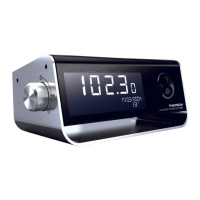
Plug the AC/DC adaptor into any household AC outlet, and then plug the DC jack into the back of the
unit. The LCD shows the default time 0:00 and is operational.
Fully extend the FM wire antenna and adjust the direction for best FM reception. Do not strip, alter or
attach to other antennas.
BACK-UP BATTERY INSTALLATION
In the event that the AC/DC adaptor power should become disconnected or a power failure or other
interruptions should occur, the back-up batteries will maintain the time and alarm settings. The batteries
only power your unit - lighting functions do not work on batteries.
SETTING THE TIME, 12/24 HR, SNOOZE DURATION AND WAKE-UP
LIGHT
1. Press SET / MEM. The time “0:00” is displayed blinking. Press ϧʳ or ϰʳto set the desired time.
Press and holdϧʳor ϰʳto move faster.
2. Press SET / MEM again. 24Hr is displayed blinking. Then press ϧʳor ϰʳto select 12Hr or 24Hr.
When the 12Hr time format is selected, the
icon will appear on the clock display to indicate
afternoon time. Please note there is no AM icon.
3. Press SET / MEM once again. Zz is displayed with “09” blinking. Press ϧʳor ϰʳto set the desired
snooze duration (from 5 to 60 minutes).
4. Press SET / MEM again.
is displayed with “OFF” blinking. Then press ϧʳor ϰʳto select:
15: turns the light on and gently brightens 15 minutes before the set alarm time.
30: turns the light on and gently brightens 30 minutes before the set alarm time.
OFF: turns off the wake-up light feature.
Press SET / MEM once again (or if no key is pressed within 8 seconds) to return to displaying the time.



 To Next Page