Operating Your Receiver
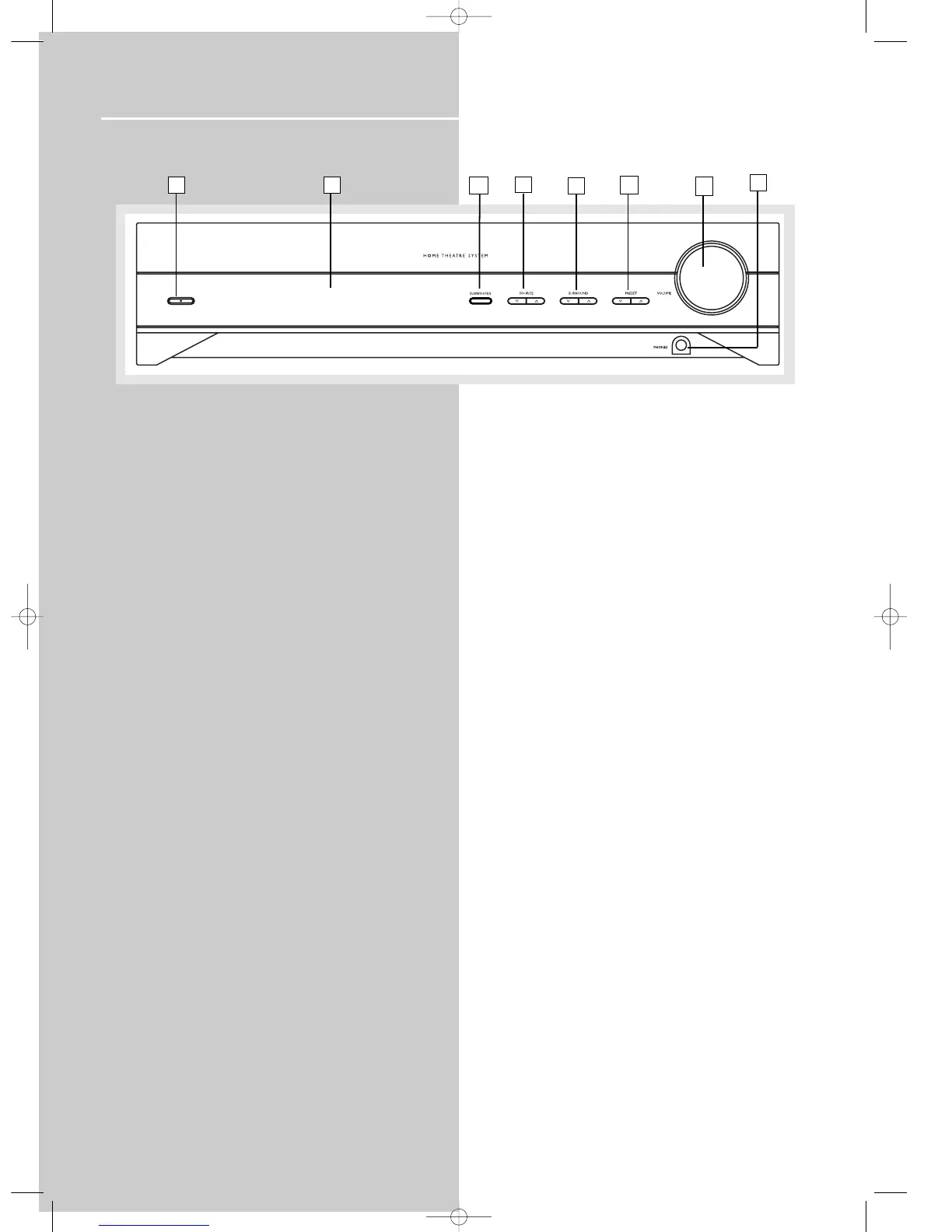
1. ON/ECO
Turns the unit on and off. When the system is turned
on, the unit will go to the mode it was in before
powered off.
2. Display
Displays current status of the receiver.
3. SUBWOOFER
Selects among subwoofer sound level. (SOFT
SUBWOOFER, BALANCED SUBWOOFER, STRONG
SUBWOOFER, POWERFUL SUBWOOFER)
4. SOURCE Buttons
Selects sound source. (DVD, Tuner, Tape, VCR, CD, TV
and SAT)
5. SURROUND Buttons
Selects digital sound processor. (DOLBY PL II MOVIE,
STEREO, DISCO, STADIUM, THEATER, JAZZ CLUB,
ARENA, 3 STEREO, DOLBY PL EMULATION, DOLBY PL
II MUSIC)
6. PRESET Buttons
Selects preset station in Tuner mode.
7. VOLUME
Increases and decreases volume level
8. PHONES
Plug your headphones (not supplied) into it for your
private enjoyment. Speakers will be off when phones
are inserted.
1
2
5
6
3
10
8
7
4
Receiver Controls



 To Next Page