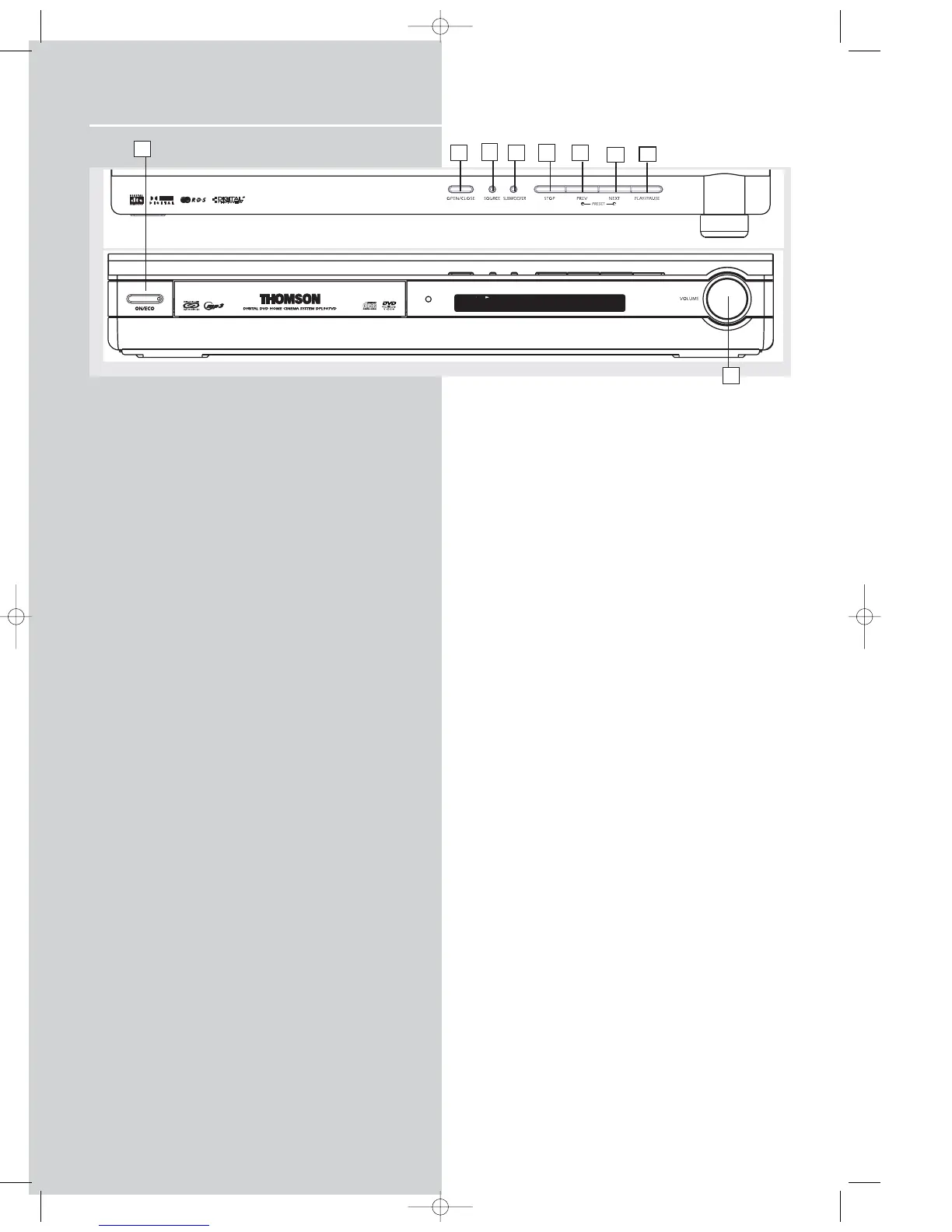
Operating Your Receiver
Receiver Controls
1. ON / ECO
• To turn on or off the receiver.
2. OPEN / CLOSE
• Press to open / close the CD compartment door.
3. SOURCE
• To select input source. For example, DVD/CD, VCR, etc.
4. SUBWOOFER
• Press to toggle among different subwoofer mode.
5. STOP
To stop DVD/CD playback.
6. PRESET - / PREV
• To move back to the beginning/previous preset memory
location in tuner mode.
• To skip to the beginning/previous track in CD mode and the
beginning/previous chapter in DVD mode (only during
playback).
7. PRESET + / NEXT
• To go to the next preset memory location in tuner mode.
• To skip to the next track in CD mode and the next chapter in
DVD mode (only during playback).
8. PLAY/PAUSE
To start and pause DVD/CD playback.
9. VOLUME
Turn the knob to adjust volume level.
1
6
2
4
9
7
5
10
3
8



 To Next Page