EasyManua.ls Logo

THOMSON DR-N14 - User Manual

THOMSON DR-N14
7 pages
Print Icon
To Next Page IconTo Next Page
Loading...
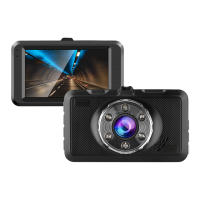
1080p Car Camera with Night Vision
Model No.: DR-N14
Read this instruction manual carefully before use and keep
for future reference.
Instruction Manual
Question and Answer IconNeed help?

Do you have a question about the THOMSON DR-N14 and is the answer not in the manual?

Summary

Product Introduction

Product Structure Overview

Details the physical layout and labeled components of the car camera.

Function Key Explanations

Explains the purpose and operation of each key on the device.

Function Descriptions

G-sensor Operation

Automatically saves video without overwriting during collisions.

Automatic Car Power Control

Device powers on/off automatically with the car engine when connected to a charger.

Power Button Usage

Describes how to turn the device on and off using the power button and indicator lights.

Operating Modes and Settings

Recording and Photo Modes

Details how to switch between and operate video recording and photo capture modes.

Playback and Menu Navigation

Explains how to play back recorded files and navigate through menu settings.

Time and Date Configuration

Guides the user on setting the device's date and time.

Connectivity and Power Management

USB Data Transfer Mode

How to connect to a PC for data access via USB.

Battery Status and Charging

Explains battery indicator images and methods for charging the device.

Product Specifications

Troubleshooting Common Issues

Warranty Information

Warranty Against Defects

Details the warranty terms, exclusions, and claim process for product defects.

Customer Support Contact

Provides support email and customer service hotline for warranty claims and inquiries.

Summary

Product Introduction

Product Structure Overview

Details the physical layout and labeled components of the car camera.

Function Key Explanations

Explains the purpose and operation of each key on the device.

Function Descriptions

G-sensor Operation

Automatically saves video without overwriting during collisions.

Automatic Car Power Control

Device powers on/off automatically with the car engine when connected to a charger.

Power Button Usage

Describes how to turn the device on and off using the power button and indicator lights.

Operating Modes and Settings

Recording and Photo Modes

Details how to switch between and operate video recording and photo capture modes.

Playback and Menu Navigation

Explains how to play back recorded files and navigate through menu settings.

Time and Date Configuration

Guides the user on setting the device's date and time.

Connectivity and Power Management

USB Data Transfer Mode

How to connect to a PC for data access via USB.

Battery Status and Charging

Explains battery indicator images and methods for charging the device.

Product Specifications

Troubleshooting Common Issues

Warranty Information

Warranty Against Defects

Details the warranty terms, exclusions, and claim process for product defects.

Customer Support Contact

Provides support email and customer service hotline for warranty claims and inquiries.

THOMSON DR-N14 Specifications

General IconGeneral
G-sensorYes
Loop RecordingYes
Motion DetectionYes
Night VisionYes
Display Size2.4 inches
Memory Card SlotMicroSD
StorageMicroSD card
BatteryBuilt-in rechargeable battery