MOTORISED 720P HD WIFI IP CAMERA
EN
8
C - iNSTALLATiON
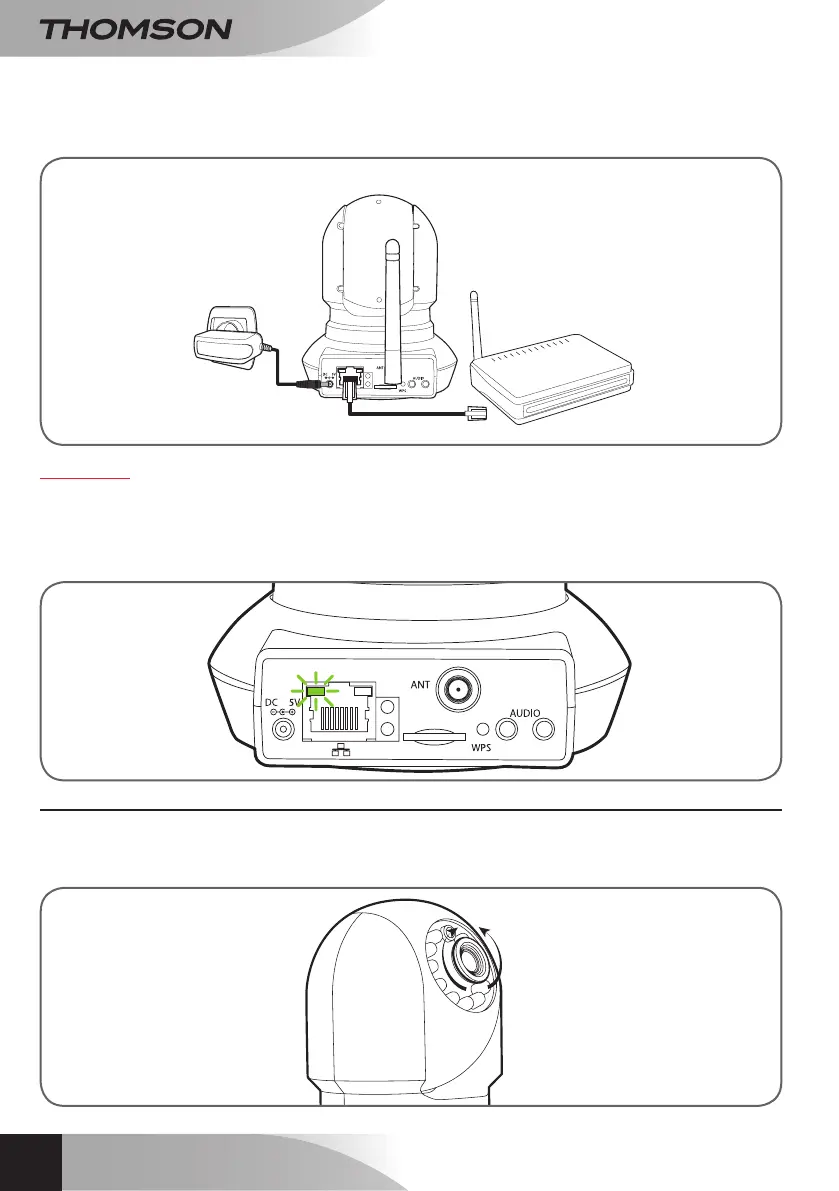
IfyourcameraisnotequippedwiththeWPSfeatureoryoudonotwanttouseit,youwillhavetousea
wiredconnectionforsetup,evenifyousubsequentlyintendtouseaWiFiconnection.
IMPORTANT:Donotconnectyourcameratoyourcomputer.Thiswillnotprovideitwithaccesstothe
internet.
Inmostcases,thecameraisimmediatelydetectedbythemodem/router,whichgrantsitaccesstothe
Internet.Afterafewseconds,thecameramotorsshouldrespondandthenetworkactivityLEDattheback
ofthecamerashouldash.
3 - FOCUSSING THE IMAGE
• Onceyouhavesetupthedevice,youcanadjustthefocusoftheimageifitislackingsharpness.
Gentlyrotatethelenstoadjustthefocus.
WARNING:Donotforcethelensorunscrewitcompletelyanddonotmovethemotorsbyhand!
camera
Modem/router
connectedto
theinternet
Mainsadapter


 To Next Page