20
Connections and initial set up
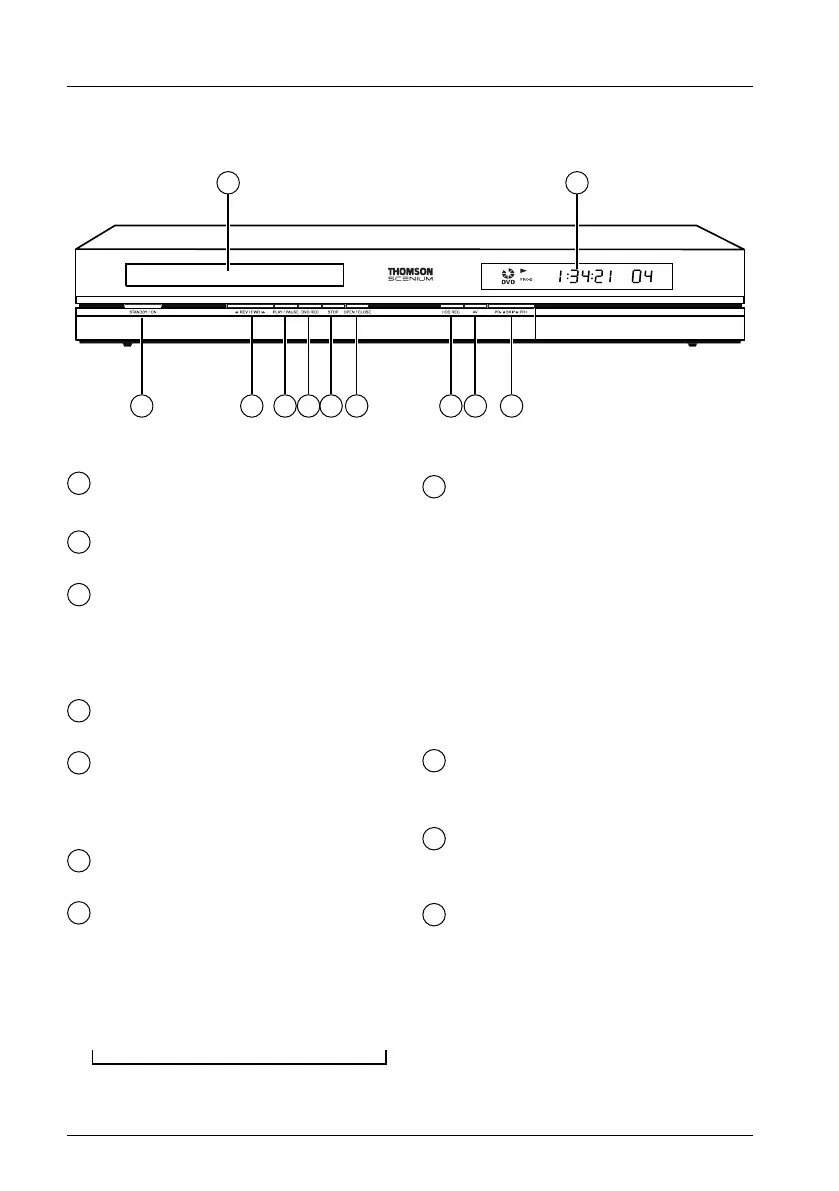
The buttons on the front
ON/STANDBY - To switch your DVD
recorder on or off.
G
REV / FWD
F
Fast forward or reverse (page 43).
PLAY / PAUSE
- To play a disc placed in the disc tray (11)
of the DVD recorder.
- Pause during playback (audio CD or
mp3) or pause on an image (DVD).
DVD REC - To record to the
DVD+R/+RW disc.
STOP - To stop play
(press once) or to stop recording in
progress using the
Channels menu (press
twice).
OPEN/CLOSE - To open and close
the disc tray.
DVR REC - To record to the hard disc.
To start recording a TV programme (the
red indicator lights up) and if necessary to
adjust recording time by pressing
repeatedly. Each press on the
RECORD
key extends recording time by 30 minutes.
AV - To select the audiovisual sources
(channels or devices connected to the AV
sockets):
PR 1 ,2 ,3 - Channel 1, 2, 3.
AV 1 - Device connected to AV1
(television set).
AV 2 - Device connected to AV2 (satellite
receiver, decoder, …).
AV 3 - Sockets AUDIO/VIDEO on the
front.
AV 4 - Sockets AV (S-VIDEO or
AUDIO/VIDEO) at the back.
PR- I
C
SKIP
B
I PR+
CTo change channels (page 26).
Skips forward or back a channel (page 44).
DISPLAY PANEL - Displays your DVD
recorder’s modes of operation (page 21).
• Adjusting the time
Disc tray.
1
2
3
4
5
6
7
8
9
10
11
2 3 4 5 6 7 8 91
11
10
➔ 0h30 ➔ 1h00 ➔ 1h30 ➔ 2h00 ➔ 2h30 ➔ 3h00 ➔
2_DTH8540-50_en.qxd 11/08/05 11:40 Page 20


 To Next Page