19
POWER SUPPLY
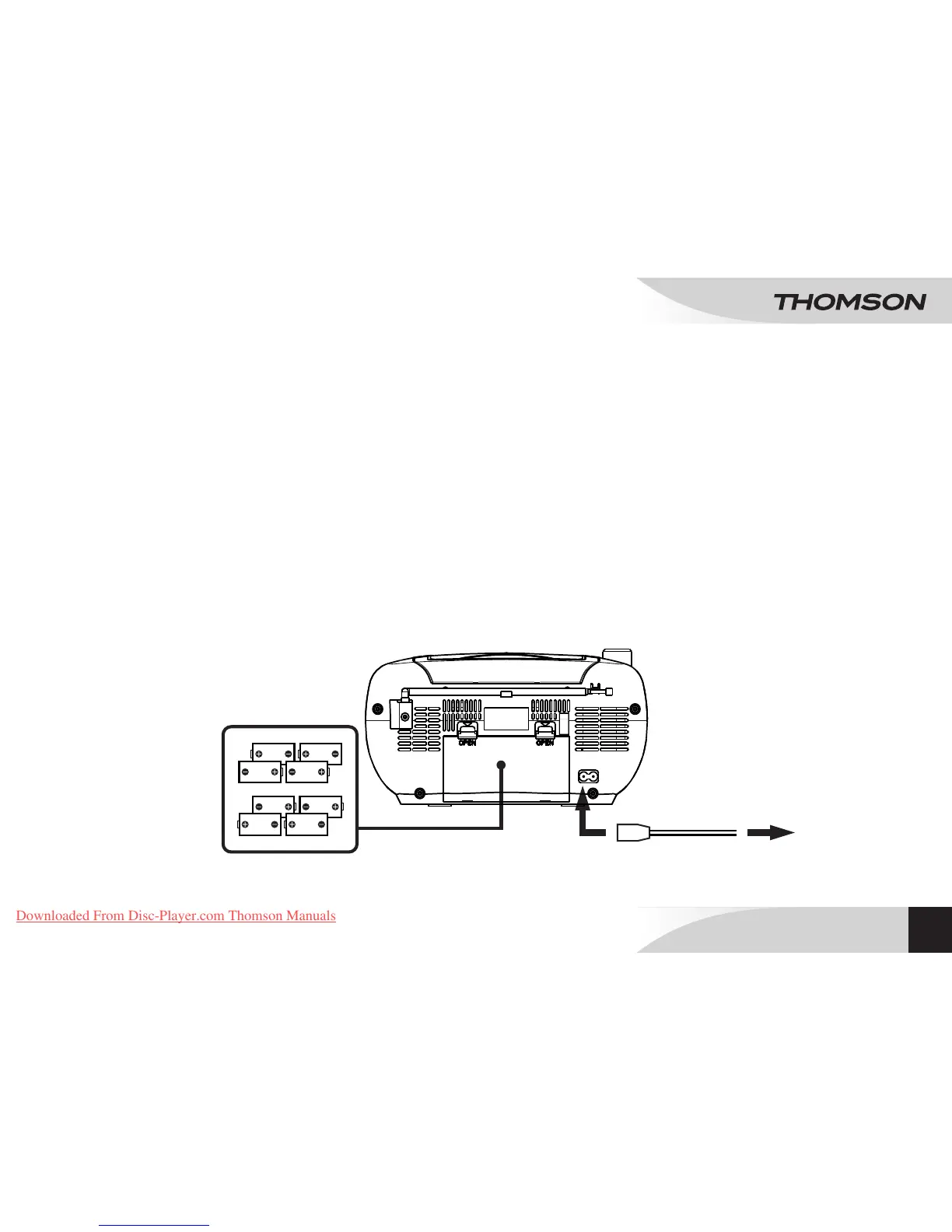
This equipment can run on batteries or on the mains.
Mains power supply
Make sure that the appliance is switched off.
Connect the electrical cable to the AC socket at the back of
the appliance, then plug the other end of the cable into a mains
socket.
Note: If the electrical cable is plugged in, the batteries are
automatically inoperative.
To avoid the batteries leaking, they should be removed if the
appliance is powered via the electrical cable.
Battery power supply
o Press the tabs and lift the cover up to open the battery
compartment (21) located at the back of the appliance.
o Insert 8 LR14 (C) 1.5V batteries (not supplied), taking care to
respect the polarity indicated.
o Close the battery compartment cover.
Note: In order to use battery power, the electrical cable must be
unplugged from the socket at the back of the appliance or from
the mains socket.
PORTABLE CD RADIO
RCD203U / RCD204U / RCD205U
EN
O
I
Downloaded From Disc-Player.com Thomson Manuals


 To Next Page