EasyManua.ls Logo

THOMSON ROC 6306 - User Manual

THOMSON ROC 6306
3 pages
Print Icon
To Next Page IconTo Next Page
Loading...
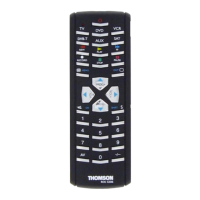
The ROC 6306 is a universal remote control (6 in 1). It can replace 6 remote controls thanks to its
6 mode keys TV, DVD, VCR,... It is compatible with the majority of television sets, video cassette
recorders, DVD players, satellite and cable receivers as well as terrestrial digital television (DVBT),
amplifiers and other audio equipment provided they are controlled by infra red signals.
This remote control has been factory programmed to allow you to use it immediately with the
majority of Thomson Group devices.We therefore advise you to try it before beginning to program it.
If programming is necessary, follow one of the methods A, B, C, D or E that are given in this manual.
But first, install 2 batteries (AAA) in the remote control.
Keep these instructions and the separate list of codes in a safe place so that you can later reprogram
your remote control.
1 I ndicator lamp: the red indicator lamp lights up when
any key is pressed.
2 B: On / Standby.
3 R emote control mode
Selects device to control TV, DVD,VCR,...
4 B (Play): play*.
5 F (FF): fast forward *.
6 L (STOP): stop playback*.
7 K (Pause): stops on an image*.
8 I (EXIT): teletext Off in TV mode.
SHIFT and EXIT: turns off the menu of the
selected product.
9 VOL-/VOL+ increases (+) or decreases (-) the
volume of the TV set.
SHIFT and VOL-/VOL+ also allows you to
navigate the menus horizontally.
1 0 S: programmes the remote control.
SHIFT: activates the secondary key features
(indications in blue).
1 1 Number keys 0 to 9: these keys have the same
functions as those of your original remote and are
also used to enter the codes for different products.
1 2 Press this key first before you type in the 2-digit
channel number (except for Thomson group
products).
1 3 AV: for selecting an external source (SCART).
1 4 c: switches the TV sound off.
SHIFT and OK: confirms a selection.
1 5 PROG+,PROG-: programmes zapping button
(received by the television set or the satellite
receiver); use to scroll vertically through menus
SHIFT and PROG+/PROG- also allow you to
navigate the menus vertically.
1 6 a (MENU): teletext On/Off in TV mode.
SHIFT and MENU: turns on the menu of the
selected products.
1 7 M (RECORD): to record.
1 8 G (REW): goes backward or advances forward*.
* The coloured buttons can be used to select categories
when teletext is activated, and specific functions
depending on the make.
2 - Te sting the remote control
before programming
1
1. T urn on the device that you wish to control.
2. P ress the key corresponding (3) to the type of device
to control:
TV: television set,
DVD: DVD player,
VCR: video cassette recorder,
DVB-T: DVBT receiver,
SAT: satellite,
AUX: other devices.
3. P oint the remote control at the device you wish to
control and try to turn it off using the
B
(2) key.
I f the device does not turn off, you must program the
remote control using one of the methods A, B, C or
D as described below.
1 - Description of keys
3 - Programming
the remote control
Before you start programming, you must find the subcode of
the set to be controlled.
Refer to the list provided with these instructions, page I of the
codes.
1 S witch on the set you want to control.
2. Hold down the S (10) key until the red indicator
lamp (1) remains lit (the indicator light remains on
for a few seconds to give you the time to proceed with
the following steps. The indicator lamp flashes when
this time is almost up, and then goes off).
3. P ress the key (3) that corresponds to the type of
equipment you want to control:
TV: television set,
DVD: DVD player,
VCR: video cassette recorder,
DVB-T: DVBT receiver,
SAT: satellite,
AUX: other devices.
4. W hile the indicator is lit, type in the subcode (example:
1 fo
r
Thomson).
5. D irect the remote control towards the set and try to
switch it off by pressing the
B
(2) key.
6. I f the set you want to control switches off, press
c (14) to memorise the subcode.
7. If the product doesn’t turn off, press the
B
(2) key
repeatedly until the set switches off. Wait approximately
one second between key presses to give the red
indicator lamp (1) enough time to go off and
light up again. This will allow you to see whether the
product responds or not.
8. I mmediately upon the switching-off of the set to be
controlled, press c (14) to store the subcode.
Note:
If you want to assign another type of product than those
mentioned on the remote control (with the exception of the
TV button which can only be used to control a television set),
begin by entering the code that corresponds to the product you
want to programme (a 4-digit code that you will find in the code
booklet – see method B).
Example: if you want to control a satellite receiver with the
DVD key, begin by entering a satellite code (any satellite, for
example: 0603 for a Thomson satellite receiver) then begin
the procedure.
Check of the programming:
In principle, your set is ready for receiving the remote control
commands. Check your remote control for proper functioning by
performing the test described on page 3.
Method A Fast programming with
1-digit subcode
1
GB
1
01_ROC6306_GB.indd 1 8/12/06 9:51:09

Question and Answer IconNeed help?

Do you have a question about the THOMSON ROC 6306 and is the answer not in the manual?

Summary

Remote Control Key Descriptions

Indicator and Power Keys

Describes the function of the indicator lamp and the On/Standby key.

Mode and Playback Controls

Details the mode selection keys and common playback control buttons.

Navigation and Menu Keys

Explains keys for menu navigation, volume, channel selection, and teletext.

Special Function Keys

Covers the S key for programming and SHIFT for secondary functions.

Testing Remote Control Before Programming

Remote Control Programming Methods

Method A: Fast Programming (1-Digit Subcode)

Guides on programming using a single-digit subcode for quick setup.

Method B: 4-Digit Code Programming

Instructions for programming using a specific 4-digit code for the device.

Method C: Code Retriever

Procedure to find the correct code by cycling through available codes.

Method D: Automatic Code Search

Method for automatically scanning all codes to find a match for the device.

Method E: Combo Device Programming

Steps for programming combined devices like TV/VCR or TV/DVD units.

Checking Programming

Steps to verify if the remote control has been programmed successfully.

Retrieving a Programmed Code

Other Functions

Volume Control Adjustment

Details on assigning volume control to specific modes like TV or VCR.

Navilight System Navigation

Guide to using the Navilight system for accessing TV or VCR settings.

Summary

Remote Control Key Descriptions

Indicator and Power Keys

Describes the function of the indicator lamp and the On/Standby key.

Mode and Playback Controls

Details the mode selection keys and common playback control buttons.

Navigation and Menu Keys

Explains keys for menu navigation, volume, channel selection, and teletext.

Special Function Keys

Covers the S key for programming and SHIFT for secondary functions.

Testing Remote Control Before Programming

Remote Control Programming Methods

Method A: Fast Programming (1-Digit Subcode)

Guides on programming using a single-digit subcode for quick setup.

Method B: 4-Digit Code Programming

Instructions for programming using a specific 4-digit code for the device.

Method C: Code Retriever

Procedure to find the correct code by cycling through available codes.

Method D: Automatic Code Search

Method for automatically scanning all codes to find a match for the device.

Method E: Combo Device Programming

Steps for programming combined devices like TV/VCR or TV/DVD units.

Checking Programming

Steps to verify if the remote control has been programmed successfully.

Retrieving a Programmed Code

Other Functions

Volume Control Adjustment

Details on assigning volume control to specific modes like TV or VCR.

Navilight System Navigation

Guide to using the Navilight system for accessing TV or VCR settings.

Overview

The ROC 6306 is a universal remote control, designed to replace up to six individual remote controls for various electronic devices. It features six dedicated mode keys for TV, DVD, VCR, DVB-T, SAT, and AUX, making it compatible with a wide range of equipment including most television sets, video cassette recorders, DVD players, satellite and cable receivers, terrestrial digital television (DVBT), amplifiers, and other audio equipment, provided they are controlled by infra-red signals.

Function Description:

The remote control comes pre-programmed for immediate use with most Thomson Group devices. For other brands or if the pre-programming doesn't work, several programming methods (A, B, C, D, and E) are available.

Key Features and Functions:

  • Indicator Lamp (1): A red light that illuminates when any key is pressed, providing visual feedback.
  • On/Standby Key (2): Used to turn devices on or off.
  • Mode Keys (3): These keys (TV, DVD, VCR, DVB-T, SAT, AUX) allow you to select the type of device you wish to control.
  • Playback Controls (4, 5, 6, 7):
    • (4) (Play): Initiates playback.
    • (5) ►► (FF): Fast forwards through content.
    • (6) ■ (STOP): Stops playback.
    • (7) II (Pause): Pauses content on an image.
    • (18) ◄ (REW): Rewinds or advances backward/forward.
  • EXIT Key (8): In TV mode, this key turns off teletext. When used with SHIFT, it turns off the menu of the selected product.
  • VOL-/VOL+ Keys (9): Increases or decreases the volume of the TV set. When used with SHIFT, these keys allow horizontal navigation within menus.
  • S Key (10): Used to program the remote control. When used with SHIFT, it activates secondary key features (indicated in blue).
  • Number Keys (0-9) (11): These keys replicate the functions of your original remote's number keys and are used for entering codes during programming. For Thomson group products, you can directly enter 2-digit channel numbers.
  • Channel Number Prefix Key (12): Press this key before typing in a 2-digit channel number, except for Thomson group products.
  • AV Key (13): Selects an external source (SCART).
  • Mute/OK Key (14): Mutes the TV sound. When used with SHIFT, it confirms a selection.
  • PROG+/PROG- Keys (15): Used for zapping channels (received by the television or satellite receiver) and for scrolling vertically through menus. When used with SHIFT, these keys also allow horizontal navigation within menus.
  • MENU Key (16): In TV mode, this key turns teletext on or off. When used with SHIFT, it turns on the menu of the selected product.
  • (RECORD) Key (17): Initiates recording.

Usage Features:

Testing the Remote Control Before Programming:

  1. Turn on the device you want to control.
  2. Press the corresponding mode key (3) for your device (TV, DVD, VCR, DVB-T, SAT, AUX).
  3. Point the remote at the device and try to turn it off using the On/Standby key (2). If the device doesn't turn off, programming is required.

Programming Methods:

  • Method A – Fast Programming with 1-digit Subcode:

    1. Switch on the device.
    2. Hold down the S key (10) until the red indicator lamp (1) remains lit.
    3. Press the mode key (3) for your device.
    4. While the indicator is lit, enter the 1-digit subcode (found in the provided code list).
    5. Point the remote at the device and try to switch it off using the On/Standby key (2).
    6. If the device switches off, press the Mute/OK key (14) to memorize the subcode.
    7. If it doesn't switch off, repeatedly press the On/Standby key (2) until it does, waiting approximately one second between presses.
    8. Immediately press the Mute/OK key (14) to store the subcode. Note: For assigning a different product type to a mode key (e.g., controlling a satellite receiver with the DVD key), start by entering a 4-digit code for that product before beginning the procedure.
  • Method B – 4-digit Codes Programming:

    1. Switch on the device.
    2. Hold down the S key (10) until the red indicator lamp (1) remains lit.
    3. Press the mode key (3) for your device.
    4. While the indicator is lit, enter the first digit of the 4-digit code (from the provided code list).
    5. Point the remote at the device and try to switch it off using the On/Standby key (2).
    6. If it doesn't switch off, repeat step 2 and enter the next 4-digit code, trying to switch off the device after each code.
  • Method C – Programming by Means of Code Retriever:

    1. Switch on the device.
    2. Hold down the S key (10) until the red indicator lamp (1) remains lit.
    3. Press the mode key (3) for your device.
    4. Point the remote at the device and try to switch it off using the On/Standby key (2).
    5. If the device switches off, press the Mute/OK key (14) to memorize the subcode.
    6. If it doesn't switch off, repeatedly press the On/Standby key (2) (up to 200 times) until the device switches off, waiting approximately one second between presses.
    7. Immediately press the Mute/OK key (14) to store the subcode.
  • Method D – Automatic Code Search:

    1. Ensure the device is on.
    2. Hold down the S key (10) until the red indicator lamp (1) remains lit, then release S (10).
    3. Press the mode key (3) for your device.
    4. Press the PROG+ key (15) once. The remote will begin listing codes (about 1 code per second).
    5. Press PROG+ (15) a second time to slow down the test (1 code every 3 seconds).
    6. As soon as the device changes channel or reacts, immediately press the Mute/OK key (14) to record the code. If you pass the code, use PROG- (15) to go back.
  • Method E – Programming for Control of a COMBO Set:

    1. Switch on the COMBO device.
    2. Hold down the S key (10) until the red indicator lamp (1) remains lit.
    3. Press the TV key (3), then follow one of the programming methods (A, B, C, or D).
    4. If a second code programming is needed, repeat steps 2 and 3.

Retrieving a Programmed Code:

  1. Hold down the S key (10) until the red indicator lamp (1) remains lit.
  2. Press the mode key (3) for your device.
  3. Briefly press S (10) again; the red indicator lamp (1) flashes once.
  4. Press the number keys (0-9) in ascending order until the red indicator lamp (1) flashes once. This digit is the first number of the 4-digit code.
  5. Repeat step 4 to find the other numbers of the code. The lamp will go off when the fourth number is found.

Checking the Programming:

  • For TV or satellite receiver: switch on and change channels using PROG+ (15).
  • For DVD player: load a DVD and press PLAY (6).
  • Test other remote control keys to verify functionality. If some keys are inactive, try programming Method B or C again.

Other Functions:

  • Adjustment of ALL Volume Controls Under a Specific Mode:

    1. Hold down S (10) until the red indicator lamp (1) remains lit.
    2. Release S (10).
    3. Press the Mute/OK key (14); the red indicator lamp (1) flashes once.
    4. Press the mode key (TV, VCR...) corresponding to the device whose volume will always be controlled by VOL (9) and Mute/OK (14) keys.
    5. Press the Mute/OK key (14) once.
  • Adjustment of Volume Controls for EACH Mode:

    1. Hold down S (10) until the red indicator lamp (1) remains lit.
    2. Release S (10).
    3. Press the Mute/OK key (14); the red indicator lamp (1) flashes once.
    4. Press the mode key (TV, VCR...) corresponding to the device whose volume will always be controlled by VOL (9) and Mute/OK (14) keys.
    5. Press the VOL - key (9) once.
    6. Press the Mute/OK key (14) once.
  • The NAVILIGHT System: This system allows access to the settings of your TV or VCR (if fitted with the THOMSON NAVILIGHT system), provided you have allocated the DVD or SAT keys to the video recorder.

    1. Switch on the device.
    2. Press the mode key (TV, VCR, or SAT). For VCR, ensure AV mode is activated.
    3. Press S (10) once, then press the MENU key (16).
    4. Navigate through menus using the play keys (4, 5, 6, 7) and VOL (9) and PROG (15) keys.
    5. Validate with OK (14).
    6. To exit menus, press EXIT (8) once. Note: The S (10) key remains on as long as the indicator lamp (1) is lit. If it goes out, press S (10) again before using navigation keys. To exit this mode, press S (10) a second time.

Maintenance Features:

  • Battery Replacement: After replacing batteries, you may need to reprogram the remote control.
  • Code Storage: It is recommended to jot down the retrieved code of your set for future use, especially after battery replacement.
  • Keeping Instructions: Keep the instructions and the separate list of codes in a safe place for future reprogramming needs.

THOMSON ROC 6306 Specifications

General IconGeneral
Device TypeRemote Control
BrandTHOMSON
ModelROC 6306
Compatible DevicesTV
Connectivity TechnologyInfrared
Battery TypeAAA
Number of Batteries2

Related product manuals