- EN 19 -
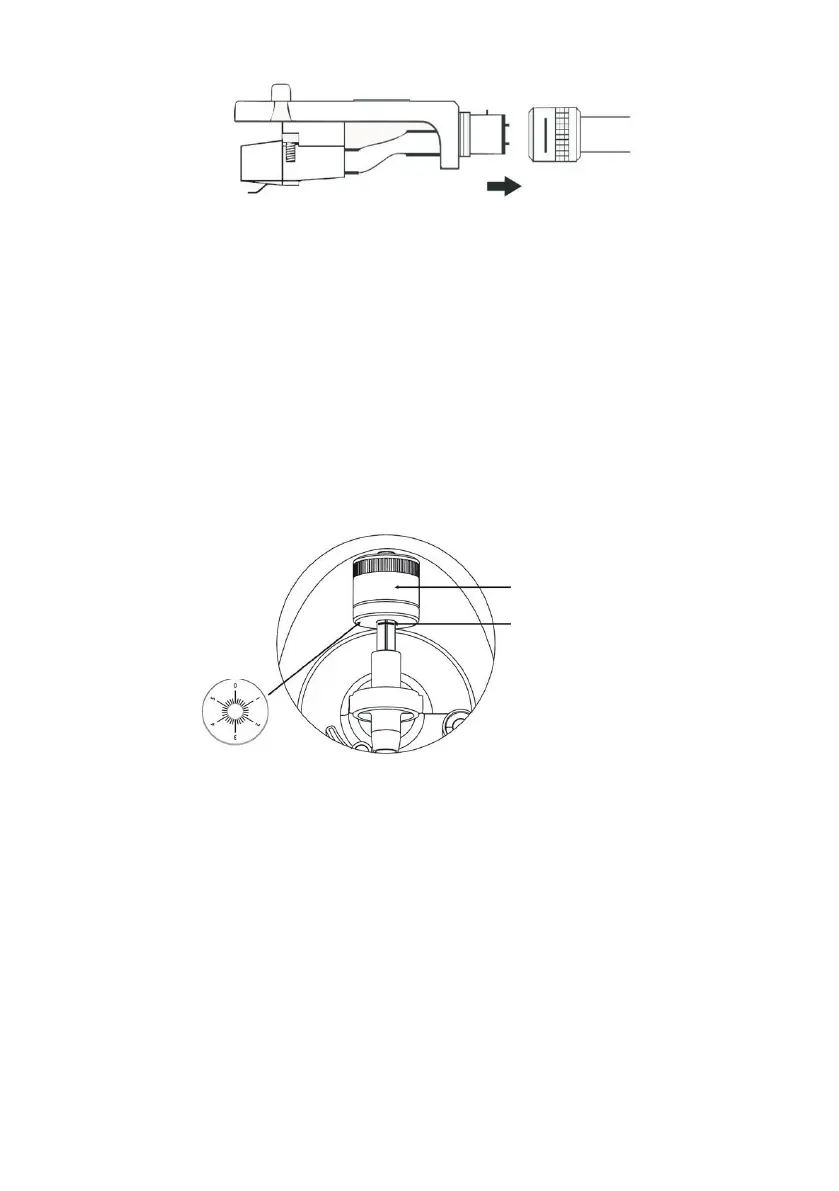
1. Add weight to the tone arm. You’ll nd the weight in the paper packaging that holds the
record player in place inside the box.
2. Turn the weight to the graduation mark.
3. Turn the dial to zero.
4. Turn the weight and dial anti-clockwise to position 1.
5. The weight is correctly adjued.
6. If you are having trouble with playing, adju the anti-skating control accordingly.
• Slide the counterweight into the tone arm. Turn it slightly and screw it (anti-clockwise)
to the rear end of the tone arm. Each full turn of the graduated ring corresponds to
approximately 5.0 grams (+/-0.5 grams).
• For the Audio-Technica AT-91 cartridge, turn the counterweight anti-clockwise until the
graduated ring reaches the graduation at the back end of the tone arm.
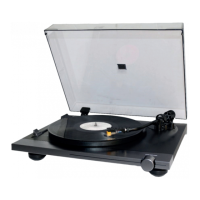
Counterweight
Graduated ring
Arm graduation
• Hold the counterweight with one hand, and with the other, turn the graduated ring to 0 on
the scale of the arm, making sure not to rotate the counterweight.
• The Audio-Technica AT-91 cartridge supplied requires approximately 2.5 grams of
tracking force. To achieve this tracking force, turn the counterweight anti-clockwise, to
position 1 on the graduated ring. If you experience any skipping issues turn towards
1.5–2.
• There is a weight tolerance of approximately +/-0.5g. If necessary, turn the counterweight
anti-clockwise to increase the tracking force, or clockwise to reduce it.
• If you’re inalling another cartridge, you can adju the tracking force by turning the
counterweight one way or the other, as required.
Adjuing the balance:
• Set the anti-skating knob to 0.
• Hold the cartridge support with one hand and balance the arm by turning the counterweight


 To Next Page