3
Making the connections
Set-up
GB
GB
AUDIO/VIDEO 1
AUDIO/VIDEO 2 DECODER
OUT
ANTENNA
L R
VIDEO AUDIO
IN
OUT
220V/240V - 50Hz
AV1
EXT1
AUX1
AV1
1
234
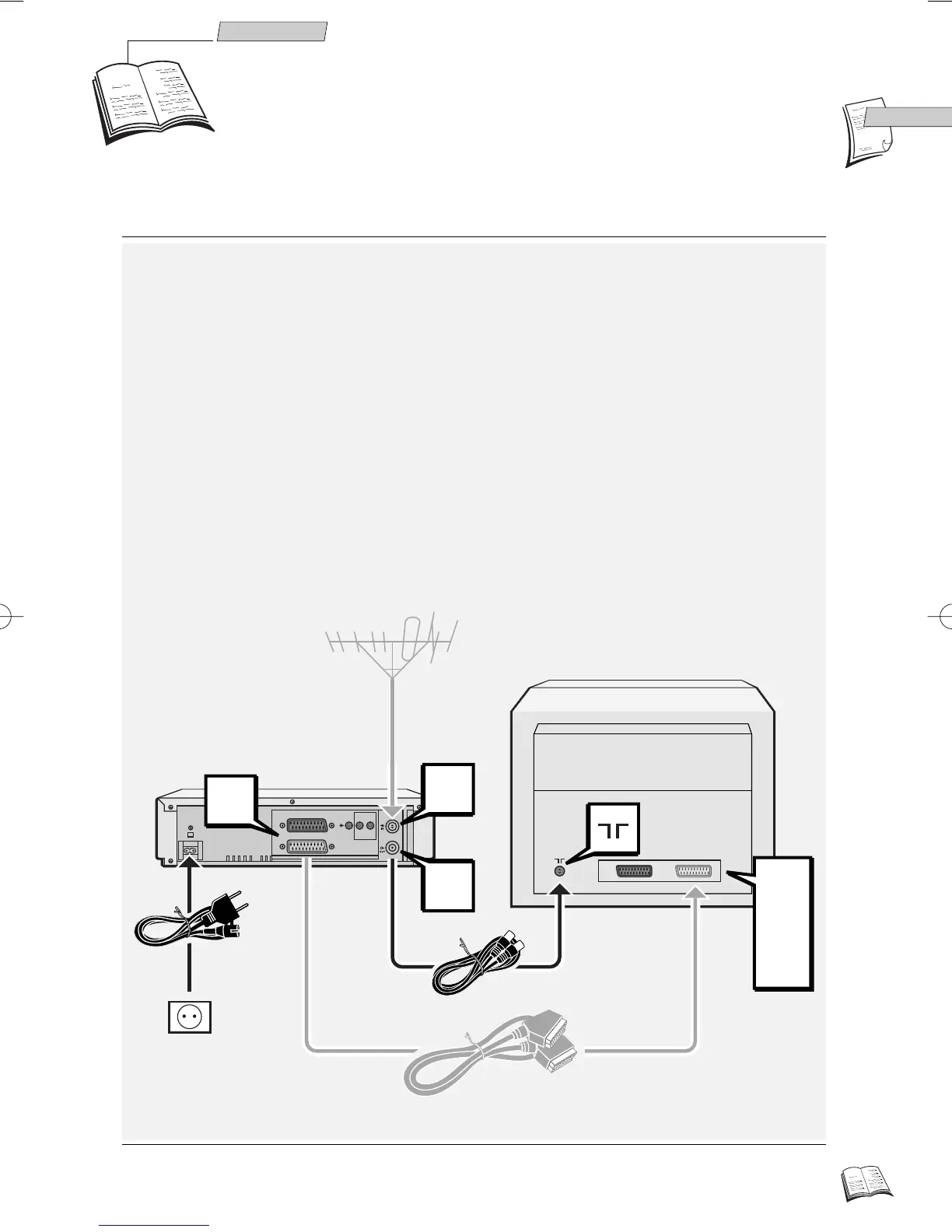
Basic connections
1 Disconnect the aerial cable from your TV set and reconnect it to the IN socket of your
video recorder.
2 By means of the coaxial cable supplied, connect the video recorder’s OUT socket to the
television’s aerial socket
gg
.
3 Connecting your VCR to your television set with a SCART cable (not supplied)
facilitates operation and considerably improves the image and sound quality. Should
you have such a cable, connect the video recorder AV 1 socket (Audio/Video 1) to the
television's SCART socket (labelled AV 1, EXT 1 or AUX 1, depending on the make).
4 Connect the video recorder to the mains with the power cord supplied by first plugging
in the connector at the video recorder rear.
Refer to page 6 for further possible connection schemes.
J
(cable not supplied)
r9-1GB01(a) 9/02/00 11:24 Page 3



 To Next Page