Quitar el registro del BT LED DISPLAY del sistema PS4™
(Sólo es necesario realizar esta operación al resolver problemas o al comprar un nuevo BT LED
DISPLAY.)
1. Apaga el BT LED DISPLAY pulsando el botón de encender/apagar (4)
.
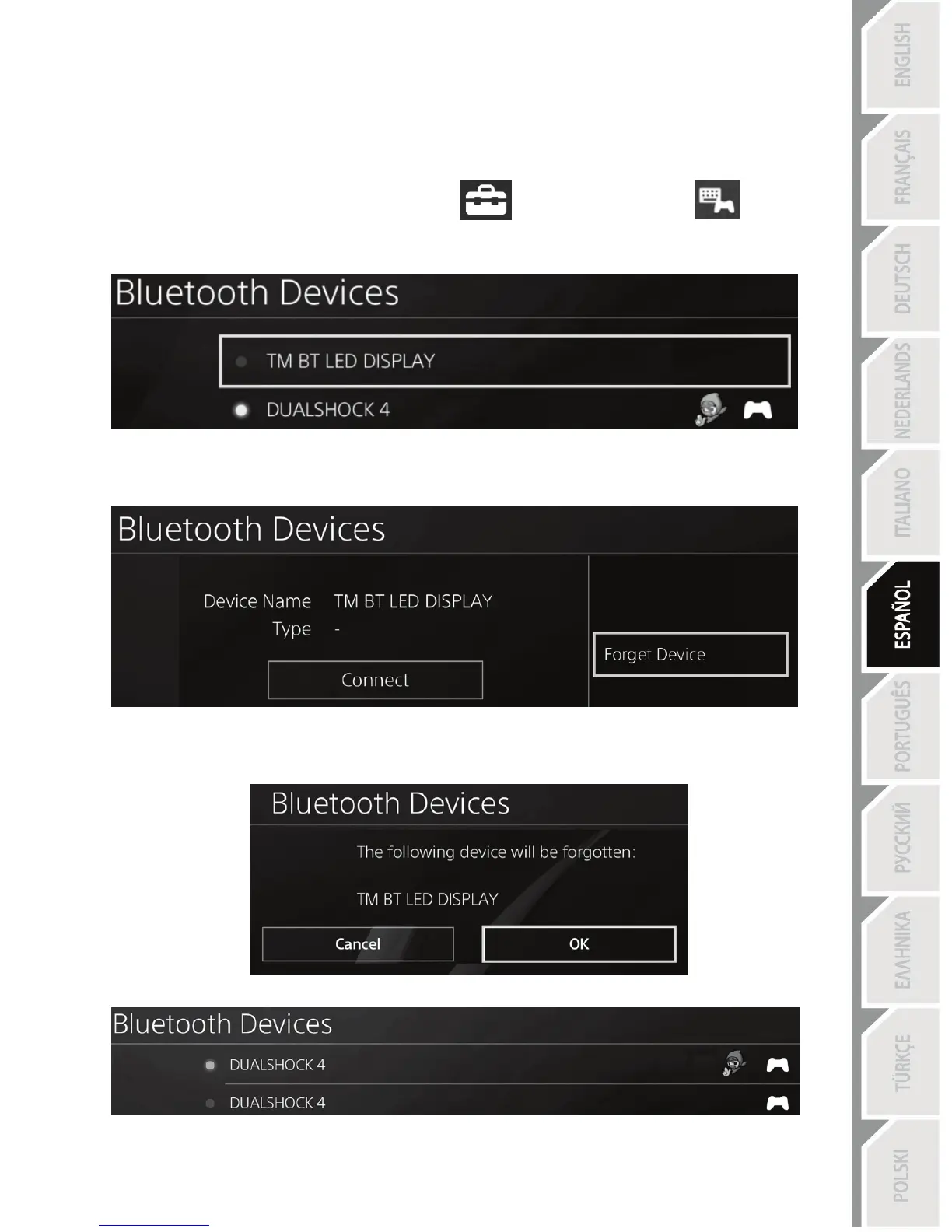
2. En el menú del sistema PS4™, selecciona
[ Settings ] [Ajustes] > [ Devices ]
[Dispositivos] > [ Bluetooth Devices ] [Dispositivos Bluetooth].
Selecciona TM BT LED DISPLAY y luego pulsa el botón s para confirmar.
3. Aparecerá el mensaje Device Name TM BT LED DISPLAY [Nombre del dispositivo TM BT LED
DISPLAY] en la pantalla. Pulsa el botón OPTIONS en el gamepad y luego selecciona Forget
Device [Olvidar dispositivo]. Pulsa el botón s para confirmar.
4. Aparecerá el mensaje The following device will be forgotten: TM BT LED DISPLAY [Se va a
olvidar el siguiente dispositivo: TM BT LED DISPLAY] en la pantalla.
Selecciona OK [Aceptar] y luego pulsa el botón s para confirmar.
5. Ya se ha quitado el registro del TM BT LED DISPLAY del sistema PS4™.


 To Next Page