Update: February 2024
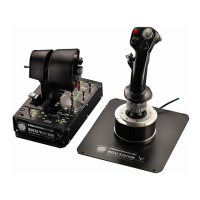
My HOTAS Warthog Dual Throttles is not detected, not recognized, by
my PC - Wake-up method (Bootloader)
System requirements: PC running Windows® 10 or more recent.
In this article we give you the procedure to follow to try to wake up your HOTAS
Warthog Dual Throttles.
Important note:
The wake-up procedure only applies in the specific case whereby the device is not
detected by your PC at all.
- No LEDs light up on the Dual Throttles.
Note:
The wake-up procedure is also available for the HOTAS Warthog Flight Stick. If
necessary, you will find this version in the FAQ section of our technical support
website:
https://support.thrustmaster.com/product/hotaswarthogflightstick/
During this procedure:
DO NOT CONNECT the HOTAS Warthog Dual Throttles to your PC’s USB before
being prompted to do so.
PC connection instructions:
The HOTAS Warthog Dual Throttles will have to be directly connected to a USB
port on the PC.
We recommend that you avoid using a USB hub, a USB extension, or any other
type of connection extension.









 To Next Page