INSTALLING THE PLUG-INS
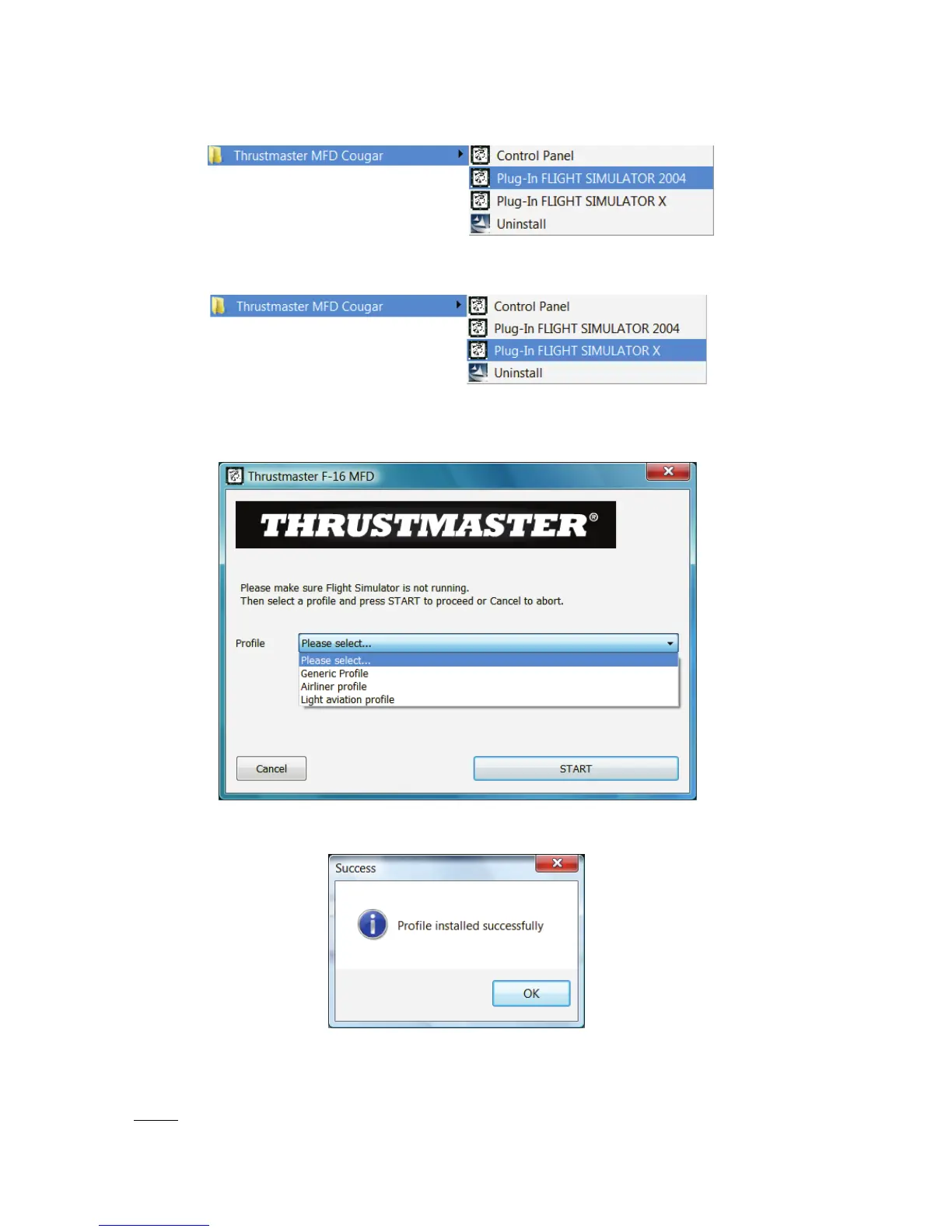
- To access the Flight Simulator 2004 plug-in, select:
Start/Programs/Thrustmaster MFD Cougar/FLIGHT SIMULATOR 2004 Plug-In
- To access the Flight Simulator X plug-in, select:
Start/Programs/Thrustmaster MFD Cougar/FLIGHT SIMULATOR X Plug-In
- After performing this operation, 3 profiles are available to you:
Generic Profile / Airliner Profile / Light Aviation Profile.
Choose the relevant profile, then click START
.
- The SUCCESS pane displays, confirming that the profile has been installed correctly.
Click OK.
YOU ARE NOW READY
TO
PLAY
WITH YOUR 2 MFD COUGARS FEATURING
THE
RELEVANT
PROFILE!
NOTE: To play with another profile, proceed as described
above
while selecting
the required profile.
14/18












 To Next Page