INSTALLER LES PLUG-IN
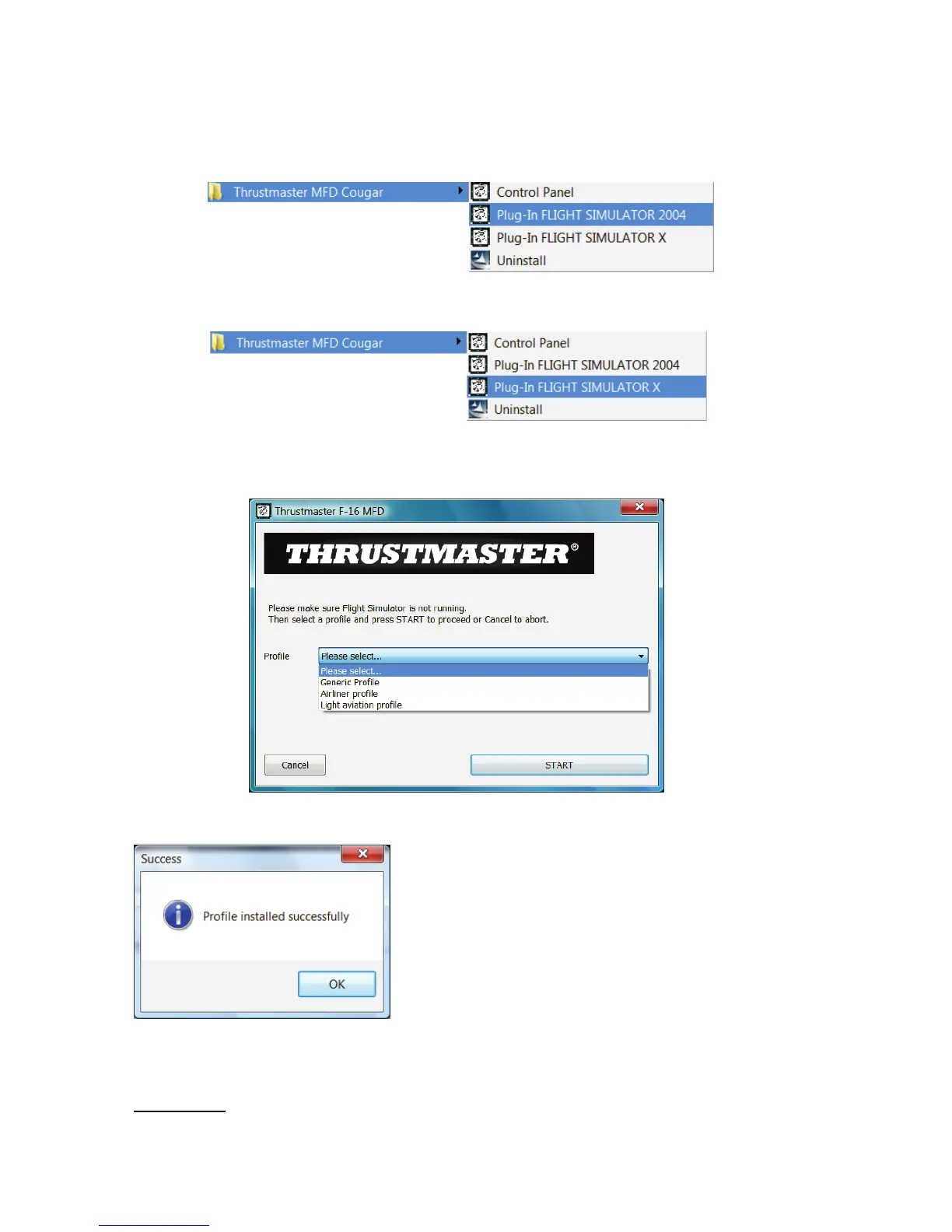
- Pour accéder au « Plug-In » de « Flight Simulator 2004 », sélectionnez :
Démarrer/Programmes/Thrustmaster MFD Cougar/Plug-In FLIGHT SIMULATOR 2004
- Pour accéder au « Plug-In » de « Flight Simulator X », sélectionnez :
Démarrer/Programmes/Thrustmaster MFD Cougar/Plug-In FLIGHT SIMULATOR X
- Une fois cette opération effectuée, 3 profils vous sont proposés :
« Generic Profile » / « Airliner Profile » /« Light aviation Profile ».
Choisissez le profil de votre choix puis cliquez sur « START ».
- Le panneau « SUCCESS » s’ouvre pour indiquer la bonne installation du profil.
Cliquez sur « OK ».
VOUS ETES MAINTENANT PRET
A
JOUER
AVEC VOS 2 MFD COUGAR DEJA PRE-CONFIGURE AVEC
LE
PROFIL CHOISI !
REMARQUE : Pour jouer avec un autre profil, effectuez la
même
opération
en choisissant le
profil de votre choix.
14
/
18












 To Next Page