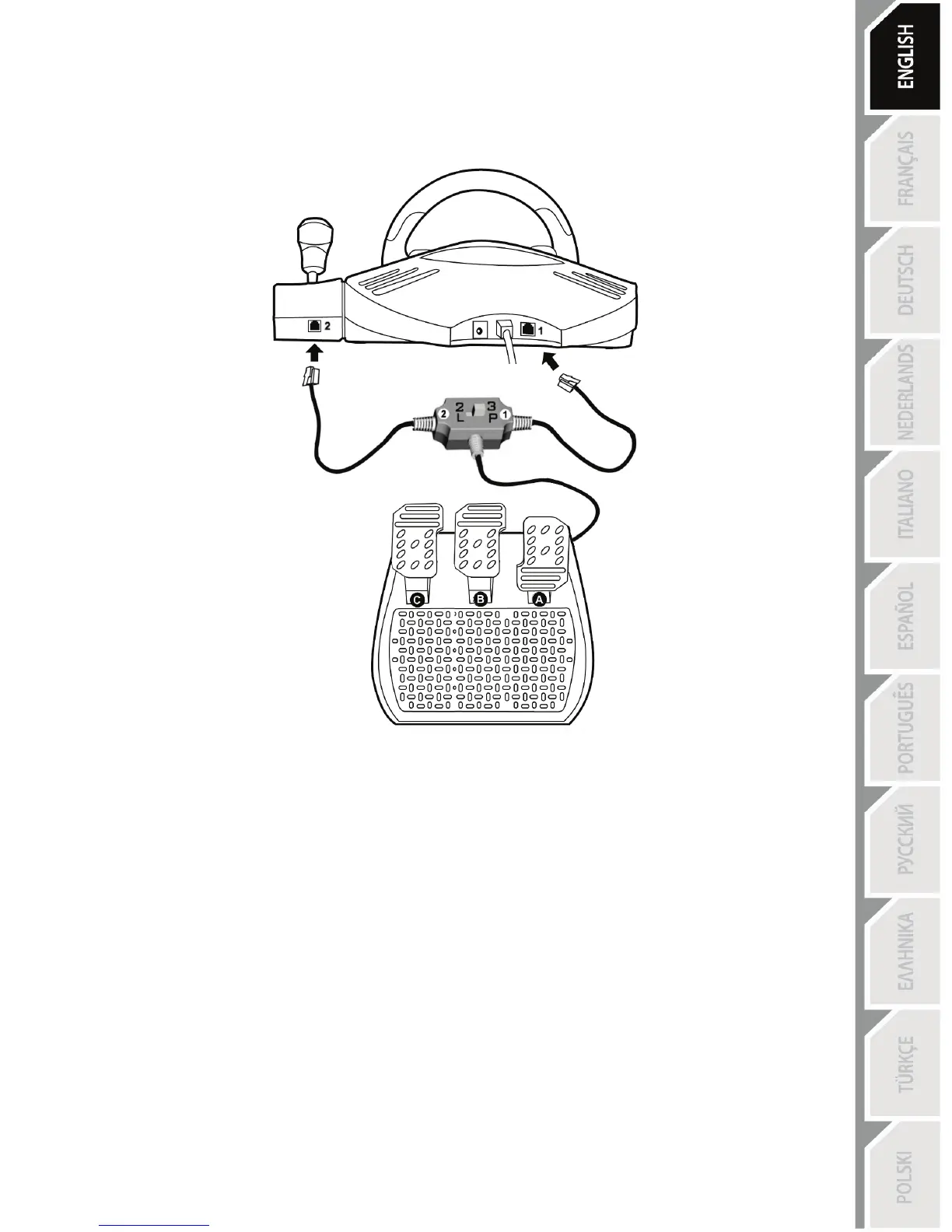
Connecting the “3 Pedals” pedal set to the wheel
1. Connect cable 1 to connector 1 located at the back of the wheel.
2. Connect cable 2 to connector 2 located behind the gearshift knob.
Using the switch
The switch, located on the cable of the “3 Pedals” pedal set, allows you at any time (even during the course of a
game) to enable (or disable):
- either the third pedal (C)
- or the 2 progressive levers located behind the wheel.
Switch set to “2 L”
The 2 progressive levers are enabled (and the third pedal disabled).
Switch set to “3 P”
The third pedal is enabled (and the 2 progressive levers disabled).
IN THE “3 P” POSITION, YOUR WHEEL AUTOMATICALLY SWITCHES TO “5 AXIS” MODE.
Connecting the wheel
Connect the power adapter (19) to the adapter connector (18) and plug the adapter into an electrical
outlet.









 To Next Page