EasyManua.ls Logo

Thrustmaster RGT Force Feedback CLUTCH - Wheel Installation Guide; Securing the Wheel to a Surface

Thrustmaster RGT Force Feedback CLUTCH
147 pages
Print Icon
To Next Page IconTo Next Page
To Previous Page IconTo Previous Page
Loading...
2/12
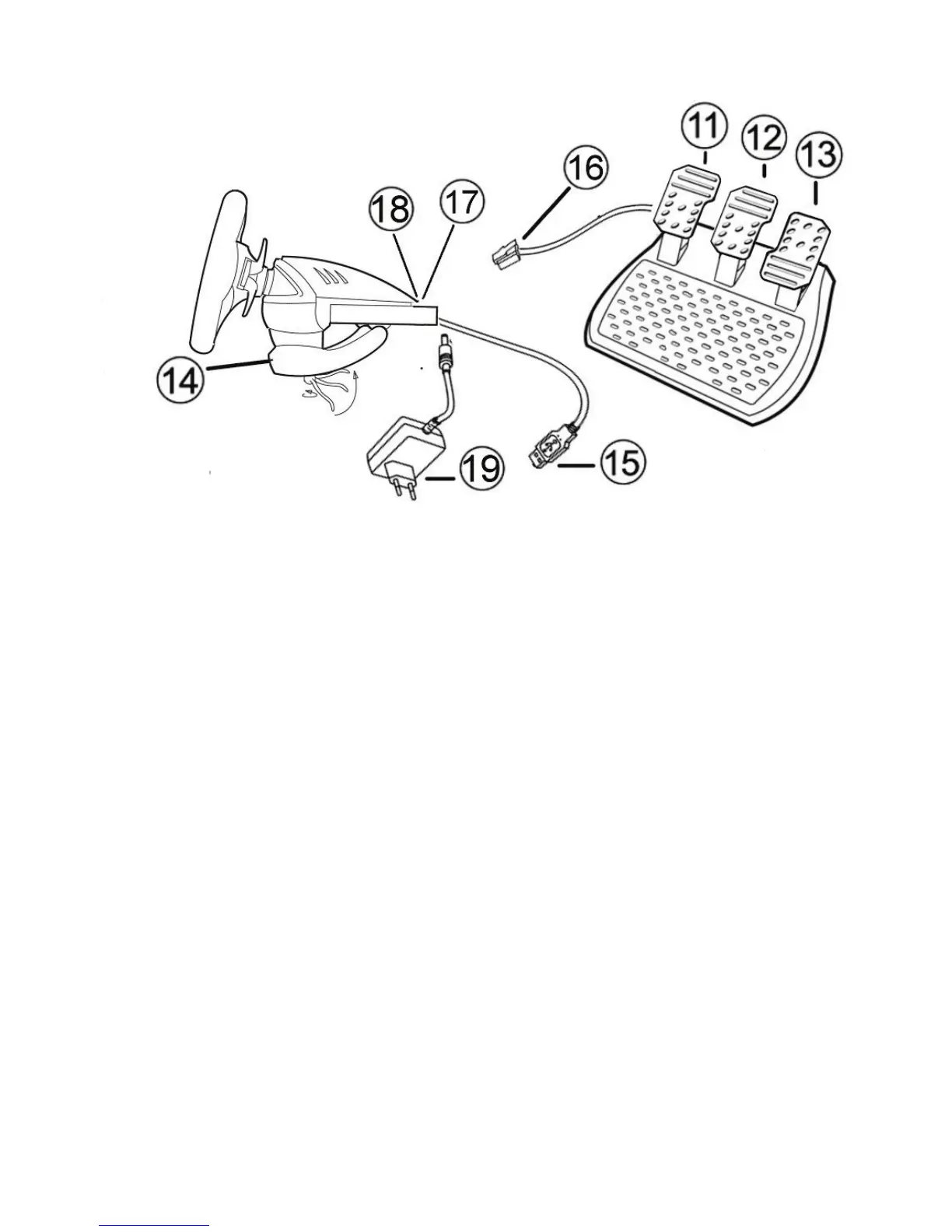
11 Axis 4: Progressive clutch pedal
12 Axis 3: Progressive brake pedal
13 Axis 2: Progressive gas pedal
14 Table clamp
15 USB PC connector
16 Pedal set cable (with switch)
17 2 RJ45 connectors for pedal set
18 Power adapter connector
19 Power adapter
INSTALLING THE WHEEL
Fixing the wheel in place
1. Place the wheel on a table or other flat surface.
2. Place the clamp screw in the table clamp (14) and then screw the clamping unit counter-clockwise into
the hole on the underside of the wheel until firmly fixed in place.

Table of Contents

Related product manuals