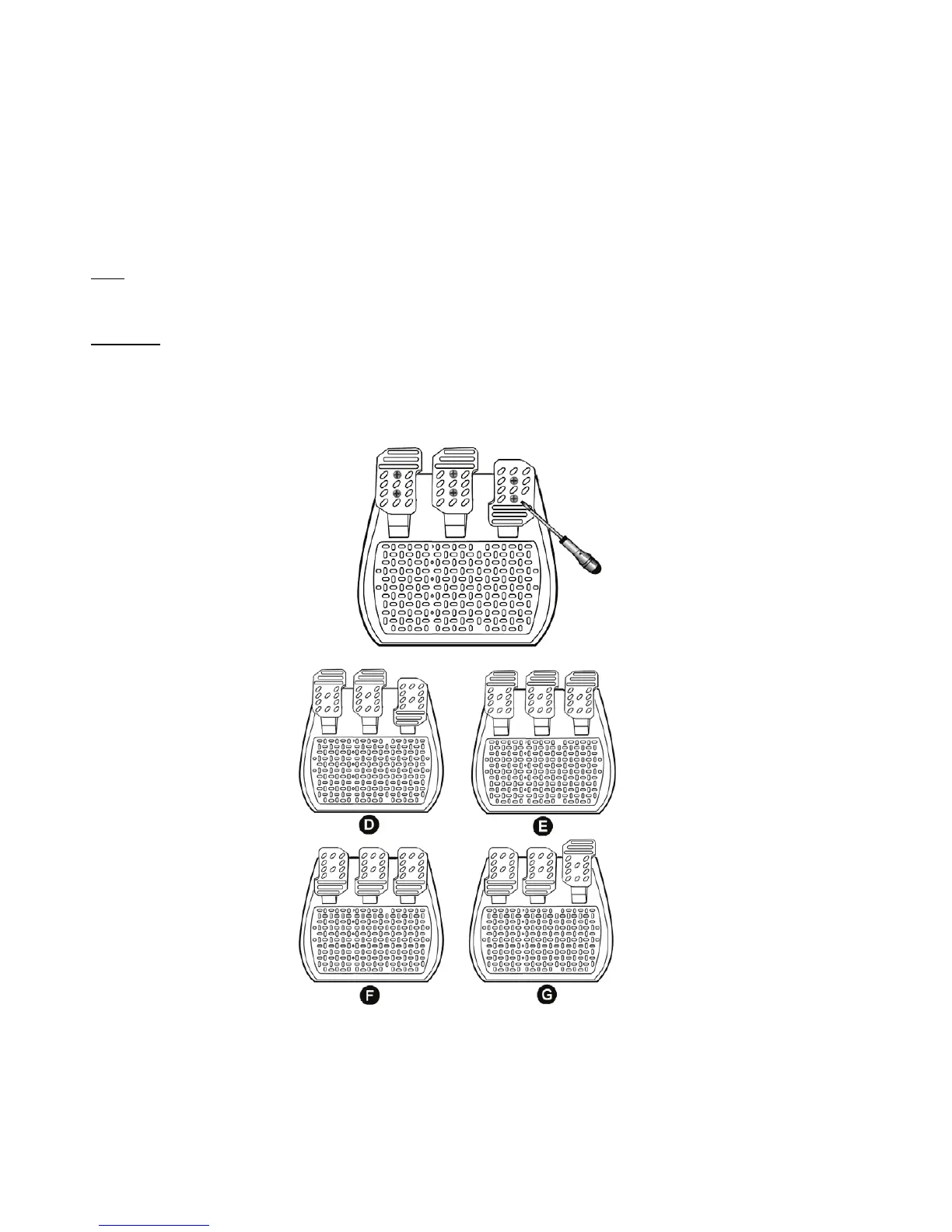
ADJUSTING THE PEDALS:
Each of the 3 aluminum pedals can be positioned to your liking in either a “Standard” or “Vertical” setting. This
adjustment allows you to adapt your pedal set not only to your style of driving (using “heel-and-toe style” or
not), but also to your seating position (“seat” or “cockpit “style).
1. Using a small screwdriver, unscrew the two screws (one short and one long) for the pedal you wish to
adjust.
2. Set the pedal into the position of your choice.
3. Replace the 2 screws.
Note: In the “Standard” position, place the large screw on the bottom; in the “Vertical” position, place the large
screw on top.
Examples: D = “Standard” gas / “Vertical” brake and clutch
E = “Vertical” gas, brake and clutch
F = “Standard” gas, brake and clutch
G = “Vertical” gas / “Standard” brake and clutch










 To Next Page