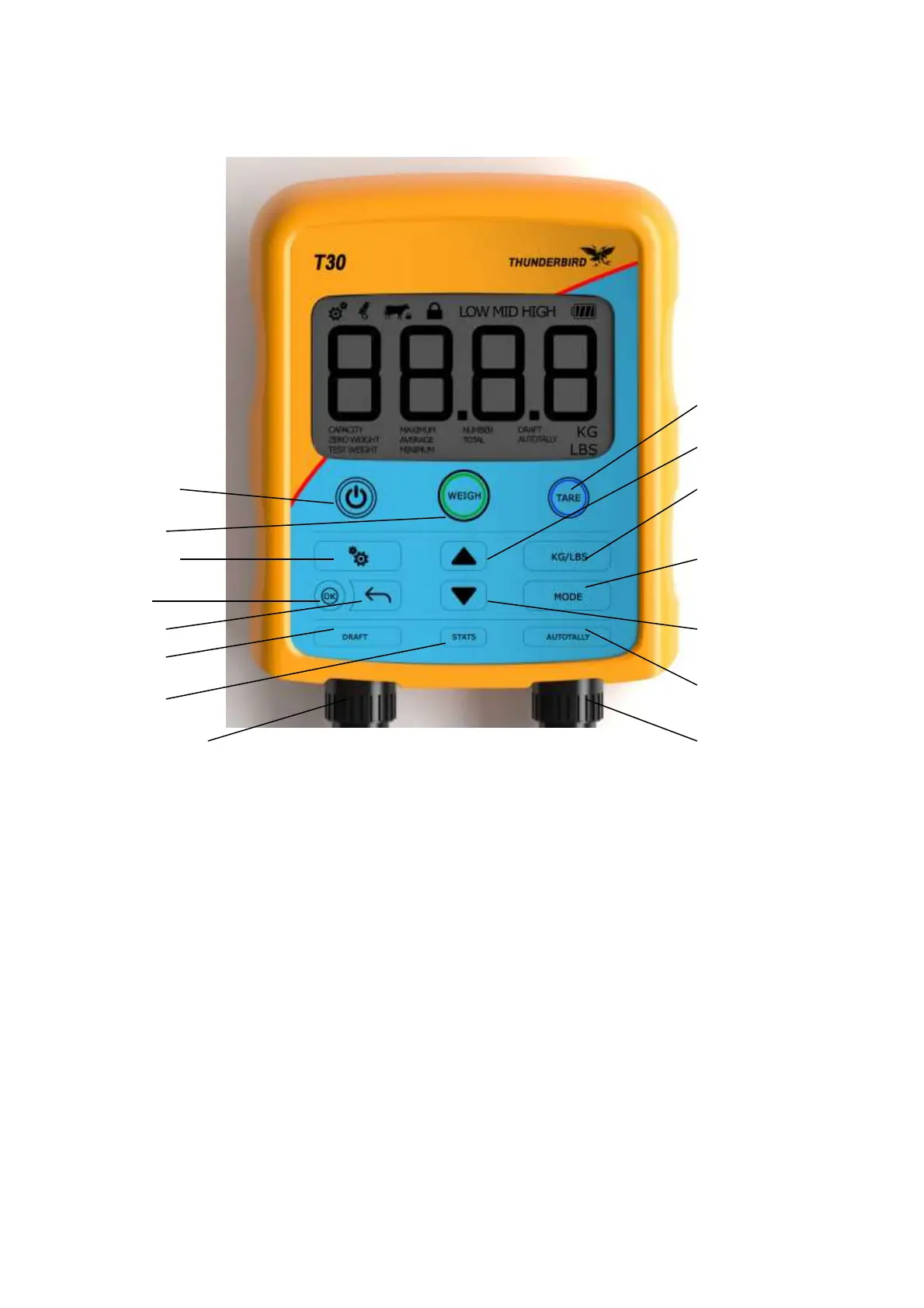
Operation
Tare
Up
On-Off Kg/lbs
Weigh
Settings Mode
OK
Back Down
Draft
Auto tally
Stats
Load cell 1 Load cell 2
The T30 has a water resistant 13 button keypad for a user interface. An extra large 40mm digit
display provides the user with the ability to view the weight at a distance. The display also has
other indications that are used at various times. All mode settings and changes are memorized at
the time of change, so that the indicator will return to the previous set up when it is turned on.
The T30 contains highly stable and sensitive circuitry, which is designed to improve accuracy.
Following is a description of each button and what it does:
Off/On
This button does what it says. There is no power drained from the batteries when the scale is
turned off.
When powering up, the indicator will display all relative segments for a short time, then the
firmware version number, and then a tare is performed automatically after a short delay. If there
was a weight on the load bars when the indicator was turned off, this weight is displayed if it
hasn’t changed, otherwise zero weight is displayed. The scale is then ready for weighing. This
means that no buttons need to be touched if the scale is used for weighing the same thing each
time.


 To Next Page
 Loading...