- 6 -
Controls and operation
22. USB-C Charging Socket
Allows you to charge the Thunderpole T-X from a standard USB Type C charging cable. Indicator LED (14) will
illuminate red whilst the battery is charging and go off to indicate when battery is fully charged. See page 7 for
more details on charging your radio.
23. Mounting Stud
Allows you to mount the radio on a standard microphone holder, such as the included adhesive holder.
Simply remove the belt clip (1) and screw the mounting stud into the back of the radio.
24. Vehicle Kit Interface
Allows you to attach the optional vehicle kit which powers (and charges) the radio from a 12v supply and allows
use of an external antenna. This will provide a much wider range when used inside a vehicle.
Please Note: The BNC Antenna (4) MUST be removed when using the vehicle kit.
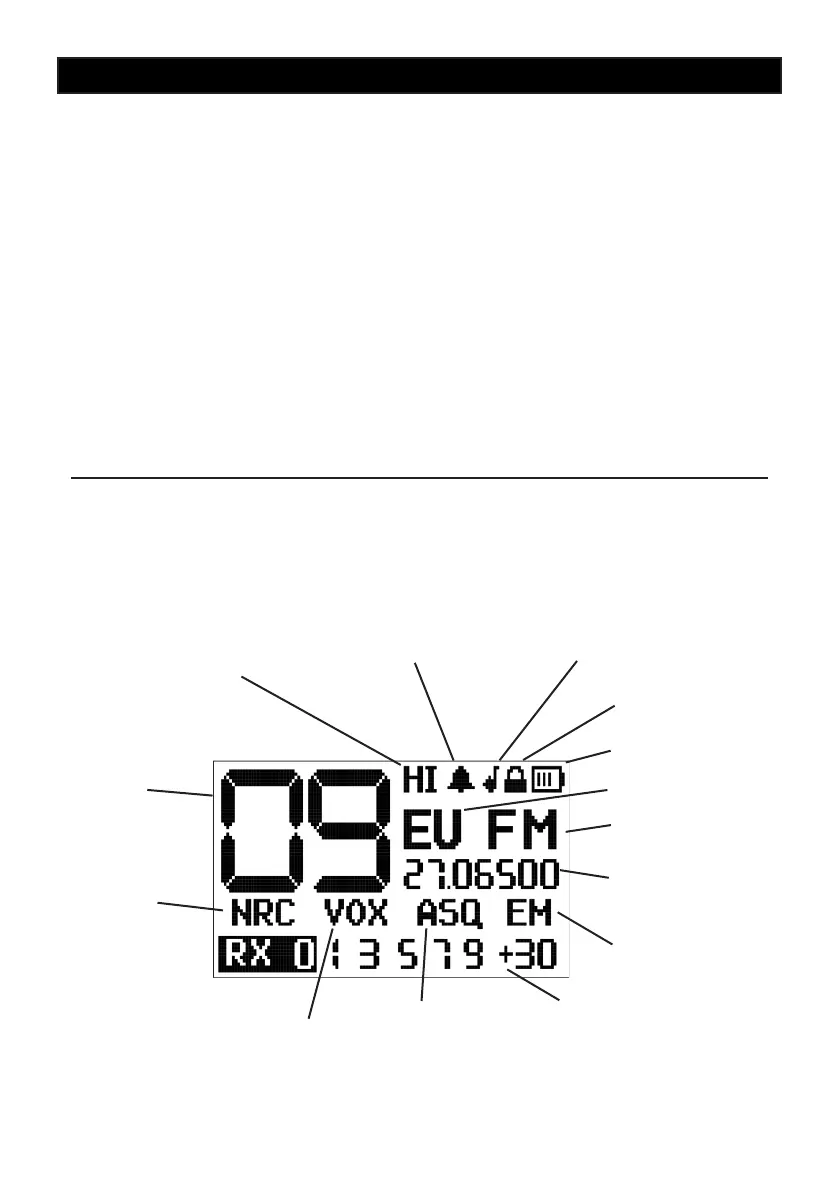
Channel
Number
High or Low
Power Output
Keypad Tone On
Noise
Reduction
Circuit
Roger Beep On
Keypad Lock On
Battery Level
Frequency Band
Modulation Type
RX/TX Frequency
Voice Activated TX
Squelch / Auto
Squelch / Monitor
Emergency
Channel On
RX Signal / TX
Power Meter
LCD Display


 To Next Page
 Loading...