EasyManua.ls Logo

TIDRADIO TD-H6 - User Manual

TIDRADIO TD-H6
11 pages
Print Icon
To Next Page IconTo Next Page
Loading...
1
TIDRADIO TD-H6 Programming Guide
INTRODUCTION
TIDRADIO TD-H6 is a dual-band (VHF, UHF) versatile amateur radio. It offers 128
channels, you can add or remove channels from scanning list and give channels
alphanumeric names via programming with a computer. With the enhanced
capabilities of the TD-H6 radio, this Programming Guide will help you get a quick
start to program the radio.
Contents
1. FTDI Cable Use Guide........................................................................................... 2
2.Radio Reading ........................................................................................................ 5
3.Channel Information ............................................................................................. 6
4.Optional Feature .................................................................................................... 7
1) Basic Setting ....................................................................................................................... 8
2) Channel Mode ................................................................................................................... 8
3) DTMF ........................................................................................................................... .......... 9
4) Frequency mode ................................................................................................................ 10
5) Backlight and FM Radio.................................................................................................... 11
5. Write and Save ....................................................................................................... 11
Question and Answer IconNeed help?

Do you have a question about the TIDRADIO TD-H6 and is the answer not in the manual?

Summary

1. FTDI Cable Use Guide

2. Radio Reading

3. Channel Information

4. Optional Feature

1) Basic Setting

Configure core radio settings like TOT, Squelch, VOX, Language, and Work Mode.

2) Channel Mode

Customize channel display settings for Channel A and Channel B.

3) DTMF

Configure DTMF settings including side tones, save modes, and PTT-ID.

4) Frequency mode

Set up frequency parameters, step, offset, and repeater settings for VFO mode.

5) Backlight and FM Radio

Adjust backlight, enable FM radio, and configure alarm and other radio functions.

5. Write and Save

Overview

The TIDRADIO TD-H6 is a versatile dual-band amateur radio, supporting both VHF (136-174MHz) and UHF (400-520MHz) frequencies. This radio offers 128 programmable channels, providing ample capacity for various communication needs. Users can customize their experience by adding or removing channels from the scanning list and assigning alphanumeric names to channels, which is facilitated through computer programming. The device is designed for ease of use, with a comprehensive programming guide to help users quickly get started with its enhanced capabilities.
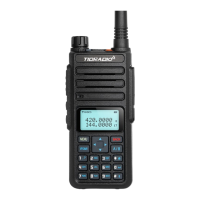
Technical Specifications and Features:

  • Frequency Bands: VHF (136-174MHz) and UHF (400-520MHz) for both receiving and transmitting.
  • Channels: 128 programmable channels.
  • Power Output: High (10W), Middle (5W), and Low (1W) settings, allowing users to adjust power based on communication range and battery conservation needs.
  • Channel Bandwidth: Supports both Wideband (25kHz) and Narrowband (12.5kHz) operations.
  • CTCSS/DCS: Features Receiving and Transmitting CTCSS/DCS (Continuous Tone-Coded Squelch System/Digital Coded Squelch) for selective calling and interference reduction. The specific codes are referenced in the manual's DCS and CTCSS tables.
  • PTT-ID: Offers various PTT-ID (Push-To-Talk ID) settings:
    • OFF: No code sent.
    • BOT (Beginning of Transmission): PTT button pressed to send code.
    • EOT (End of Transmission): PTT button released to send code.
    • BOTH: Code sent when PTT button is pressed and released.
    • The PTT-ID codes are sent during either the beginning or end of a transmission, depending on the setting.
  • Busy Channel Lockout (BCL): When enabled, prevents transmission on an occupied channel, emitting a beep tone instead. If disabled, the radio will transmit regardless of channel occupancy.
  • Scan Add: Allows users to include or exclude channels from the scan list.
  • Signal Code: Supports 1 to 15 DTMF codes, each up to 5 digits, programmable via software.
  • Channel Naming: Customizable alphanumeric channel names, up to 10 digits long, for easy identification.

Usage Features:

  • Programming Software: The radio is programmed using dedicated software available at walkietalkiesoftware.com. Users connect the radio to a computer via an FTDI cable.
  • FTDI Cable Compatibility: The device uses an FTDI cable for programming. The cable is designed for automatic driver installation on most computers. If automatic installation fails, drivers can be downloaded from bit.ly/driverfree.
  • Troubleshooting Connection Issues: If the radio fails to connect, users should check:
    • If the radio is turned on.
    • If the cable is fully inserted (a "double click" sound indicates proper insertion).
    • Applying slight pressure to hold the cable in place.
    • Dampening the cable pins for a solid contact.
  • Device Manager Check: For Windows users, verifying the FTDI cable's presence under "Ports (COM & LPT)" in Device Manager is crucial. A yellow warning triangle indicates a driver issue, requiring an update from ftdichip.com/Drivers/VCP.htm.
  • Radio Reading/Writing: The software allows users to "Read Data From Radio" to create a programming template and "Write Data To Radio" to save settings.
  • Time-Out Timer (TOT): Limits transmission time (15-600 seconds) to conserve battery and prevent interference from stuck PTT switches.
  • Squelch Level: Adjustable from 0-9, muting the speaker in the absence of a strong signal. Higher levels require stronger signals to unmute.
  • VOX (Voice Operated Transmit): Adjustable gain level (0-10) for hands-free transmission without pressing the PTT button.
  • Voice Switch: Toggles voice prompts on/off.
  • Language: Supports Chinese/English for menu display and voice prompts.
  • Auto Backlight: Adjustable display time (OFF/0-10 seconds) for the LCD backlight.
  • Work Mode: Supports VFO (Variable Frequency Oscillator) and Channel modes.
  • Channel Display Customization: Users can choose to display "CH + Name" (Channel Number and Name) or "CH + Freq" (Channel Number and Frequency) on Channel A/B.
  • DTMF Side Tone Settings:
    • OFF: No DTMF side tones heard.
    • KB Side Tone: Side tones heard only from manually keyed DTMF codes.
    • ANI Side Tone: Side tones heard only from automatically keyed DTMF codes.
    • KB ST+ANI ST: All DTMF side tones heard.
  • Save Mode: Selects sleep cycle ratios (Mode 1/Mode 2/Mode 3) to conserve battery, with higher numbers extending battery life but potentially causing missed initial words of transmissions.
  • Scan Mode:
    • TO (Time Operation): Scanning resumes after a fixed time.
    • CO (Carrier Operation): Scanning resumes after the signal disappears.
    • SE (Search Operation): Scanning does not resume.
  • PTT Delay: Adjustable from 0-30ms for signal code sending delay.
  • KB_Lock (Keypad Lock): When ON, the keypad locks after 8 seconds of inactivity and can be unlocked by pressing the [# О] key for 2 seconds.
  • Beep (Keypad Beep): Provides audible confirmation for key presses.
  • Frequency Mode Settings:
    • STEP: Selects frequency change increments in VFO/Frequency mode.
    • SFT_D (Shift Direction): Enables repeater access: OFF (simplex), [+] (TX higher than RX), [-] (TX lower than RX).
    • Offset: Specifies the difference between TX and RX frequencies.
  • Tail Noise Clear (RPT Noise Clear): Squelch tail elimination.
  • RPT Noise Detect (Trunk Tail Delay): Trunk tail delay.
  • FM Radio Enable: Activates the FM radio function.
  • Roger Beep: Sends an end-of-transmission tone to indicate to other stations that transmission has ended.
  • TX Under TDR Start: In Dual Watch mode, when enabled, priority returns to the selected display once the signal in the other display disappears.
  • TDR (Dual Watch Mode): Allows monitoring two channels simultaneously.

Maintenance Features:

  • Driver Updates: Users are advised to keep their FTDI drivers updated to avoid incompatibility issues, especially if a yellow warning triangle appears in Device Manager.
  • Support: For any issues with the TD-H6 radio or programming, users can contact support via walkietalkiesoftware.com.

TIDRADIO TD-H6 Specifications

General IconGeneral
BrandTIDRADIO
ModelTD-H6
CategoryRadio
LanguageEnglish

Related product manuals