4
HANDLING THE AIRCRAFT
Powering On / Off
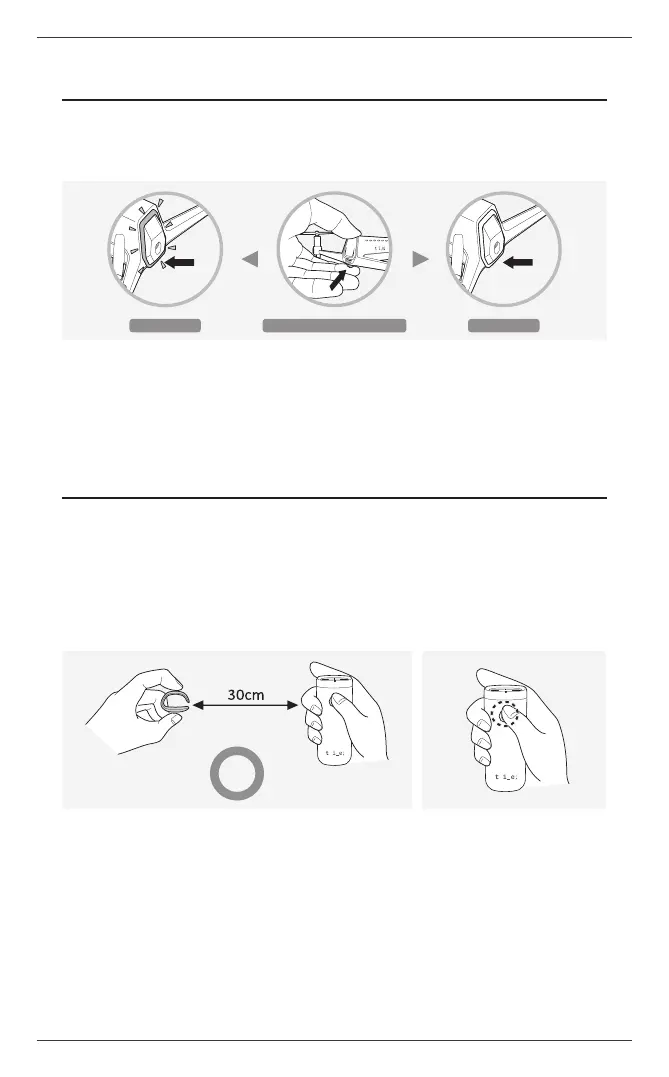
1. Press and hold the power button for two seconds and the aircraft will power on/off.
Powering on
Powering off
Long-press the power button
Charging Drone
Connect the aircraft to a USB port using the provided USB cable to begin charging.
a
A certied USB adapter rated at 5 V and 1.5 A is recommended for charging. Connecting to a PC may cause delayed
or unsuccessful charging.
HANDLING THE CONTROLLER
With every change in the place of ight, users are recommended to turn the controller off and on
again so that control sensitivity may be automatically recalibrated.
Powering On / Off
1. Before turning on, place the controller ring at least 30 cm (1.0 ft) away from the controller stick.
2. Press and hold the power button for at least two seconds to turn on the controller.
a
If automatic calibration is unsuccessful due to environmental factors, the controller gives a warning beep and powers
off automatically.
a
If the controller does not turn off properly, press the reset button on the bottom with a pin of appropriate thickness. Hold
the pin vertically not to damage to the controller.
Paring with Aircraft
When the aircraft and controller are ready for ight, they are automatically paired and the controller’s
LED indicator turns solid white.
a
If the LED indicator does not turn solid, the controller and aircraft have not been paired successfully. Turn off the aircraft
and controller, and turn on again.
ⓒ 2019. this is engineering Inc. All Rights Reserved.


 To Next Page