6
Flight Control
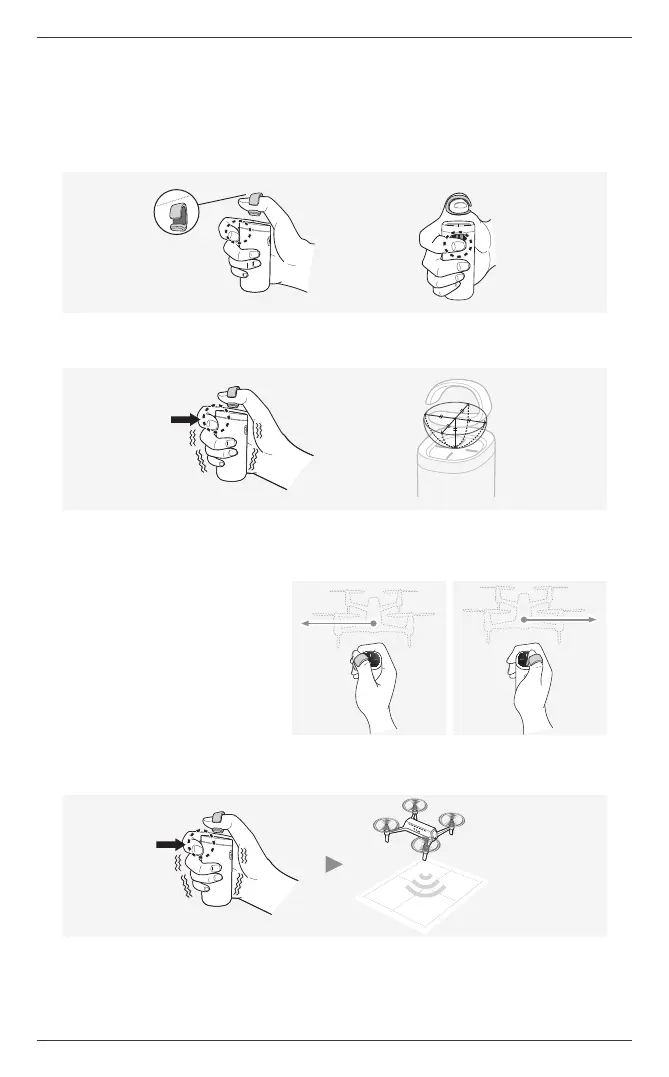
1. As shown in the gure, wear the ring on your left or right thumb with the thicker part facing
downward. Wrap your other ngers around the control stick, and place your index nger on the jog
button.
2. While the drone is hovering, press and hold the jog button to switch to ight mode. Ring control is
enabled after the controller vibrates once.
1cm
a
When switching to ight mode using the jog button, the center of the ring on your thumb should be within 1 cm (0.04 in)
around and above the center of the controller pad. If the ring is out of the range, the controller gives off a warning and
fails in switching to ight mode.
3. The drone ies proportionately to the
height and direction of the ring. Move
your ring-wearing thumb in the desired
direction of ight, and the drone will y
in the same direction.
a
Your thumb with the ring should be at an
adequate height above the controller pad to
allow better control over the flight altitude.
a
The degree of acceleration or deceleration
can be set proportionately to the distance moved by the ring.
4. When turning the head of the aircraft to the desired direction, turn the jog button accordingly.
ⓒ 2019. this is engineering Inc. All Rights Reserved.


 To Next Page