5
ⓒ 2019. this is engineering Inc. All Rights Reserved.
Charging Controller
Connect the controller’s USB port to a USB charger using the provided USB cable to begin charging.
a
A certied USB adapter rated at 5 V and 1.5 A is recommended for charging. Connecting to a PC may cause delayed
or unsuccessful charging.
CONTROLLING THE DRONE
Taking Off
1. Place the drone level, horizontal to the ground and headed in the direction you are headed, and pair
it with the controller.
2. Wear the control ring on your thumb, and wrap your hand gently around the control stick. For
details on wearing the control ring and using the control stick, read “Flight control.”
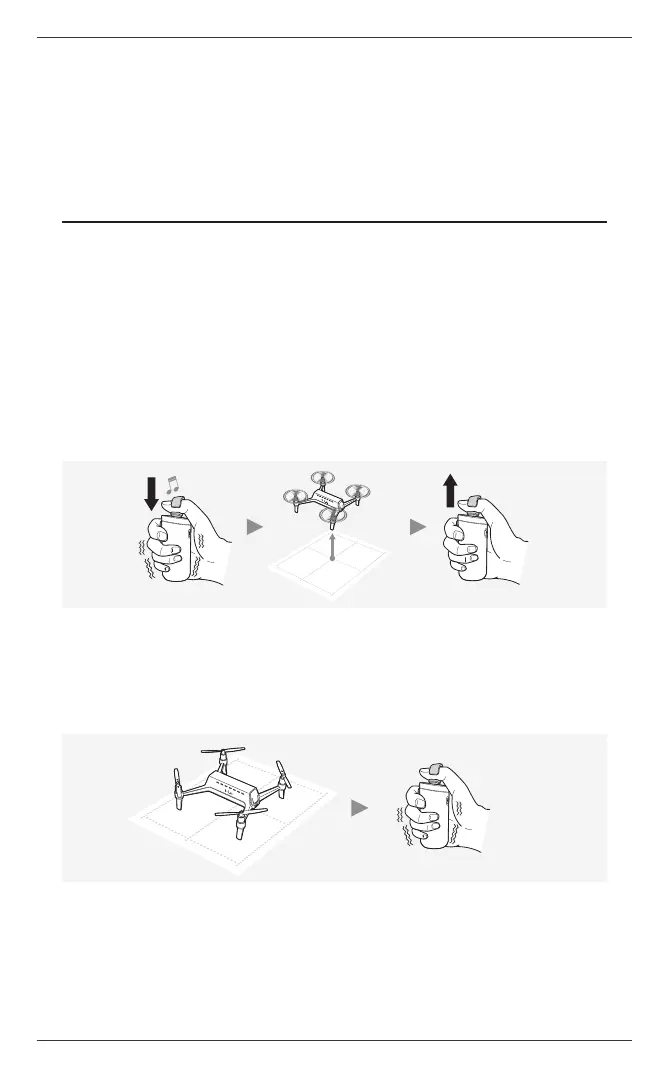
3. Touch the center of the control pad with the ring for over one second, and the drone will take off
while playing a takeoff melody. After takeoff, lift the ring off the pad.
4. When the drone succeeds in automatic takeoff, the front LED and power button LED on the drone
blink once, and the drone stands by while hovering at a height of 1 m (3.3 ft).
Landing
1. While the drone is hovering, touch the center of the pad with the ring for over one second to initiate
automatic landing. During landing, you cannot control the drone by moving the ring.
2. Once the drone comes to a complete stop, the controller vibrates and the motors stop
automatically.


 To Next Page