4
6. Setting the clock:
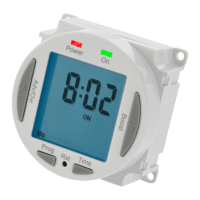
Press and hold down the Time
button for 3 seconds. The word hold
will show on the screen.
After 3 seconds, the screen will
show a year.
Use the Adv/Ovr or Boost buttons to
change the year to the correct year.
Press Time to set the year, and then the
month will show.
Use the Adv/Ovr or boost button to
adjust the month to the correct month.
Press Time to set the month, and then the day will show.
Use the Adv/Ovr or boost button to
adjust the day to the correct day.
Press Time to set the day, and then
the time will show, hours first.
Use the Adv/Ovr or boost button to
adjust the hour to the correct hour.
Press Time to set the hour, and then
the time will show the minutes.
The hour is a 24 hour clock.


 To Next Page