Need help?
Do you have a question about the Time Guard ZV700B and is the answer not in the manual?
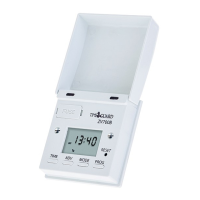
Details the ZV700B timer with its flap closed, highlighting components like the Output LED and Photosensor.
Lists the items included in the ZV700B package, such as the timer, fixing screws, spare fuse, and user manual.
Illustrates the ZV700B timer with its flap open, detailing the LCD display, buttons, and other controls.
Highlights features like battery backup, summer/winter changeover, and compatibility with low energy lighting, excluding LED/discharge.
Emphasizes professional installation, adherence to regulations, and switching off mains electricity before work.
Provides specific guidance for connecting ON/OFF and 2-way switches to the ZV700B terminals.
Explains battery charging, the initial display state after power restoration, and the mandatory reset before programming.
Guides users on enabling or disabling the automatic daylight saving (summer/winter changeover) function.
Details the step-by-step process for entering the correct year, month, and day using the device buttons.
Explains how to accurately set the current hour and minutes using the time adjustment controls.
Allows selection between 24hr, 5+2 day, or 7 day programming modes for setting ON/OFF times.
Details how to set the ON times for each programmed period using the 'Prog' button and other controls.
Guides on setting the OFF times for each programmed period, sequentially for ON/OFF pairs.
Explains how to correctly program ON/OFF times that span across midnight, including blanking end times.
Output is controlled by programmed times, indicated by 'A' on the display.
Output switches on based on programmed times and ambient light level drops.
Programmed times are used but may vary randomly by up to 30 minutes earlier or later.
Output is controlled directly by the 'Adv' button, bypassing programmed times.
The back light activates when a button is pressed and stays on for 30 seconds after the last press.
Details conformity to directives and the rated power loads for different lighting types.
Covers battery backup duration, ambient temperature range, operating voltage, and dusk start sensitivity.
Includes information on terminal suitability, fuse rating, back box requirements, and lighting type restrictions.
Outlines the 3-year guarantee, proof of purchase requirements, and shipping responsibilities for replacements.
Provides helpline numbers, email addresses, and postal addresses for product assistance and brochures.
 General
| Operating Voltage | 230V AC |
|---|---|
| Operating Temperature | -10°C to +40°C |
| Current Rating | 16A |
| Number of Channels | 1 |
| Timer Resolution | 1 minute |
| IP Rating | IP20 |
| Contact Rating (Resistive) | 16A |
| Mounting Type | Surface Mount |

 To Next Page