2. Installation and Commissioning
We recommend that this unit
be fitted by a qualified electrician.
Install in accordance to wiring
and current building regulations.
Please read the instructions carefully.
If in any doubt contact the
Timeguard helpline.
Switch off mains electricity.
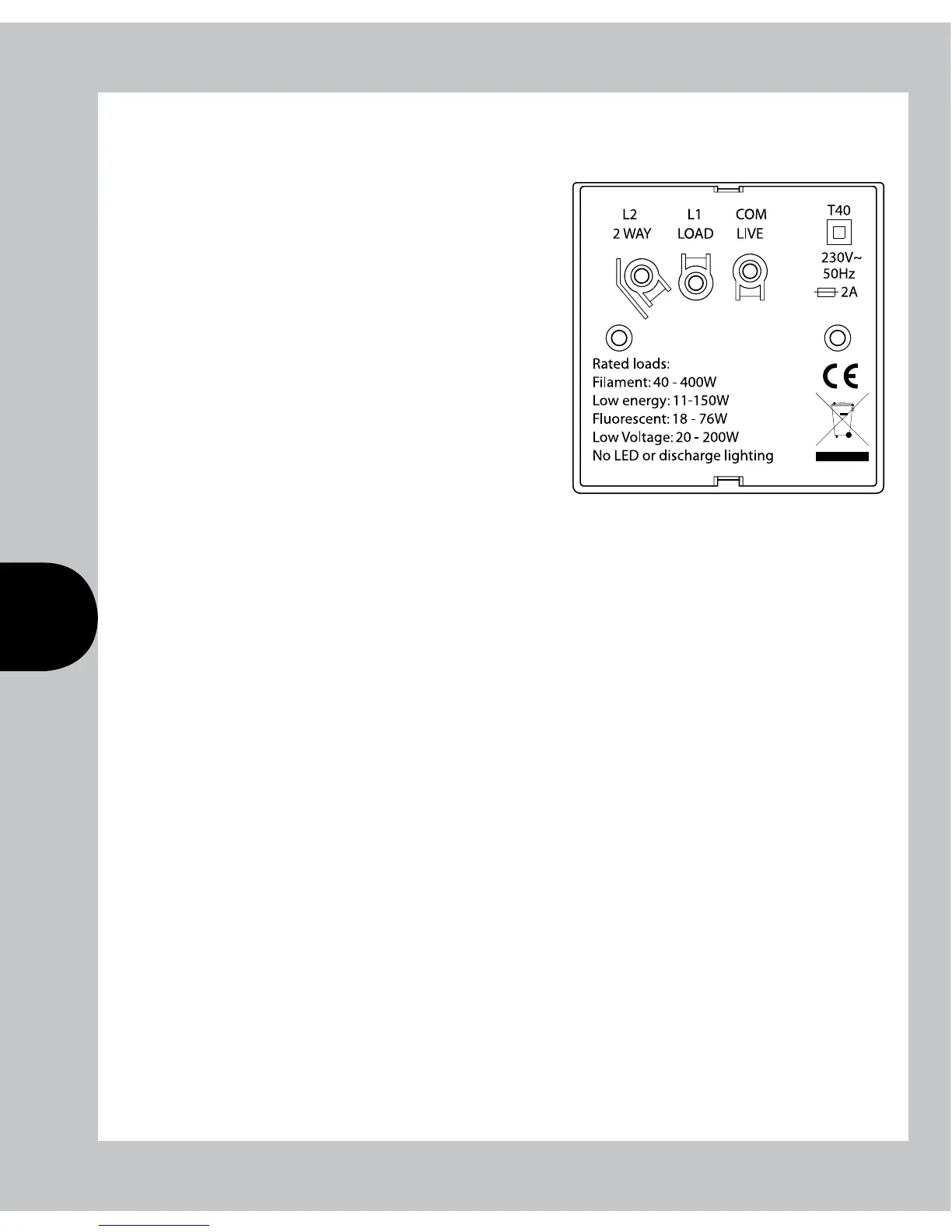
Remove the existing light switch, and transfer the wires to the ZV700B
according to the following instructions:
If the switch is an ON/OFF type, the supply wire should be inserted into the live
terminal (com), and the live out (L1) to the load terminal. Do not disturb any
earth wires connected to the wall box terminal.
If the switch is a 2-way switch, used in conjunction with a second light switch,
it will have 3 wires. In this case the wire originally connected to COM terminal
must be connected to the live terminal. The remaining two wires connect to the
Load (L1) and the 2 way (L2) terminals in either position.
If two wires are connected to any one terminal on the original switch,
these should be kept together and inserted into the corresponding single
terminal on the ZV700B.
Once mains power has been restored, the ZV700B will require its internal
battery to be charged before programming. Once it is charged sufficiently
(Approximately 4 hours), the display will show “––:––”
Reset must be pressed before commencing programming.


 To Next Page