Employee Attendance
Tracking System
Page 1
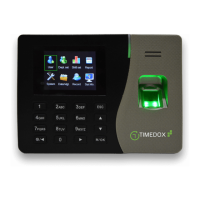
1. Time-Clock: Interface
Figure 1. Time-Clock
In this figure:
Navigates back to the previous menu.
Navigates up/down between menu options.
Press M/OK to activate a selection after navigation.
Press-and-hold to display the main menu.
Confirm a selected item after navigating using the arrow keys.
Press for one (1) second: Turns the time-clock On.
Press for three (3) seconds: Turns the time-clock Off.
If the main screen is displayed: Navigate to the left.
If a data-entering screen is displayed: A short click erases the
typed text.
Finger-print scanner surface.
Before using for the first time remove the protection sticker.
USB port. Connect the time-clock directly to the computer or
use a disk-on-key.
In addition, you may use a proximity card.


 To Next Page