手动模式
中文 English
100%
75%
50%
25%
Step 5: Set Language & Start
"02-Guest"
Language
"01-Host"
Language
Auto Mode Page
Ex. In Auto mode,choose the languages on the top of the page for
both Earphones.
Instr uct ions
What it means
Sleep Mode
Connect to App
Ready to use
Low battery
Upgrading
Charging
LED Indicator
No light
Green light flashing
Green light remain solid
Red light flashing /
remain solid
Blue light remain solid
White light remain solid
Charging
Earphones will automatically shutdown when putting back into charging case, charging
will begin when LED indicator flash white light. At full charge, white light will disappear.
It will take approximately 90 minutes for both charging case and the Earphones to be
fully charged.
LED indicator
Operational Teaching and Video
If you can't use WT2 products properly, you can find the instructions on the
settings page in the mobile App.
Following the instructions, you can find your answers to the questions and follow
the instructions to solve the problems and learn to use WT2 Plus.
We have also prepared operation teaching videos for you intimately.
You can scan two-dimensional codes or enter a Web site to access video links
and learn how to use WT2 Plus against the video.
YouTube
Video Links
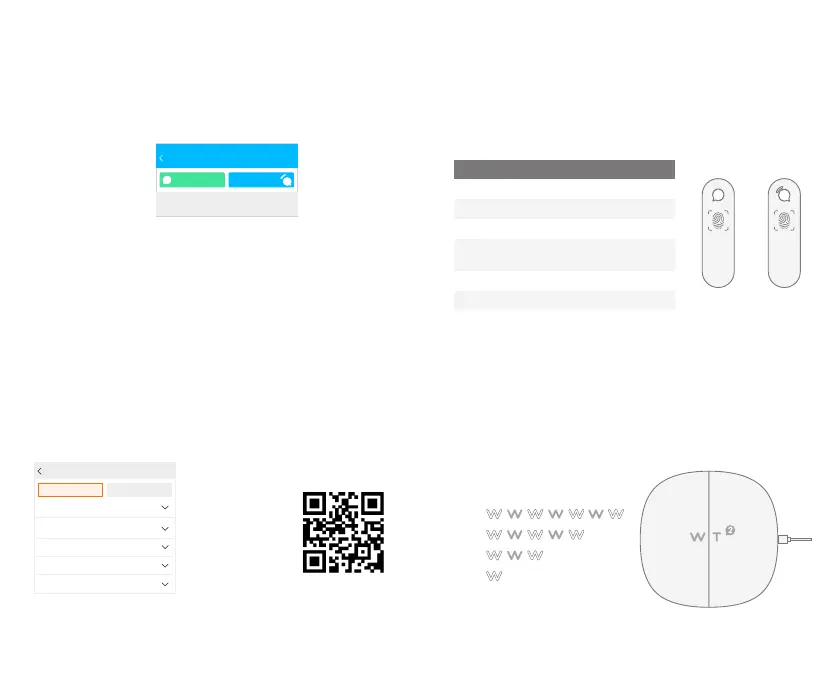
Charging and Indicator Lamp
We can know the current status of electricity from the flash mode of the charging box.
When the headset is put into the charging box, the WT flash 4 times, representing the
full power state, the rest of the state as shown in the figure below.
When the headset is put into the charging box, the WT has no flash, which means
that the battery is dead. Please plug in the Micro USB cable for charging.
Charging Case Battery Leve
Charging with
Micro USB Cable
01-Host
02-Guest
Skill s
Tro ubleshootin g
Q Why can't I hear the translator right away when
speaking?
Q Why does it take so long to translate?
Q Why is it that the words spoken by both sides
are not recognized while useing?
Q Why can't some accents and slang be translated
correctly?
Q How does the automatic mode work?


 To Next Page
 Loading...