TimerGPS+ QUICK GUIDE
Note! Device is
only splash-proof.
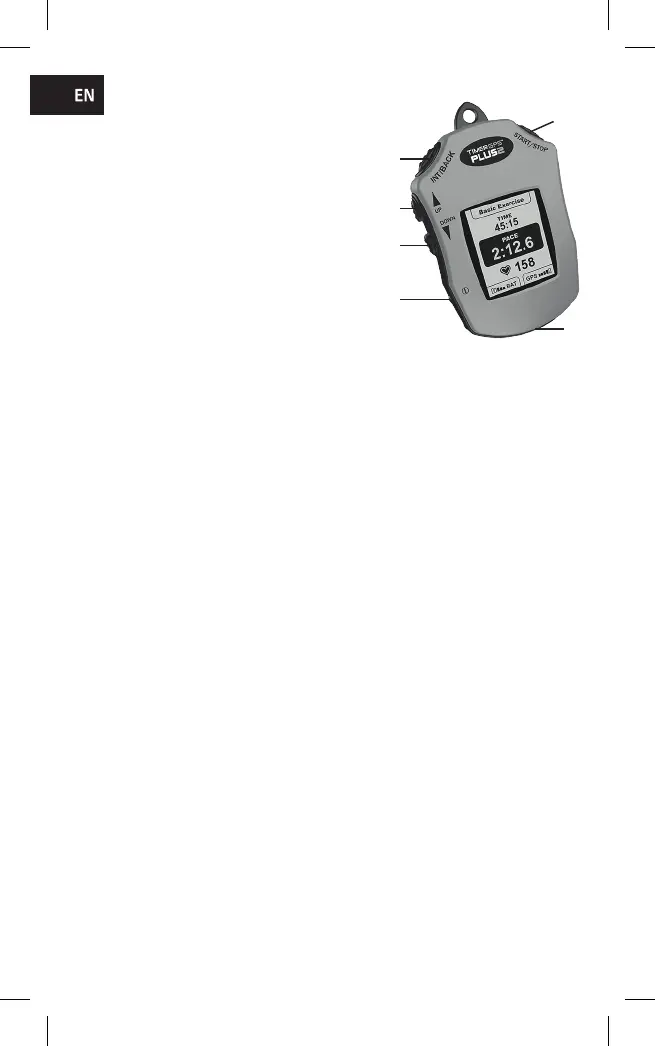
1: START/STOP -button. This button starts
basic exercise in start screen, and accepts
commands in menu.
2: INT/BACK -button. a. By pressing this
button during exercise, you can start a new
interval. Button is also used to return to the
previous screen. b. Interval: During exercise,
this button starts and stops the interval.
3/4: UP and DOWN button. a. With these buttons you can move within menus.
b. In exercise mode, you can select what features you want to be shown in the
screen with these buttons. c. For example with “DOWN” button, you can select
between distance, average speed, maximum heart rate or average heart rate to
be shown on the bottom of the screen.
5: Power button. You can power up or down the device by pressing this button
for 2 seconds. It is advised, no tools are to be used pressing these buttons, to
prevent device damage.
6:USB-port. This for device recharging and data transferring. Close the protec-
tive cover after use to prevent any possible moisture damage.
TimeGPS device exercise modes
TimerGPS device includes the following exercise modes:
Basic excercise. Basic training can be started and stopped by pressing ”START/
STOP” button.
Interval exercise. Interval exercise can be started and stopped during basic
exercise with ”INT/BACK” button. You can save as many intervals as you like.
Track exercise. With track exercise you can save your own tracks lap-times.
Select track exercise from the menu and press ”START/STOP” button at some
point on the track and the device will mark a virtual goal line to this point. Every
time you cross the goal line the device will show you your lap-time.
Race exercise. With race exercise you can simulate different race distances.
You can select between distances 1600 m, 2100 m, 2600 m and 3100 m.
Race exercise is started by pressing ”START/STOP” button, after which the race
simulation is automatic. The device will show you 1:500, 1:1000 etc. intervals
and the race results.
1
2
3
4
5
6



 To Next Page