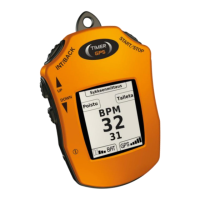
TimeGPS device heart rate features:
Heart Rate Girth. If you have Heart Rate Girth available, you can display the
heart rate by pressing UP or DOWN three times.
HR-Check. If you have HR-Check handle available, the heart rate will be auto-
matically shown after exercises while in the splash screen.
Starting the device for the first time
While starting the device for the first time, the device will ask you for the
default language to be used. Select the language by pressing UP or DOWN but-
tons. When you have selected your preferred language, press START/STOP once
button to lock your selection. After this, the device will ask you for your preferred
measuring unit. You can select it like the language, by pressing UP or DOWN and
locking it by pressing START/STOP button. After your language and measuring
unit has been selected, the device will restart itself. You can now power up the
device and input your horses name to the device. You can select different letters
by pressing UP or DOWN. INT/BACK button removes unwanted letters. When you
are ready, select
-symbol by pressing UP or DOWN and press START/STOP
button once. You are now ready to use your TimerGPS+device.
General information
For the device to work properly, you have to note a few things. Measuring of the
device is based on GPS tracking, so you have to be outside with direct visibility
to the sky. When you are in the splash-screen (You’ll see version number and
description) by pressing START/STOP, the device will begin searching for satel-
lites. Only after the device has found enough satellites for precise measuring,
it will enable the exercise mode. Time for finding satellites varies depending on
weather and position. The device will find satellites faster while not on the move.
Battery of the devices lasts up to several days depending on use. We recom-
mend recharging only when there is only a single block of charge left. To avoid
warranty void, you should recharge the device in a warm room temperature
place, so no moisture gets in to the device. To achieve best battery performance,
remove the device from the charger as soon as the battery is full. Recharging
takes from 4 to 5 hours.
You can download the complete user manual from our website:
www.timergps.com



 To Next Page