7
OPERATION
Using the Clock
Backlight Settings
This clock features an Indiglo
®
backlight that automatically detects low lighting
and illuminates the display in the dark. To select your backlight brightness
preference, use the Backlight Switch, located on the back of the clock, to select
between: HIGH, LOW, or OFF.
To conserve battery power or prevent the backlight from turning on, you may
choose the LOW or OFF setting for the backlight. The chart below displays
estimated battery life based on your backlight settings.
Note: The backlight MAY turn off at 2:00 AM and 3:00 AM to acquire the
atomic clock (RCC) signal.
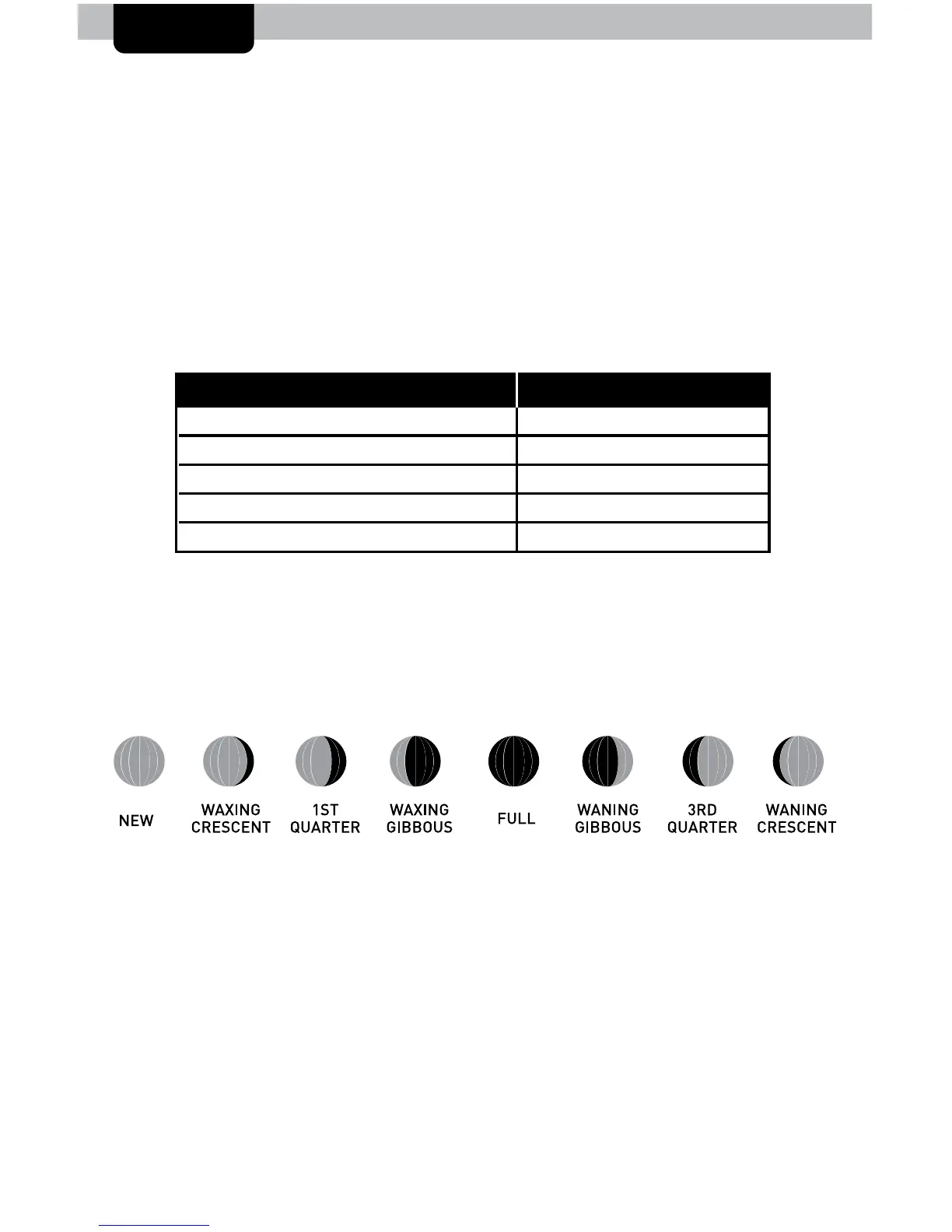
Moon Phase
Track the phases of the moon, conveyed through simple lunar phase icons.
Backlight OFF Approximately 3 years
LOW Backlight ON for 8 hours Approximately 1 year
LOW Backlight ON for 24 hours Approximately 3 months
HIGH Backlight ON for 8 hours Approximately 6 months
HIGH Backlight ON for 24 hours Approximately 1 month
Backlight Setting Battery Life


 To Next Page