
 Need help?
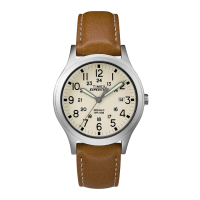
Do you have a question about the Timex Expedition Scout and is the answer not in the manual?
Instructions for starting a quartz watch by setting the crown.
Guide to starting and charging a solar-powered watch.
Steps for starting and winding a hand-wind watch.
Details water resistance depths and corresponding pressure ratings.
Precautions to maintain water resistance and avoid damage.
Procedure to set the correct time on date models.
Procedure to set the correct day on date models.
Instructions for using the QuickDate® setting feature.
Steps to set the time on day/date models.
Steps to set the date on day/date models.
This document describes a range of Timex watches, covering their basic functions, setting procedures, and maintenance.
To start a quartz watch, remove the plastic guard from under the crown and press the crown in against the case. The second hand will then begin to move in one-second intervals. For some deep-depth water-resistant watches, the setting crown needs to be screwed in to ensure water-resistance. To screw in the crown, push it firmly against the threaded protrusion and turn it clockwise until tight. To set the watch again, the crown must first be unscrewed counter-clockwise.
Solar watches feature a solar cell that charges an internal battery. To charge the battery, expose the watch to direct sunlight, sunlight through a window, or artificial indoor lighting. Once fully charged, the watch can operate for up to two months without additional charging. To start a solar watch, remove the plastic guard from under the crown and press the crown in against the case, initiating one-second interval movement of the second hand. Charging is faster in direct sunlight and slower indoors. A depleted battery may require several days of sunlight exposure to fully charge. It's important to wear the watch so that the dial is not covered, which would impede charging. Store the watch where it will be exposed to light to prevent the battery from running down. Leaving the watch in direct sunlight or near a lamp for extended periods can cause it to become hot, so handle with care. If the rechargeable battery becomes unable to fully charge after many years, it can be replaced with a new one of the same type.
To start a hand-wind watch, remove the plastic guard from under the crown, set the time and date (if applicable), and then press the crown in against the case. Slowly turn the crown clockwise until resistance is felt, and the watch should begin ticking with the second hand moving. If the watch stops within 24 hours, increase the number of clockwise turns during winding until it operates for a full 24-hour period. The watch should be wound at approximately the same time each day to ensure continuous operation. If it stops, follow the setting and winding instructions to restart it.
If a watch is water-resistant, it will have a meter marking or an icon indicating its resistance level. To maintain water-resistance, avoid pressing any buttons or pulling out the crown while underwater, unless the watch is specifically rated for 200 meters water-resistance. Water-resistance is maintained only as long as the lens, push buttons, and case remain intact. These watches are not designed for diving and should not be used for such activities. After exposure to salt water, rinse the watch with fresh water. Shock-resistance is indicated on the watch face or caseback, meaning the watches are designed to pass ISO tests for shock-resistance. However, care should still be taken to avoid damaging the crystal or lens.
The INDIGLO® night-light can be activated by pressing a button or the crown. This electroluminescent technology illuminates the entire watch face, making it visible in low light conditions or at night.
To set the time, pull the crown all the way out and turn it to the correct time. Then, push the crown back in to restart the watch. For screw-in setting crowns, push the crown in while turning it clockwise to tighten. For watches with a date display, ensure the correct time of day (A.M. or P.M.) is set for proper date function.
To set the day, pull the crown to the "middle" position and turn it clockwise until the correct day appears. If the day does not change, pull the crown to the "out" position and turn it clockwise or counter-clockwise through the necessary number of 24-hour periods until the correct day appears.
To set the date using the Quickdate® feature with a 3-position crown, pull the crown to the "Middle" position and turn it clockwise or counter-clockwise until the correct date appears.
To set the date using the Quickdate® feature with a 2-position crown, pull the crown to the "OUT" position and turn it clockwise until the date changes. Repeat until the correct date appears. Adjust the date when the month has fewer than 31 days. Push the crown in when finished. Caution: Wearing or storing the watch with the crown in the "middle" position can damage the movement. Always return the crown to the normal position, or if you wish to save battery life while storing the watch, leave the crown in the "out" position.
The date function advances between 10 PM and 2 AM. Avoid setting the date during this timeframe to prevent damage. To Set the Time: Pull the crown out to the "C" position, turn it either way to the correct time, and push the crown in to the "A" position. To Set the Date: Pull the crown out to the "B" position, turn it either way to the correct date, and push the crown in to the "A" position. To Set the Day: Pull the crown out to the "C" position, turn it either way for a full 24-hour cycle to set the day, and push the crown in to the "A" position.
If your watch has a bilingual day display, you can select the desired language. Pull the crown out to the "C" position. Repeatedly move the time back to 11 PM and forward to 4 AM until the current day is displayed in the desired language. Then, push the crown in to the "A" position.
If your watch has a GMT function, you can set the 4th center hand to display a second time zone. Pull the crown out to the "B" position. Turn the crown clockwise to set the correct date. Turn the crown counter-clockwise to set the correct 4th hand position for the second time zone you are tracking. Then, push the crown in to the "A" position.
To Set Time: Pull the crown all the way out and turn to the correct time. Push the crown in to restart. For screw-in setting crowns, push the crown in while turning it clockwise to tighten. To Set "Moon Phase" Feature: Pull the crown to the "Middle" position (B) and turn it clockwise or counter-clockwise until the correct moon phase appears. Caution: Wearing or storing the watch with the crown in the "middle" position can damage the movement. Always return the crown to the normal position, or if you wish to save battery life while storing the watch, leave the crown in the "out" position.
This feature includes an hour marker, an alarm set turning ring, a minute marker, and a timekeeping/INDIGLO® night-light crown. Pushing the timekeeping crown activates the INDIGLO® night-light. The alarm crown is pulled "out" to activate the alarm.
From the "A" position, push the timekeeping crown in (towards the watch case) to activate the INDIGLO® Night-Light and illuminate the watch dial.
To Set the Date: With the timekeeping crown in the "B" position, turn the timekeeping crown or turning ring in either direction to set the date. To Set the Time: With the timekeeping crown in the "C" position, turn the timekeeping crown or turning ring in either direction to set the time.
Your easy set alarm watch is equipped with two types of alarms:
With the alarm crown in the "D" position, turn the alarm crown or turning ring in either direction to set the hour and minute alarm markers. To activate the alarm to ring or vibrate at the desired time, pull the alarm crown out to the "E" position. A single beep sound and flash, or a vibration, will indicate that the 12-Hour Alarm is activated. The alarm will sound and the dial will flash or vibrate at the desired time (hour and minute) and will repeat every twelve hours unless the alarm is deactivated. Note: The alarm is deactivated when the alarm crown is in the "D" position. If the alarm is not deactivated, it will automatically stop ringing after 20 beeps and flashes or stop vibrating, and will resume in 12 hours at the indicated time.
With the alarm crown in the "D" position, turn the alarm crown or turning ring in either direction to set the minute alarm marker. To activate the alarm to ring or vibrate at the desired minute, pull the alarm crown out to the "F" position. Three beeps sound and flash, or a vibration, indicates the Hourly Alarm is activated. The alarm will sound and the dial will flash or vibrate at the desired minute and will repeat every hour on the specified minute unless the alarm is deactivated. Note: The alarm is deactivated when the alarm crown is in the "D" position. If the alarm is not deactivated, it will automatically stop ringing after 20 beeps and flashes or stop vibrating, and will resume again in one hour at the indicated minute.
Your Perpetual Calendar watch accurately tracks the number of days in each month and adjusts for leap years. The date (including month and year) is preset at the factory to Eastern Standard Time, Greenwich Mean Time, or Hong Kong Standard Time, depending on where you purchased your watch. You only need to adjust the time. To Set Time: Simply pull the crown all the way out and turn it. Day and date change automatically when time is adjusted past midnight; there is no additional step for setting day or date. Push the crown in when done. After setting, if the date changes at noon, the time needs to be adjusted ahead or back by 12 hours. If the crown is accidentally put in the MIDDLE position and turned, the date display will change temporarily, but the date setting is unaffected. Simply pull the crown all the way out and set the time. Proper date display will resume.
If the battery needs to be changed, Timex recommends that only Timex replace it. Your watch will need to be recalibrated to correct time and date after changing the battery. To return your watch to Timex, visit the retailer where you purchased your watch or go to the provided website for information on contacting Timex. Shipping and handling charges apply. Never include a special watchband or any other article of personal value in your shipment.
If your watch has a rotatable outer ring on the face with numbers corresponding to minutes, you can use this Elapsed Time Ring to time an activity from the start, or to mark the ending time for the duration of an activity. To Time an Activity from the Start: Set the Start/Stop triangle at the time (hour or minute) when you start the activity. At completion, you can see how long the activity took. To Measure the Time Remaining: Set the triangle to the hour or minute position when you wish to complete the activity, and check the watch periodically for progress towards that goal. In the illustration shown on the previous page on the right, you can stop when the minute hand reaches the 20 minutes past the hour position.
The tachymeter feature can be used to measure speed in miles per hour (MPH), nautical miles per hour (knots), or kilometers per hour (KPH) using the sweep second hand and the scale on the wall above the watch face. You need to know the actual distance you are covering in miles or km. Start the chronograph with the second hand at zero (the twelve o'clock position). Within the first minute, the second hand will point to the rate for a one-mile (or one kilometer) course: if it takes 45 seconds, the hand will point to 80 at that position - 80 MPH or 80 KPH. If within the first minute, a distance greater than one mile or kilometer is covered, multiply the tachymeter number by the distance to get the actual rate: if you went 1.2 miles in 45 seconds, multiply the 80 by 1.2 - 96 MPH.
If your watch is equipped with a movable ring around the dial marked at the letters "N", "E", "W", "S" (for the four compass directions) or compass degrees, you can use this feature to find an approximate compass directional reading. Lay the watch on a flat surface, or hold it so that the face is parallel to the ground. Locate the sun and point the hour hand at the sun. In the A.M., rotate the ring until the "S" (south) marker is halfway between the hour hand and 12:00 (after the hour hand or within the shortest distance between the hour hand and 12:00). In the P.M., rotate the ring until "S" is before the hour hand and halfway between the hour hand and 12:00.
Sliding Clasp Bracelet: Open the locking plate. Move the clasp to the desired bracelet length. Exert pressure while holding the locking plate and slide the clasp back and forth until it engages in grooves on the underside of the bracelet. Press the locking plate down until it snaps closed. The clasp can be damaged if excessive force is used. Foldover Clasp Bracelet: Find the spring bar that connects the bracelet to the clasp. Using a pointed tool, push in the spring bar and gently twist the bracelet to disengage. Determine your wrist size, then insert the spring bar into the correct bottom hole. Push down on the spring bar, align it with the top hole, and release it to lock in place.
Removing Links: Place the bracelet upright and insert a pointed tool into the opening of the link. Push the pin forcefully in the direction of the arrow until the link is detached (pins are designed to be difficult to remove). Repeat until the desired number of links are removed. Re-assembly: Rejoin the bracelet parts. Push the pin back into the link in the opposite direction of the arrow. Press the pin down securely into the bracelet until it is flush.
Timex strongly recommends that a retailer or jeweler replace the battery. The battery type is indicated on the watch back. If present, push/short the internal reset switch after replacing the battery. Battery life estimates are based on certain assumptions regarding usage; battery life may vary depending on actual usage. Do not dispose of the battery in fire. Do not recharge. Keep loose batteries away from children.
 General
| Shockproof | - |
|---|---|
| Waterproof | Yes |
| Chronograph | No |
| Mechanism type | Quartz |
| Watch dial type | Analog dial |
| Gender | Male |
| Case shape | Round |
| Band material | Leather |
| Watch glass type | Mineral |
| Watch marker style | Arabic numerals |
| Watch case material | Brass |
 Weight and Dimensions
| Height | 11 mm |
|---|---|
| Band width | 20 mm |







 To Next Page