Need help?
Do you have a question about the Timex T110 and is the answer not in the manual?
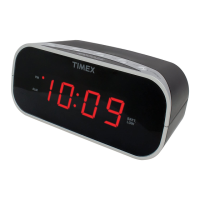
Identifies and labels the various buttons and switches on the alarm clock for user interaction.
Explains the meaning of indicators like PM, Alarm Icon, and Battery Backup on the clock display.
Step-by-step guide on how to open the compartment and insert a 9-Volt battery for backup power.
Describes the location and function of the LED that indicates battery status.
Advice on placing the unit, protecting furniture, and cleaning the clock casing.
Instructions on how to set the current time and the alarm time using the clock's buttons.
Explains how to adjust the alarm buzzer volume using the Loudness Switch.
Steps to turn the alarm on, off, and reset it for the next day, including snooze function.
Instructions on using the Dimmer Switch to select high or low brightness for the display.
Cautions regarding electric shock, fire risks, and proper plug usage for user safety.
Describes the meaning of the lightning flash and exclamation point symbols used for safety alerts.
Safety guidelines covering water, ventilation, heat, power sources, cord protection, overloading, cleaning, and object entry.
Instructions on identifying damage requiring professional service and limitations on user servicing.
Details the warranty period, defect coverage, service procedures, and required documentation for returns.
Outlines warranty claim limitations, geographical validity, and consumer rights.
 General
| Brand | Timex |
|---|---|
| Model | T110 |
| Category | Alarm Clock |
| Language | English |

 To Next Page