13
11. INITIAL SETUP
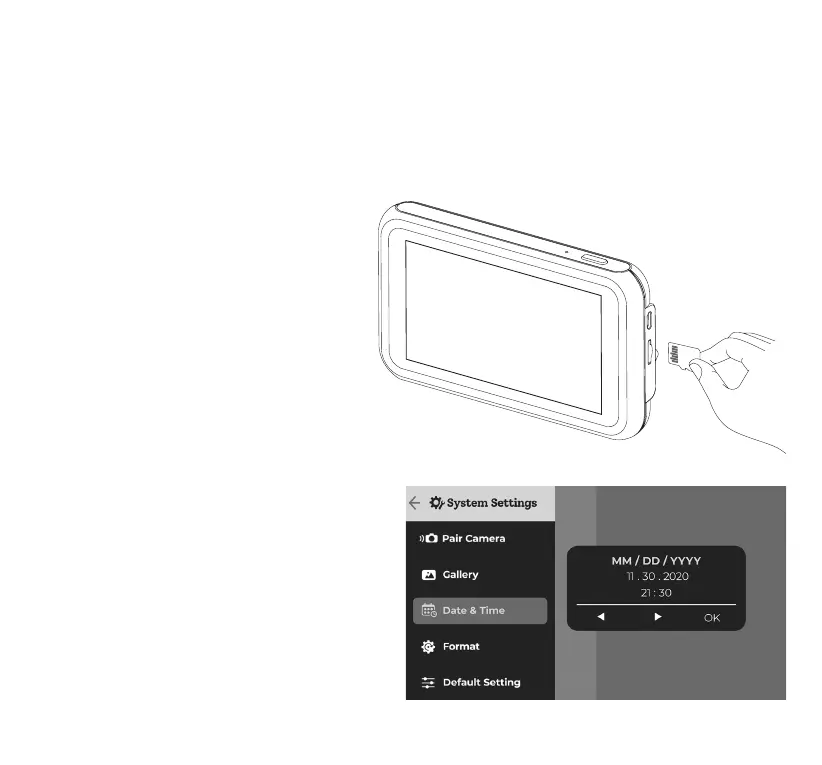
MicroSD Card (Pre-installed)
NOTE: If you use your own MicroSD card
please insert it into the Monitor and use the
format function under the system settings
page (refer to page 16) before rst use. DO
NOT format the MicroSD card using other
devices.
The default settings have been carefully selected
to allow you to use your Baby Monitor without
the need to change any settings. However, you
should set the date and time during your rst
time using the Baby Monitor as this will affect
the time stamp on all recorded media les.
To set the date and time, go to System Settings
> Date & Time.
Usage Precautions
Many vehicles provide constant power to the 12/24V outlet. If your outlet provides constant power, please
remember to unplug the LCD Touch Screen Monitor and Camera when not in use to avoid draining of the
vehicle’s battery.


 To Next Page