8
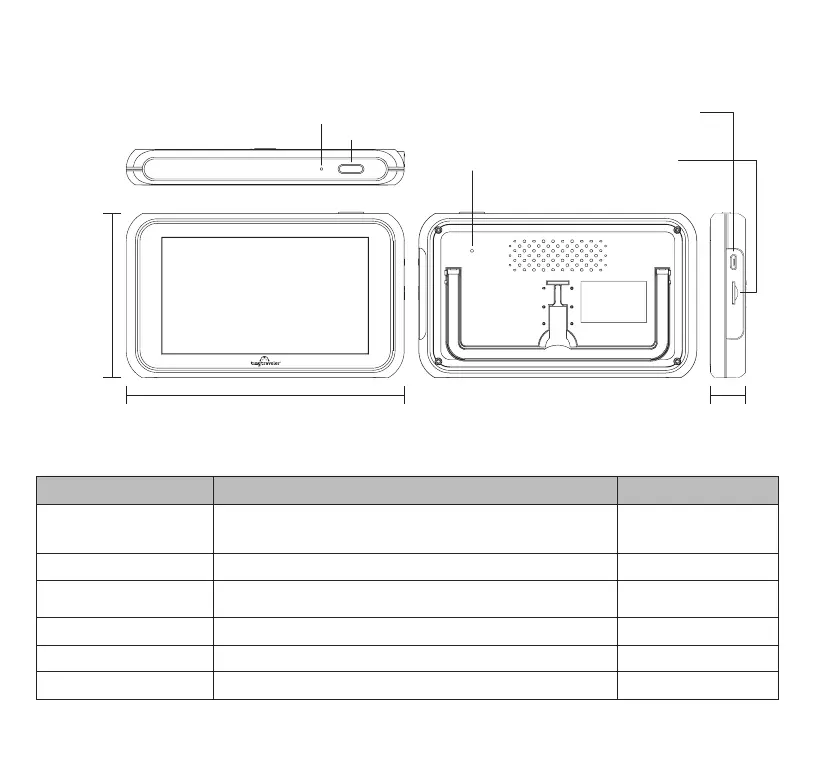
5” Touch Screen LCD Monitor
5.86” / 149 mm
3.46”
/ 88 mm
Power /
Screen Save Button
Reset Hole
Micro USB Input
(DC 5V)
Micro SD Slot
LED Indicator
0.74” / 19 mm
Power / Mode Status 5” Touch Screen Monitor Camera
Power On Blue LED light stays on. Monitor powers on when the engine is turned
on. Alternatively, press and hold the power button for more than 2
seconds to power on the Monitor.
Blue LED light stays on.
Low Voltage Indication Red LED light ashes. N/A
Power Off LED light is off. Press and hold the power button for more than 2 seconds
to power off the Monitor.
LED light is off.
Screen Save Mode Blue LED light stays on. Blue LED light stays on.
Pairing Mode Blue LED light stays on. Blue LED light ashes.
Charging Red LED light stays on and then turns off when fully charged. N/A
6. TINY TRAVELER™ MONITOR & CAMERA LED INDICATORS


 To Next Page