Page 9;&(%$*4.8"4,7%<'*#$"&8#=%/7*,#*%4,77%>?@@@?@AA?BCDC1Item 58058
EF;6GHIJ6KFGLIMNFLMG6MFMO6 EJ6OL;LOFGLIME
N,"8$*8,84*
GI%JK6!6MG%E6KLI\E%LM_\KH%;KIN%GIIS%;FLS\K6-%%T&%8&$%'#*%9,5,3*9%*<'"/5*8$1%%
L2%9,5,3*%&(%,+8&(5,7%&/*(,$"&8%&44'(#=%.,X*%$.*%/(&+7*5%4&((*4$*9%+*2&(*%2'($.*(%'#*1
R6;IK6%6FOZ%\E6=%"8#/*4$%$.*%3*8*(,7%4&89"$"&8%&2%$.*%$&&71%%O.*4V%2&(%7&&#*%
.,(9),(*=%5"#,7"385*8$%&(%+"89"83%&2%5&X"83%/,($#=%4(,4V*9%&(%+(&V*8%/,($#=%9,5,3*9%
*7*4$("4,7%)"("83=%,89%,8U%&$.*(%4&89"$"&8%$.,$%5,U%,22*4$%"$#%#,2*%&/*(,$"&81
M&$*- Replace the Lens Cover(s) if they are cracked, scratched, soiled, pitted or damaged in any way. For
additional information regarding the parts listed in the following pages, refer to Parts List and Diagram on page 11.
I'$*(%S*8#%K*/7,4*5*8$%
1. Remove the Lens Frame from the Helmet Shell.
Once the Lens Frame is removed, remove
the Outer Lens from the Helmet Shell.
2. Remove any protective film from both
sides of the new Lens Cover.
3. Install new Front Lens Cover into Gasket and
assemble Lens, Gasket, and Lens Holder into
Shell the same way they were removed.
MIGLO6- Front lens must be in place during
welding. Weld spatter will permanently damage
Auto-Darkening Filter and voids warranty.
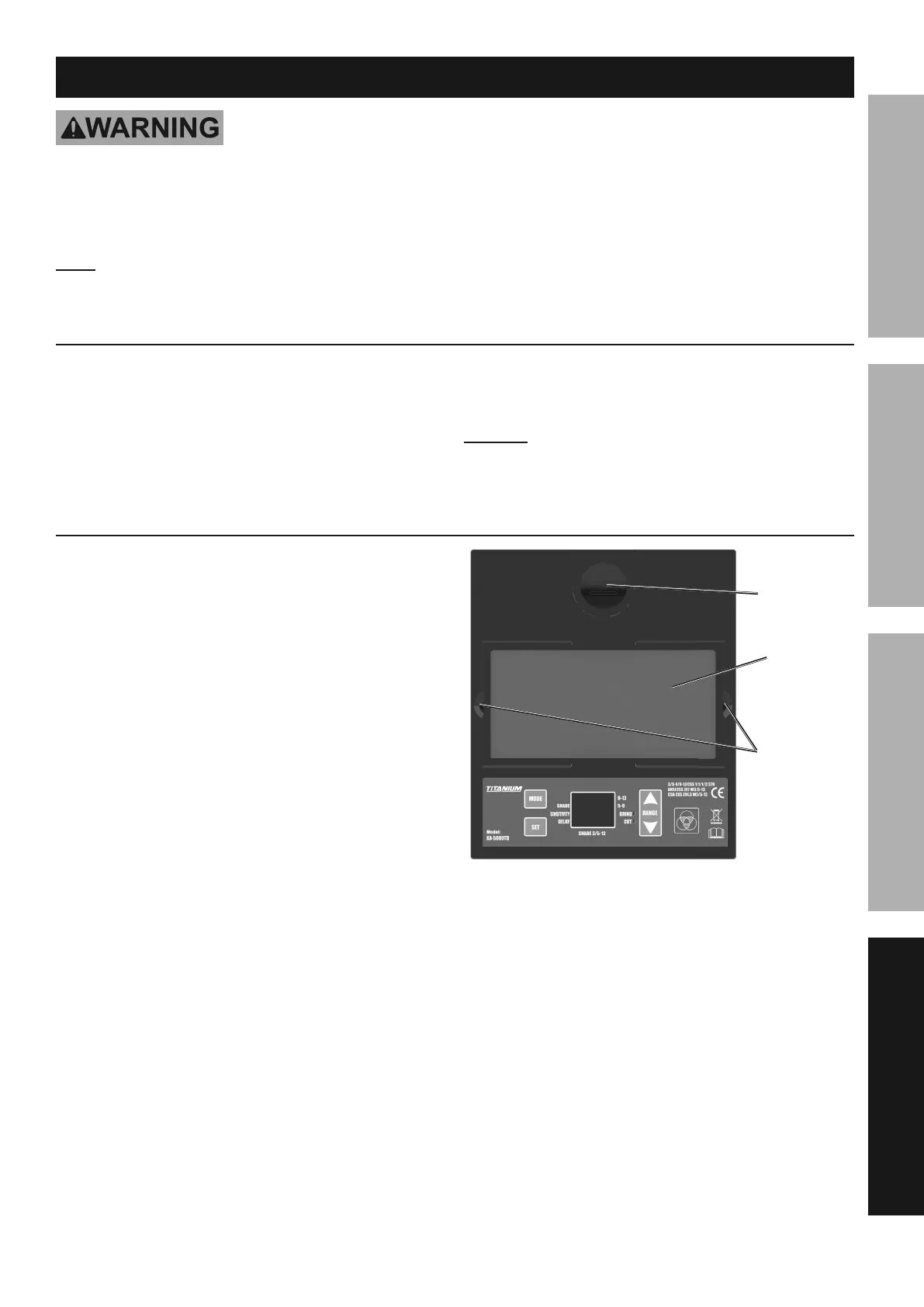
L8#"9*%S*8#%O&X*(%K*/7,4*5*8$
1. Remove the old Inside Lens Cover by
pulling it up at the finger notch.
2. Remove any protective film from both
sides of the new Lens Cover.
3. Line up the new Inside Lens Cover with the flanges
at the sides of the lens and snap it into place.
L8#"9*%
S*8#%
O&X*(%
;"83*(%M&$4.
;"3'(*%T-%%L8#"9*%S*8#%J,8*7%E*$'/
R,$$*(U%
Z&'#"83


 To Next Page