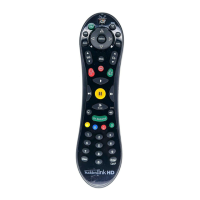
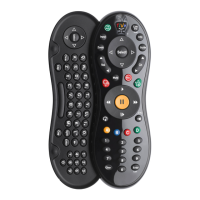
Acvity light
Setup
1. Be sure that your TiVo box is using the new TiVo Experience. To learn more, visit
vo.com/newexperience.
2. TiVo Roamio (all models) and TiVo Mini only:
Insert the USB extension cable (with the USB receiver aached) into one of the
TiVo box’s USB ports. Place the receiver close to the front of your TiVo box
(beside or on top of the box) for best recepon.
3. Insert the baeries. The remote will aempt to pair with your TiVo box automacally. You will
know your remote is paired when the acvity light at the top of the remote flashes yellow
with each buon press.
4. If the acvity light flashes red with each buon press, the remote is not fully paired, and
voice commands will not work. To pair it manually,
go to Menu > Sengs > Remote, CableCARD, &
Devices > Remote Control Setup and follow the on-screen instrucons.
Voice Commands
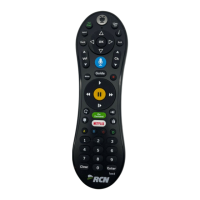
To issue a voice command, press and hold the buon, and speak naturally into the remote
(note the microphone locaon below). Release the buon when you have finished speaking.
Here are some things you can do with voice:
• Search by tle, actor, or keyword: “Find Modern Family” or “Show me some acon movies.”
HINT: Add on to your inial command to get more specific. For example, aer the command,
“Show me some acon movies,” you could add “From the 80s...just the ones with Bruce
Willis.”
• Watch a show: “Play the latest episode of Modern Family.”
• Launch an app: “Launch Nelix.”
• Change channels: ”Go to NBC.”
• Go to a TiVo menu screen: “Take me home,” or “Show me the Guide.”
The TIVO BUTTON takes you to the Home screen.
If programmed, TV PWR turns your TV on or off. Go to Menu >
Sengs > Remote, CableCARD, & Devices > Remote Control Setup
to program.
If programmed, use INPUT to select the input for your TV.
BACK goes back to the previous screen.
Use the ARROW BUTTONS to navigate the TiVo menus. In live TV,
press UP for the one-line guide, DOWN to see personalized
predicons, LEFT for your favorite channels, and RIGHT to see what’s
on other tuners.
Press and hold the VOICE buon to issue voice commands.
If programmed, VOLUME and MUTE control the volume on your TV
or AV receiver.
REPLAY repeats the last eight seconds of the show. Press and hold to
jump to the beginning of a show. When browsing, press to jump to
the first item in a strip.
Use the THUMBS UP and THUMBS DOWN buons to rate shows
to influence which shows get recorded as TiVo Suggesons.
The A, B, C buons set opons and sort and filter views, and to turn
accessibility features on or off. Press and hold A for the screen reader,
B for closed caponing, or C for video descripon.
CLEAR dismisses items appearing over live TV and deletes tles from
My Shows and the To Do List.
LIVE TV takes you to live TV and lets you cycle through tuners.
INFO shows the info card while watching a show; press this buon
again to make it disappear.
Press OK to choose menu items.
Use EXIT to close certain apps.
Use CHANNEL UP/DOWN to change the channel or move quickly
through lists and the guide.
GUIDE takes you to the on-screen program guide.
Press RECORD to record the show you’re watching, or to set up a
recording for a show selected in the guide.
While watching shows, use these buons to control playback. Press
up to three mes for three speeds. In the TiVo menus, use REWIND
and FAST-FORWARD to move quickly through strips. Press PLAY
and then OK to start/stop QuickMode
™.
ADVANCE moves forward in 30-second increments; press and hold
to jump to the end of the show. Or, press to jump to the next ck
mark when fast-forwarding or rewinding. Use to enter a dash when
tuning to OTA sub-channels.
The SKIP buon iniates the SkipMode
™
funcon while watching a
SkipMode-enabled recording. Look for the on-screen ps.
Press the NETFLIX buon to launch the Nelix app.
ENTER/LAST returns to the last channel viewed.
Remote Control Buttons
Microphone
C
M
Y
CM
MY
CY
CMY
K
VoxRemote_FINAL_15AUG2017.pdf 2 8/15/2017 10:29:52 AM


 To Next Page
 Loading...