Need help?
Do you have a question about the TiVo Remote HD and is the answer not in the manual?
Describes two types of on-screen arrows for navigation and their function.
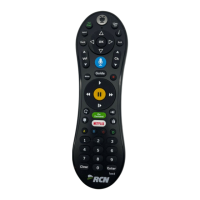
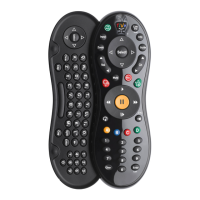
Provides instructions and tips for using the TiVo remote control effectively.
Details the steps for opening the battery compartment and inserting batteries.
Outlines the initial steps required to set up and begin using the TiVo service.
Defines essential terms used throughout the guide to understand the TiVo service.
Explains different video formats and resolution types for HDTV broadcasts.
Introduces basic live TV functions and controls available on the TiVo device.
Guides users on how to find and schedule program recordings using various methods.
Explains how to manage and view recorded programs in the Now Playing list.
Details how to discover and collect entertainment using TiVo's search features.
Introduces advanced features and capabilities of the TiVo media device beyond basic recording.
Guides users on how to search for programs to record using various criteria.
Describes how to use the program guide to find, watch, and record shows.
Instructions on how to search for programs by their title using the TiVo interface.
Guides users on how to find programs by browsing specific TV channels or time slots.
Details how to create and use WishList searches to find programs based on interests.
Explains how to set up automatic recordings for series and manage repeating programs.
Describes how to view and manage all scheduled recordings, including cancellations.
Details various options to customize individual recordings or series passes for desired results.
Explains the status bar displayed during playback, showing program progress and live TV status.
Describes the information and shortcuts available in the channel banner displayed on screen.
Explains how to navigate the program guide to find, watch, and record shows.
Details how to customize the program guide display by filtering channels and changing styles.
Introduces the Home Networking Package for enhanced media access and content management.
Explains how to transfer recorded shows between TiVo devices on a home network.
Guides users on streaming music from a computer to the TiVo media device.
Details how to publish and view photos stored on a computer via the TiVo media device.
Instructions for transferring recorded TiVo programs to a PC for viewing.
Guides on transferring video files from a PC to the TiVo media device for playback.
Explains how to convert transferred TiVo recordings for viewing on portable devices.
Describes how to download video content from the internet directly to the TiVo media device.
Provides information on how to increase the storage capacity for recordings.
Allows adjustment of audio output, alternate audio tracks, and sound effects volume.
Covers adding channels, managing the channel list, and scanning for available channels.
Controls how the channel banner is displayed and the status LEDs on the media device.
Enables setting limits on content based on classifications, locking channels, and managing passwords.
Manages network connection, tests diagnostics, and views network status for optimal connectivity.
Configures recording behavior, including extending recording times and managing overlap conflicts.
Allows programming of the remote control and managing device settings for seamless operation.
Adjusts aspect ratio, letterbox color, and aspect correction modes for optimal picture display.
Sets up a child-friendly environment, restricting channels and programs based on age classifications.
Explains how to access and read messages and alerts received from the TiVo service.
Displays account details, system information, media access key, and copyright information.
Offers options to restart the device, repeat guided setup, or clear system data and settings.
Describes how to put the TiVo device into standby mode and its effects on recordings and connectivity.
Information on how to get assistance and support for the TiVo service and media device.
An index listing common issues and corresponding page numbers for troubleshooting solutions.
Troubleshooting steps for issues with the initial Welcome screen display upon device setup.
Addresses common inquiries regarding the functionality and requirements of the TiVo service.
Troubleshooting tips for issues related to receiving, accessing, and changing TV channels.
Solutions for problems with the TiVo remote not working or controlling the TV.
Addresses issues related to storage space and managing recorded programs in the Now Playing list.
Troubleshooting tips for watching live TV, including program guide issues and banner messages.
Covers common problems with recording programs, conflicts, and HD vs. SD differences.
Explains the automatic deletion of older programs when storage space is limited.
Troubleshooting for accessing program search features due to incomplete information indexing.
Methods for scheduling recordings for programs not yet listed in the guide or for manual recording.
Addresses issues with programs requested online not recording or recording at different times.
Troubleshoots aspect correction, bars on screen, and audio/video sync issues.
Steps to resolve a frozen picture issue by changing channels, pausing, or restarting the device.
Solutions for a "Searching for signal" message, including antenna adjustment and cable checks.
Guides on troubleshooting network connectivity issues with the TiVo service and home network.
Steps to resolve problems connecting the TiVo device to a wireless home network.
Addresses issues with parental controls not working or preventing access to desired channels.
Important safety precautions and warnings to follow before operating the TiVo media device.
Identifies and explains the functions of the LEDs and buttons on the front panel of the device.
Details the various ports and connectors located on the back panel of the TiVo media device.
Lists the technical details, dimensions, power requirements, and input/output specifications of the device.
 General
| Brand | TiVo |
|---|---|
| Model | Remote HD |
| Category | Remote Control |
| Language | English |

 To Next Page