Injection Molding Machine Appendix D
D-9 V1.0
Filename must be different from existed files.
Wait until system messages show.
SAVE FILE COMPLETE 100%.
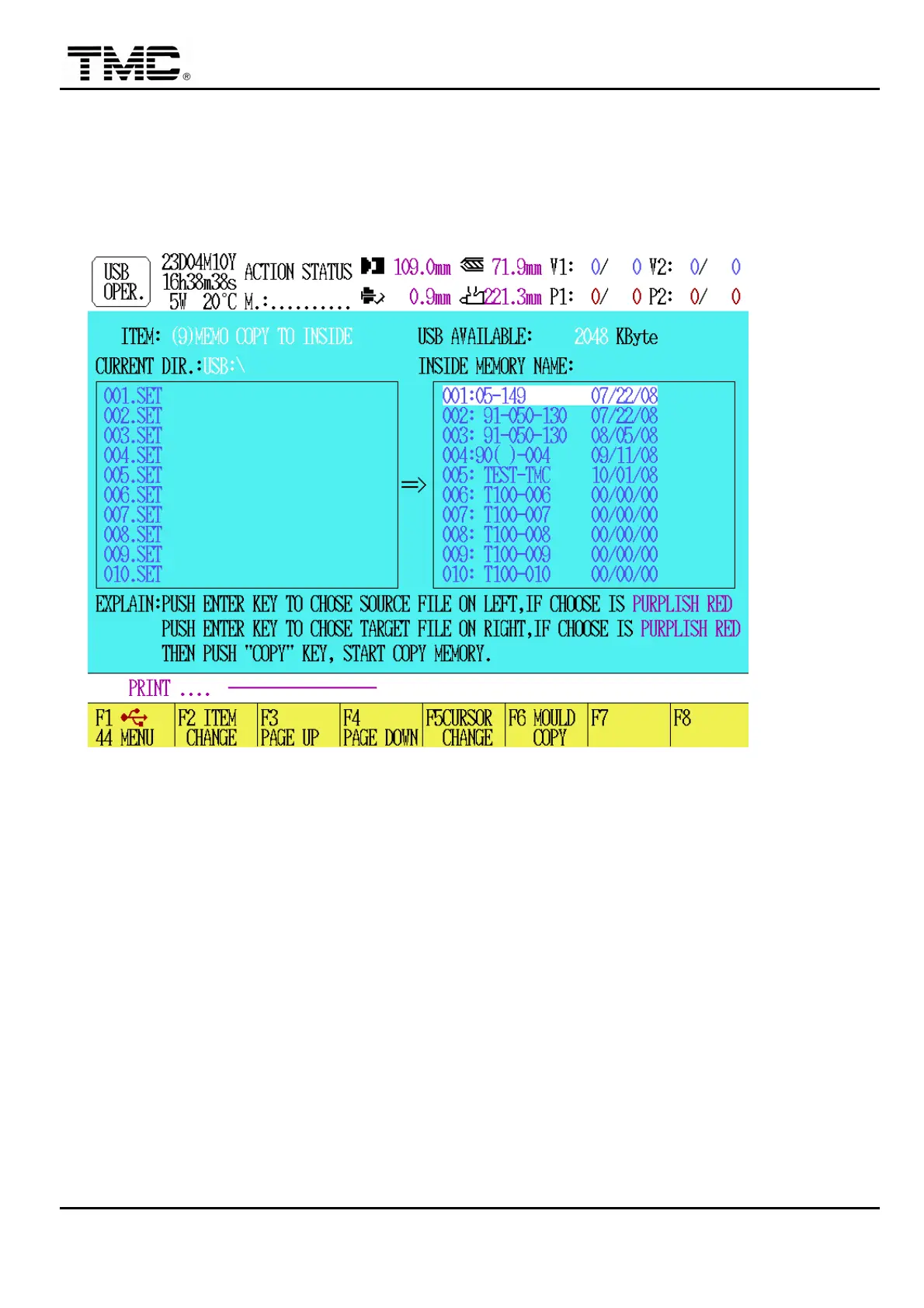
Graph(C): used in item (9)
(9) MEMO COPY TO INSIDE: copy mold data (.SET) stored in USB disk to machine
internal memory.
This function will overwrite existed mold data in internal memory.
Steps: press F2 [ITEM CHANGE] UNTIL [(9)MEMO COPY TO INSIDE ] is showed,
Æ use F3,F4, ↑,↓ then enter to select mold file, selected files are colored
in purple, repeat above steps to choose multiple files.
Press F5 will move cursor to INSIDE MEMORY NAME area, enter to selected
destination file position, and repeat selection by using move/enter keys.
Press F6 to start copying processes.
Wait until system messages show.
COPY OK.
Graph (D): used in item (10)


 To Next Page
 Loading...