12
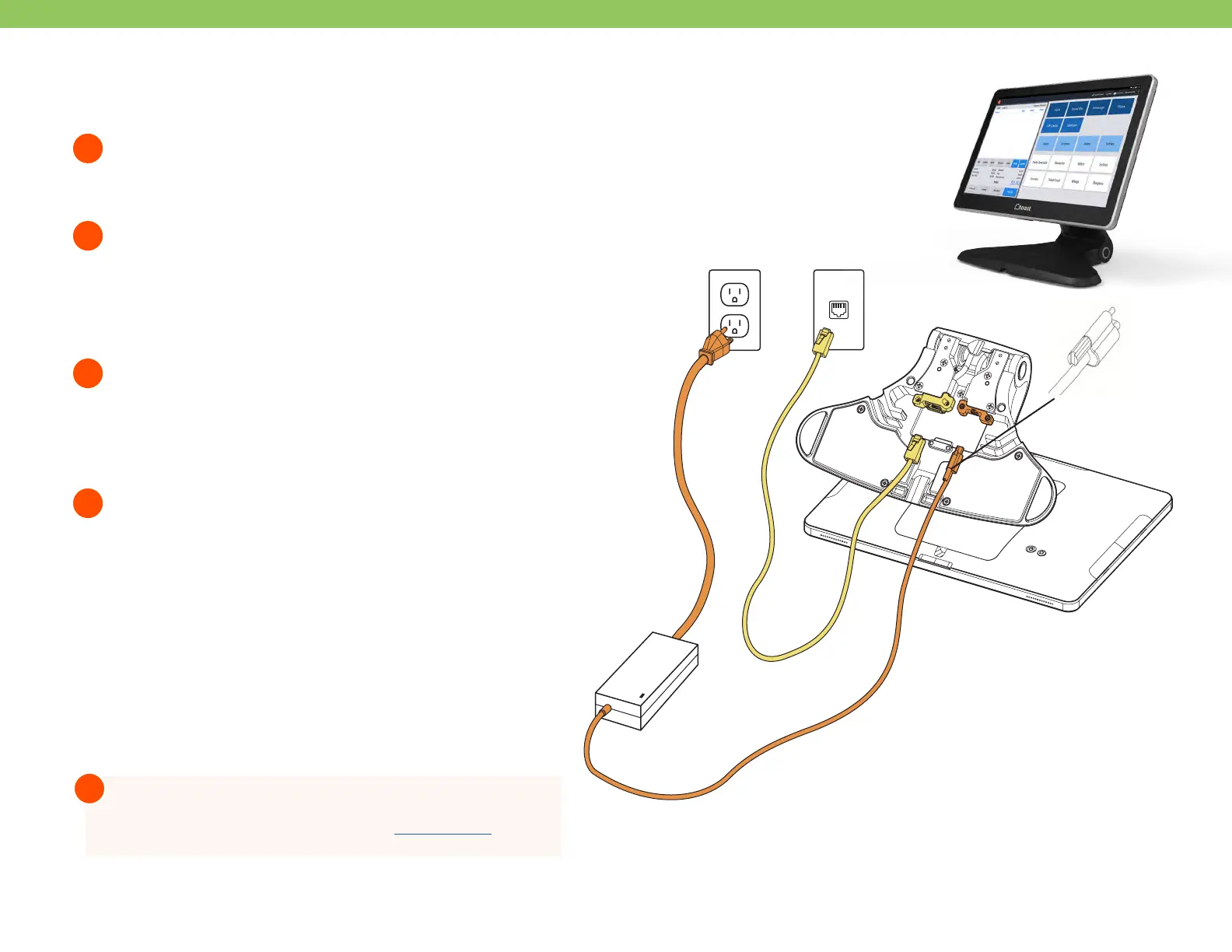
Unpack the Toast Flex terminal and place the terminal
on your counter.
Remove the box labeled “Connect.” This box contains
two yellow ethernet cables. One cord is 3 ft and one is 7
ft. Choose the cord length that best suits your restaurant
and connect it from the Toast Network to the yellow
port labeled “Internet IN” on the base of the Toast Flex
terminal stand.
Remove the power box labeled “Power.” Plug in the power
cord from the wall into the orange port located at the
base of the Toast Flex terminal stand. Use the thumb
screw to secure it. Ensure the thumbscrew is
tight to avoid connectivity issues.
Set up payment using one of the options below:
Toast Flex
1
2
3
4
Step 3 Step 2
Thumb
Screw
Step 3 Step 2
B
A
If you are attaching your Toast Tap to your Toast
Flex only, plug the USB-A end of your cable directly
into the side of the Toast Flex.
If you have Toast Tap (Direct Attach to Toast Flex),
this will already be adhered to your Toast Flex
terminal.
To Meraki /
Toast Network
For more information on Card Reader set up search “Toast
Tap On-Counter Installation Guide” in Toast Central
!



 To Next Page