Scan QR code for installation
videos and more details
https://toast.help/3DgDFXs
149.06803.0001
Toast Flex 22” Stand Kit 2
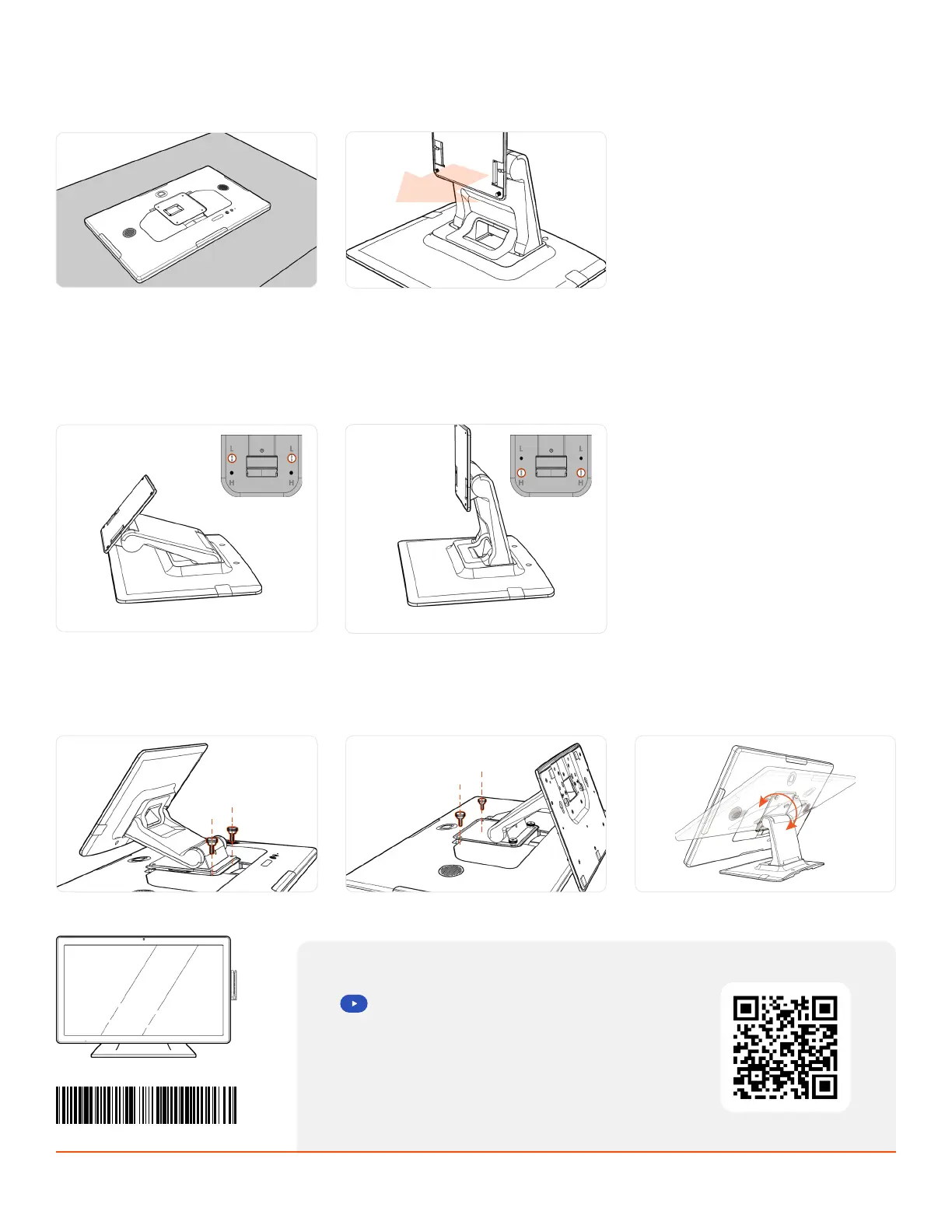
Secure the stand with the thumbscrews.
Start with the two screws at the top.
Next, hinge the stand for easier installation
of the bottom screws.
Adjust the display angle. Move the top hinge
to nd the angle that works best for you.
Step 4
Step 2
Place the display on a at surface. Ensure
the surface is clean and stable.
Check the stand direction. Ensure the plate
is facing towards the front of the stand.
Step 3
Choose your height. The stand can be
congured in high or low mode, depending
on your comfort. Flip the stand over to nd
the height options, marked by “H” and “L.”
If you would like to change the height or
your stand, unscrew the bottom screws,
hinge the stand to the alternate position,
and re-secure with the screws.



 To Previous Page