3
Getting Started
1
3
4
Ensure the device is fully charged before use.
Connect the device to your Toast Wi-Fi network.
Log into the Toast app using your Toast email and
password.
5
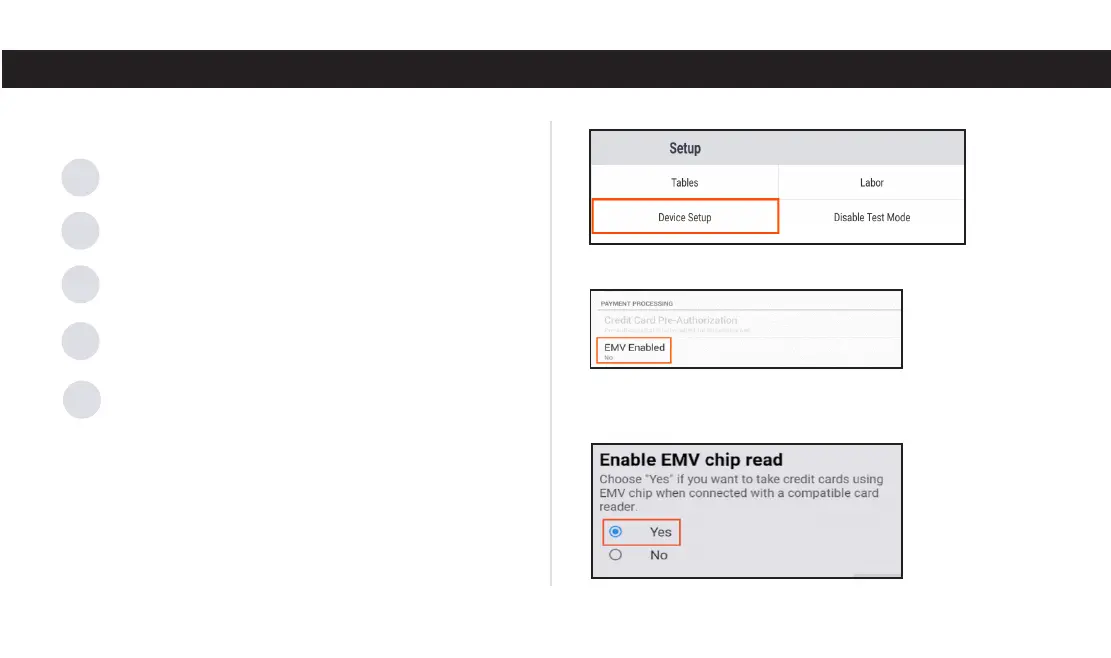
Enable EMV to accept dip and tap (contactless)
payments:
A.
On the lower left corner of the passcode screen,
click the credit card icon.
Enter your pin to log in.
D.
Scroll down and select EMV Enabled.
E.
Select Yes. You may be prompted to update the card
reader during the process.
After unboxing your new Toast Go 2, follow these steps to
complete initial set up:
2
Press and hold the power button briefly to turn the
device on.
C.
From the main menu, go to Setup and select Device Setup.
B.



 To Next Page