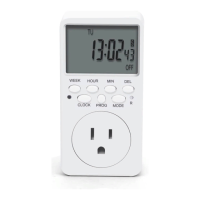
INSTRUCTION MANUAL
TOGOAL Plug-in Timer Outlet
Important
Please read these direcons and follow all the steps, including the TIPS and
NOTES
, before you use the device. These notes can help you make beer use
of the device. If you are not 100% sasfied for any reason, before leaving a
negave review, please contact us at
enoverus@foxmail.com
We will immediately resolve any issue you may have.
Safety Use & Care
If the screen is blank, please plug the mer into an acve wall socket, and
then use a pin to press the RESET
buon for about 5 seconds.
Please keep this manual in a safe place for future reference.
Heaters, pet feeders and similar appliances should never be le
unaended during operaon. The manufacturer recommends such
appliances not be connected to mers.
DO NOT aempt to repair, disassemble or modify under any circumstances.
Features
Up to 18 groups of ON-OFF mer programs; every program you set repeats
once each week
Countdown funcon to turn off appliances automacally aer pre-set me
Random seng for lights to go on and off at varying mes while you’re
away from home
NOTE: The on-off mer program, the random, and the countdown funcon
cannot run concurrently. To use the random feature, please exit the
countdown. To use the on-off mer programs, please cancel the countdown
and the random funcon.
To Set the Digital Clock
For example, to set the me as 9:30am Tuesday in DST.
1. Press the RESET
buon with a pin to reset the mer. The mer will enter
the "Clock Mode".
2. While holding the CLOCK
buon down, press the TIMER buon to choose
12-hour mode. "AM" will appear on the screen.
3. While holding the CLOCK
buon down, press the ON/AUTO/OFF buon to
toggle between Standard Time and Daylight Saving Time (DST). The clock will
increase by one hour and the display will show "S" when changed to the DST.
4. While holding the CLOCK
buon down, press WEEK to adjust the day to TU.
5. While holding the CLOCK
buon down, press HOUR repeatedly to set the
me to 9:00AM.
6. While holding the CLOCK
buon down, press MINUTE repeatedly to set the
me to 9:30AM.
TIPS: Press and hold the HOUR
or MINUTE buon during seng, you can
navigate quickly through the numbers.
To Set the ON-OFF Programs
You can set up to 18 programs. To set a program, you will need to enter both
the ON me and OFF me. For example, to set the mer to come on at
8:30AM and go off at 10:30PM every Monday thru Friday, please do the
following:
1. Press TIMER
to begin to set the ON me for the 1st program.
2. Press WEEK
repeatedly to set the day combinaon to "MO TU WE TH FR".
The pre-set day combinaons will advance in the following sequence: MO TU WE TH FR SA SU -> MO
-> TU -> WE -> TH -> FR -> SA -> SU -> MO TU WE TH FR -> SA SU -> MO TU WE TH FR SA -> MO WE FR
-> TU TH SA -> MO TU WE -> TH FR SA -> MO WE FR SU
3. Press HOUR repeatedly (or press and hold it) to adjust the me to 8:00AM,
and then the MINUTE
buon to adjust the me to 8:30AM.
4. Press the TIMER
buon again to begin to set the OFF me for the 1st
program.
5. Refer to steps 2~3 to set the off me to 10:30PM every MO TU WE TH FR.
(Note: Do not forget to select the desired day combinaon for the off me as
MO TU WE TH FR.)
6. Press TIMER again, you will be able to set the 2nd, the 3rd... and totally up to
18 programs by referring the steps above.
7. When all programs needed are finished, press CLOCK
to go back to the clock
mode. Plug the mer into an acve outlet and it is ready for use.
TIPS: Please leave the ON-OFF switch of your appliance always on in order to
use it with the mer.
*IMPORTANT : If you plug the mer into the wall socket between any on-off
interval you set(8:30AM~10:30PM every Monday thru Friday), the mer may
not come on immediately on that day the moment you plug it in. Instead, it will
stay inacve and automacally come on at 8:30AM next morning, and then
repeat the programs you set automacally. Under this circumstance, if you want
to have the mer on the moment it is plugged in, please hit the ON/AUTO/OFF
buon to manually turn on the mer first, and then press the buon once more
to put the screen back to AUTO.
TIPS:
1. When seng the programs, you can press the RES/RCL
buon to erase the
current seng or press the buon once more to restore.
2. To review the programs you set, press the TIMER
buon repeatedly.
During review, you can also modify the sengs according to your needs.
3. If you have mulple programs, please make sure that the on-off intervals
of the programs do not overlap with each other, especially when using the day
combinaon opon.


 To Next Page
 Need help?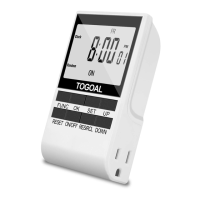

 General