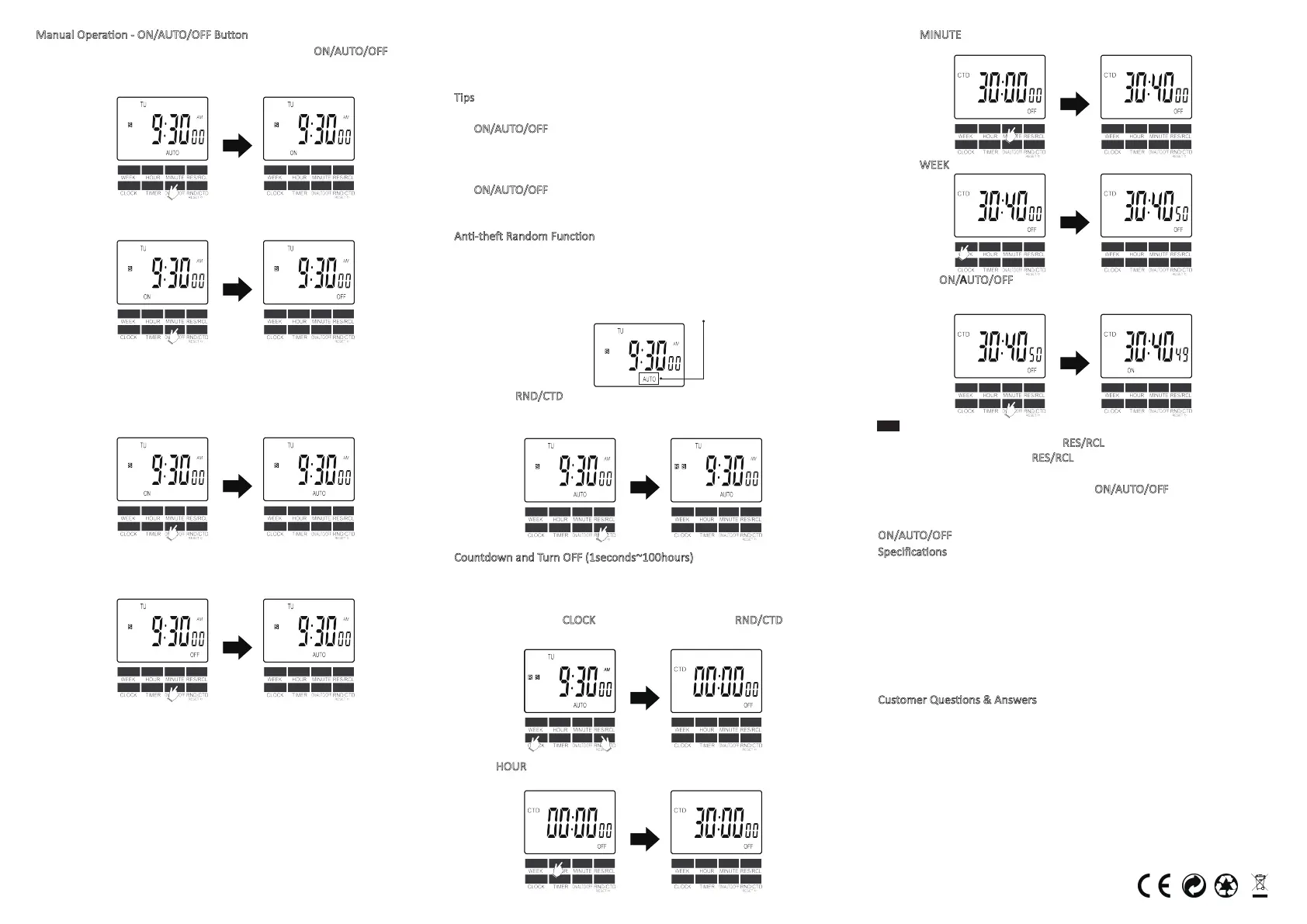
Manual Operaon - ON/AUTO/OFF Buon
You can manually turn on/off the mer by pressing the ON/AUTO/OFF buon.
Manual ON: Screen shows "ON" and mer is switched on permanently, with
the LED indicator always on.
Manual OFF: Screen shows "OFF" and mer is switched off permanently, with
the LED indicator always off.
Please set the mer to AUTO if you want it to work automacally based on the
programs you set. When switched to AUTO, there are 2 situaons:
Manual ON to AUTO: Screen shows AUTO, and the mer will stay on with the
LED indicator on unl the next off seng arrives. And then, the mer will work
exactly as you programmed.
Manual OFF to AUTO: Screen shows AUTO and the mer will stay off with the
LED indicator off unl the next on seng arrives. And then, the mer will work
exactly as you programmed.
For example, the mer is set to come on at 8:30AM and go off at 10:30PM
every day (MO TU WE TH FR SA SU). When you switch the mer from MANUAL
ON/OFF to AUTO, the following are some scenarios:
1: Between Tuesday10:30PM~ Wednesday 8:30AM, if the mer is switched
from Manual ON to AUTO, the mer will stay on unl 10:30PM Wednesday,
and then work exactly as you programmed;
2: Between Tuesday 10:30PM~ Wednesday 8:30AM, if the mer is switched
from Manual OFF to AUTO, the mer will stay off unl 8:30AM Wednesday,
and then work exactly as you programmed;
3: Between Wednesday 8:30AM~ Wednesday 10:30PM, if the mer is
switched from Manual ON to AUTO, the mer will stay on unl 10:30PM
Wednesday, and then work exactly as you programmed;
4: Between Wednesday 8:30AM~ Wednesday 10:30PM, if the mer is
switched from Manual OFF to AUTO, the mer will stay off unl 8:30AM
Thursday, and then work exactly as you programmed.
Tips
for temporarily override the mer:
1. To temporarily override program and turn on the mer when it is OFF: Press
the ON/AUTO/OFF
buon unl ON shows on screen and immediately press
once to return to AUTO. The mer will stay ON unl the next scheduled OFF
me. Then, the mer work exactly as you programmed.
2. To temporarily override program and turn off the mer when it is ON: Press
the ON/AUTO/OFF
buon unl OFF shows on screen and immediately press
once to return to AUTO. The mer will stay OFF unl the next scheduled ON
me. Then, the mer work exactly as you programmed.
An-the Random Funcon
In the random mode, the mer will go on and off in a random manner from
6:00PM~6:00AM every day. Each on interval ranges from 1 min~16mins and off
interval ranges from 16mins~32mins. When random is acvated, the mer
programs and countdown program will stay inacve.
1. Make sure the mer is in the AUTO mode (screen shows AUTO).
2. Press the RND/CTD
buon to acvate or deacvate this funcon. An "R" will
appear on the le of the screen when acvated. Plug the mer into an acve
outlet and it is ready for use.
Countdown and Turn OFF (1seconds~100hours)
With this feature, you will be able to set your appliance to automacally go off
aer a given period of me. For example, to set the mer to go off aer
30hours 40mnites and 50 seconds:
1. Press and hold the CLOCK
buon, and then press the RND/CTD buon to
enter(or exit) the countdown seng.
2. Press HOUR
repeatedly (or press and hold) to make the screen show
30:00:00.
3. Press MINUTE
repeatedly (or press and hold) to make the screen show
30:40:00.
4. Press WEEK
repeatedly (or press and hold) to make the screen show 30:40:50.
5. Press the ON/AUTO/OFF
to start the countdown. The screen will show how
much me is remaining.
TIPS:
1. During seng, you can use the RES/RCL buon to erase the seng; during
countdown, you can press the RES/RCL
buon to pause or resume the
countdown.
2. During countdown, you can press the ON/AUTO/OFF
buon to stop or
restart the countdown.
3. When countdown runs up, the mer will turn off. You can press the
ON/AUTO/OFF
buon to rerun the countdown.
Specificaons
Model No.: TE06
Voltage: 120V AC/ 60Hz
Rang: 120V AC / 15A / 1800W
Operang Temperatures: -10℃~+40℃
Accuracy: +/-1 Minute per Month
Minimal Seng: 1 Minute (1s for countdown)
Maximum Seng: 7 Days
Baery: NIMH1.2V > 100 Days
Customer Quesons & Answers
1. How long is the warranty for this product?
We offer a 12-month limited warranty on this mer. If your mer is broken,
please email your order number and describe the issue. We will immediately
issue a full refund or arrange a new replacement aer verificaon. We believe
what makes us different is not just the product we offer but also our outstanding
customer service. We also hold the belief the buyer and seller can achieve a
win-win outcome through mutual effecve communicaon.
2. What should I do if I am having trouble seng up the mer?
Please tell us the programs you need via email: enoverus@foxmail.com. Our
technical support team will give you personal step-by-step guidance illustrated
with pictures.


 To Previous Page
 Loading...